With the 2.54 release, WPEPlatform became the default way of integrating WPE WebKit with the underlying platform, and its API is now considered stable. At the same time, the libwpe-based API that WPE has relied on since its beginnings is now deprecated. In this article we explain why this change was made, how applications use the new API, and what is involved in migrating an existing application from libwpe.
Back in 2022 we published an overview of the WPE WebKit project, describing the different components of WPE and how they fit together. Most of what that article explains about WebKit and the WPE API is still valid, but the way WPE connects to the platform has changed considerably since then, so this is a good moment to revisit that part of the picture.
How WPE used to integrate with the platform
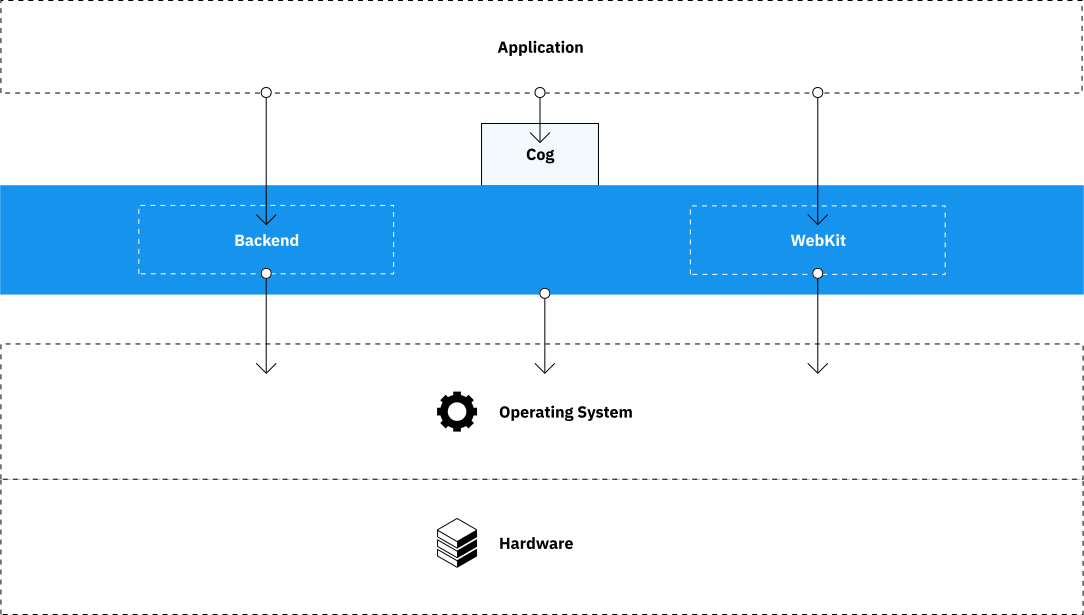
Since its beginnings, WPE has delegated graphics and input to code that lives outside of WebKit. libwpe defined a generic interface for these, and a backend, loaded at runtime, implemented that interface for a given platform. WPEBackend-fdo, based on Wayland and other freedesktop.org technologies, was the reference backend, while Cog provided a convenience layer on top for those writing browsers.
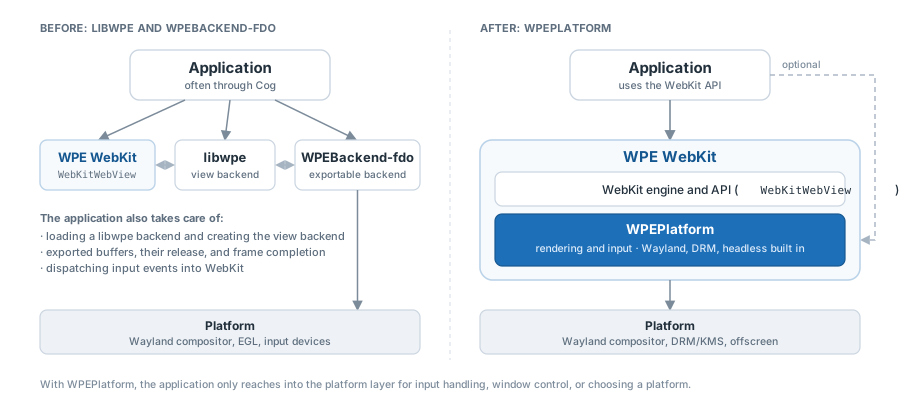
This design achieved its main goal: hardware vendors and integrators could support WPE on their platforms without having to modify WebKit itself. However, it also meant that a good part of the platform work was left to the application. To show a web page on screen using WPEBackend-fdo, an application had to:
- Load a libwpe backend with
wpe_loader_init()and initialize it, usually by passing it an EGL display. - Create a view backend through the “exportable” API of WPEBackend-fdo,
wrap it in a
WebKitWebViewBackend, and pass that to the web view. - Receive, in a set of callbacks, the buffers exported by WebKit for each frame, present them on screen, release them, and notify WebKit when the frame had been displayed.
- Collect input events from the windowing system and forward them to
WebKit with the
wpe_view_backend_dispatch_*_event()family of functions.
As a result, even a simple browser required a fair amount of knowledge of the graphics pipeline, and the code involved was split across three repositories (WebKit, libwpe, and WPEBackend-fdo) that had to be kept in sync. Much of this code was the same from one application to the next, and Cog provided a ready-made implementation of it for applications that did not want to write their own.
What WPEPlatform changes
WPEPlatform is a GObject-based library that lives in the WebKit repository and is built as part of WPE WebKit. It replaces both libwpe and the backends written against it, and it moves the responsibility of rendering and input handling away from the application and into WebKit and the platform implementation.
The library is only used by WebKit’s UI process. As before, the web process renders the page into buffers that are shared with the UI process (DMA-BUF buffers on Linux, AHardwareBuffer on Android, or shared memory when rendering in software). The difference is that WebKit now hands these buffers directly to the platform implementation, which takes care of presenting them, without the application having to take part in the process.
The API is built around four classes:
WPEDisplay: the connection to the platform, and the object that creates all the others.WPEToplevel: a top-level surface, which is normally a window, or the whole output on platforms that have no windows.WPEView: the surface where a single web view is rendered, hosted in a toplevel. It also receives the input events for that web view.WPEBuffer: the pixel data produced by WebKit and handed to the view, with a subclass for each type of buffer.
These are complemented by smaller classes for screens, keymaps, settings, input methods, gestures, gamepads, the clipboard, and accessibility. Several of them, such as screens, settings, input methods, and gestures, had no equivalent in libwpe.
WPE WebKit ships with three built-in platform implementations: Wayland, DRM/KMS (for devices that drive the display directly, without a compositor), and headless (for testing and offscreen rendering). Other implementations can be developed out of tree and installed as modules, which WPE WebKit discovers at runtime. wpe-platform-gtk, which embeds WPE web views in GTK 4 applications, is an example of this.
Using WPEPlatform in an application
For most applications, WPEPlatform is not visible at all. A
WebKitWebView created without a backend selects a platform
automatically: WPE WebKit tries the available platform implementations in
order of priority and uses the first one that connects successfully. The
following program is a complete, if minimal, browser:
#include <wpe/webkit.h>
#include <wpe/wpe-platform.h>

static void
on_view_closed (WPEView *view, gpointer user_data)
{
    g_main_loop_quit (user_data);
}

int
main (int argc, char *argv[])
{
    g_autoptr(GMainLoop) loop = g_main_loop_new (NULL, FALSE);
    g_autoptr(WebKitWebView) web_view = g_object_new (WEBKIT_TYPE_WEB_VIEW, NULL);

    WPEView *view = webkit_web_view_get_wpe_view (web_view);
    g_signal_connect (view, "closed", G_CALLBACK (on_view_closed), loop);

    webkit_web_view_load_uri (web_view, argc > 1 ? argv[1] : "https://wpewebkit.org");
    g_main_loop_run (loop);

    return 0;
}
It only needs the wpe-webkit-2.0 pkg-config module to build, which
pulls in wpe-platform-2.0 when WPE WebKit is built with WPEPlatform
support (the default since 2.54). Note that the closed signal is
emitted when the user closes the window, and of the built-in platforms,
only Wayland emits it. On DRM and headless the application decides by
itself when to exit.
The platform API comes into play when an application needs more than these defaults. The most common cases are the following.
Choosing a platform. The WPE_PLATFORM environment variable
(wayland, drm, or headless) forces a given platform without any
changes to the code. An application that is meant to run on a single
platform can also create the display itself and pass it to the web view:
#include <wpe/wayland/wpe-wayland.h>

g_autoptr(GError) error = NULL;
g_autoptr(WPEDisplay) display = wpe_display_wayland_new ();
if (!wpe_display_connect (display, &error))
    g_error ("Could not connect to Wayland: %s", error->message);

WebKitWebView *web_view = g_object_new (WEBKIT_TYPE_WEB_VIEW,
                                        "display", display,
                                        NULL);
The Wayland-specific API is available with the same wpe-webkit-2.0
module, but an application that depends on it can check for the
wpe-platform-wayland-2.0 pkg-config module, which is only installed
when WPE WebKit is built with the Wayland platform enabled. The DRM and
headless implementations work the same way, with wpe_display_drm_new()
and wpe_display_headless_new().
Handling input. Input events are delivered to the WPEView through
the event signal before they reach the web page. An application can
connect to it to implement keyboard shortcuts, returning TRUE to stop
the event from reaching the page:
static gboolean
on_view_event (WPEView *view, WPEEvent *event, gpointer user_data)
{
    if (wpe_event_get_event_type (event) == WPE_EVENT_KEYBOARD_KEY_DOWN
        && (wpe_event_get_modifiers (event) & WPE_MODIFIER_KEYBOARD_CONTROL)
        && wpe_event_keyboard_get_keyval (event) == WPE_KEY_q) {
        g_main_loop_quit (user_data);
        return TRUE;
    }
    return FALSE;
}

g_signal_connect (view, "event", G_CALLBACK (on_view_event), loop);
Controlling the window. The toplevel that hosts the view is available
through wpe_view_get_toplevel(), and provides functions to set the
title (wpe_toplevel_set_title()), resize, maximize, or switch to
fullscreen (wpe_toplevel_fullscreen()). Changes in its state are
reported by the toplevel-state-changed signal of the view. How much of
this is supported depends on the platform: Wayland implements all of it,
the headless implementation only keeps track of size and fullscreen
state, and DRM does not support them, since its toplevel always covers
the whole screen.
Finally, wpe_display_get_settings() gives access to WPESettings,
where applications can override platform settings such as the dark mode
preference, reduced motion, or contrast. The prefers-color-scheme,
prefers-reduced-motion, and prefers-contrast CSS media queries
follow these settings.
Migrating from libwpe
For an application, most of the migration consists of removing code. With
WPEBackend-fdo, creating a web view looked roughly like this, with most
of the actual work happening in the callbacks of exportable_client:
struct wpe_view_backend_exportable_fdo *exportable =
    wpe_view_backend_exportable_fdo_egl_create (&exportable_client, app, width, height);
struct wpe_view_backend *wpe_backend =
    wpe_view_backend_exportable_fdo_get_view_backend (exportable);
WebKitWebViewBackend *backend =
    webkit_web_view_backend_new (wpe_backend, destroy_backend, exportable);
WebKitWebView *web_view = webkit_web_view_new (backend);
With WPEPlatform, the same is achieved with a single line:
WebKitWebView *web_view = g_object_new (WEBKIT_TYPE_WEB_VIEW, NULL);webkit_web_view_new() is only available when WPE WebKit is built with
the legacy API, so applications need to switch to g_object_new(). The
rest of the application code that uses the WebKit API (settings, network
sessions, navigation, and so on) does not need any changes. The diagram
below summarizes what moves out of the application:
The rest of the libwpe code in an application maps to WPEPlatform as follows:
| libwpe / WPEBackend-fdo | WPEPlatform |
|---|---|
wpe_loader_init() and backend initialization |
Automatic, or WPE_PLATFORM, or creating a WPEDisplay |
| Exportable client callbacks, buffer release, frame completion | Handled by WebKit and the platform implementation |
wpe_view_backend_dispatch_*_event() |
Handled by the platform; intercept with the WPEView::event signal |
| Fullscreen handler | wpe_toplevel_fullscreen() and the toplevel state |
There are a few things in libwpe and WPEBackend-fdo that have no
equivalent in WPEPlatform. The process provider API of libwpe is gone,
since WebKit is again in charge of launching its auxiliary processes. The
only exception is Android, which has its own WPEProcessManager API. The
audio extension of WPEBackend-fdo has not been supported since 2.46,
and the video plane extension, used to display video frames on hardware
overlay planes, has no equivalent yet.
Those who maintain a custom backend for WPEBackend-fdo, rather than an
application, will need to port it to a WPEPlatform implementation. This
means subclassing WPEDisplay, WPEToplevel, and WPEView, and
optionally the input method, keymap, and screen classes. The tutorial on
writing a platform
implementation
covers this in detail. In many cases, extending one of the built-in
implementations might be enough: the Wayland one, for example, exposes
its wl_display, wl_compositor, and wl_surface objects, which makes
it possible to add support for additional Wayland protocols.
On the build side, the legacy API is still built by default in 2.54 and
will continue to be maintained while applications migrate. Once an
application no longer needs it, it can be disabled at build time with
the ENABLE_WPE_LEGACY_API=OFF CMake option. As for Cog, it will not
have further stable releases beyond the 0.18.x series, so we recommend
that new applications use the WebKit and WPEPlatform APIs directly.
Further reading
The reference documentation for WPEPlatform has been considerably extended for this release, and is the best place to continue from here:
- The overview of the API.
- A tutorial on writing a browser with WPEPlatform.
- A guide on migrating from libwpe, with more examples than this article.
- A mapping table with the WPEPlatform equivalent of every public symbol in libwpe and WPEBackend-fdo.
For an example of a platform implementation that lives entirely outside of WebKit, Alex has written about WPE WebKit on Android with WPEPlatform, which shows how far the API can be taken.
If you run into problems while migrating, or find that something you relied on in libwpe is missing, please let us know, either by filing a bug in WebKit’s Bugzilla, on the webkit-wpe mailing list, or in the #wpe Matrix channel.