Planet Igalia

December 05, 2025

Enrique Ocaña

Meow: Process log text files as if you could make cat speak

Some years ago I had mentioned some command line tools I used to analyze and find useful information on GStreamer logs. I’ve been using them consistently along all these years, but some weeks ago I thought about unifying them in a single tool that could provide more flexibility in the mid term, and also as an excuse to unrust my Rust knowledge a bit. That’s how I wrote Meow, a tool to make cat speak (that is, to provide meaningful information).

The idea is that you can cat a file through meow and apply the filters, like this:

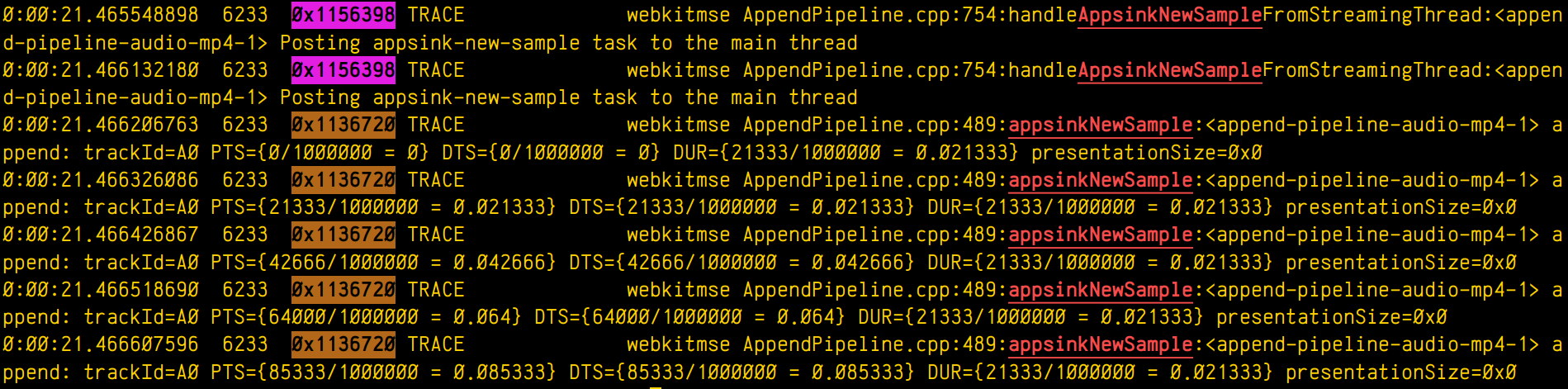
cat /tmp/log.txt | meow appsinknewsample n:V0 n:video ht: \
ft:-0:00:21.466607596 's:#([A-za-z][A-Za-z]*/)*#'

which means “select those lines that contain appsinknewsample (with case insensitive matching), but don’t contain V0 nor video (that is, by exclusion, only that contain audio, probably because we’ve analyzed both and realized that we should focus on audio for our specific problem), highlight the different thread ids, only show those lines with timestamp lower than 21.46 sec, and change strings like Source/WebCore/platform/graphics/gstreamer/mse/AppendPipeline.cpp to become just AppendPipeline.cpp“, to get an output as shown in this terminal screenshot:

Screenshot of a terminal output showing multiple log lines. Some of them have the word

Cool, isn’t it? After all, I’m convinced that the answer to any GStreamer bug is always hidden in the logs (or will be, as soon as I add “just a couple of log lines more, bro🤭).

Currently, meow supports this set of manipulation commands:

  • Word filter and highlighting by regular expression (fc:REGEX, or just REGEX): Every expression will highlight its matched words in a different color.
  • Filtering without highlighting (fn:REGEX): Same as fc:, but without highlighting the matched string. This is useful for those times when you want to match lines that have two expressions (E1, E2) but the highlighting would pollute the line too much. In those case you can use a regex such as E1.*E2 and then highlight the subexpressions manually later with an h: rule.
  • Negative filter (n:REGEX): Selects only the lines that don’t match the regex filter. No highlighting.
  • Highlight with no filter (h:REGEX): Doesn’t discard any line, just highlights the specified regex.
  • Substitution (s:/REGEX/REPLACE): Replaces one pattern for another. Any other delimiter character can be used instead of /, it that’s more convenient to the user (for instance, using # when dealing with expressions to manipulate paths).
  • Time filter (ft:TIME-TIME): Assuming the lines start with a GStreamer log timestamp, this filter selects only the lines between the target start and end time. Any of the time arguments (or both) can be omitted, but the - delimiter must be present. Specifying multiple time filters will generate matches that fit on any of the time ranges, but overlapping ranges can trigger undefined behaviour.
  • Highlight threads (ht:): Assuming a GStreamer log, where the thread id appears as the third word in the line, highlights each thread in a different color.

The REGEX pattern is a regular expression. All the matches are case insensitive. When used for substitutions, capture groups can be defined as (?CAPTURE_NAMEREGEX).

The REPLACEment string is the text that the REGEX will be replaced by when doing substitutions. Text captured by a named capture group can be referred to by ${CAPTURE_NAME}.

The TIME pattern can be any sequence of numbers, : or . . Typically, it will be a GStreamer timestamp (eg: 0:01:10.881123150), but it can actually be any other numerical sequence. Times are compared lexicographically, so it’s important that all of them have the same string length.

The filtering algorithm has a custom set of priorities for operations, so that they get executed in an intuitive order. For instance, a sequence of filter matching expressions (fc:, fn:) will have the same priority (that is, any of them will let a text line pass if it matches, not forbidding any of the lines already allowed by sibling expressions), while a negative filter will only be applied on the results left by the sequence of filters before it. Substitutions will be applied at their specific position (not before or after), and will therefore modify the line in a way that can alter the matching of subsequent filters. In general, the user doesn’t have to worry about any of this, because the rules are designed to generate the result that you would expect.

Now some practical examples:

Example 1: Select lines with the word “one”, or the word “orange”, or a number, highlighting each pattern in a different color except the number, which will have no color:

$ cat file.txt | meow one fc:orange 'fn:[0-9][0-9]*'
000 one small orange
005 one big orange

Example 2: Assuming a pictures filename listing, select filenames not ending in “jpg” nor in “jpeg”, and rename the filename to “.bak”, preserving the extension at the end:

$ cat list.txt | meow 'n:jpe?g' \
   's:#^(?<f>[^.]*)(?<e>[.].*)$#${f}.bak${e}'
train.bak.png
sunset.bak.gif

Example 3: Only print the log lines with times between 0:00:24.787450146 and 0:00:24.790741865 or those at 0:00:30.492576587 or after, and highlight every thread in a different color:

$ cat log.txt | meow ft:0:00:24.787450146-0:00:24.790741865 \
 
  ft:0:00:30.492576587- ht:
0:00:24.787450146 739 0x1ee2320 DEBUG …
0:00:24.790382735 739 0x1f01598 INFO …
0:00:24.790741865 739 0x1ee2320 DEBUG …
0:00:30.492576587 739 0x1f01598 DEBUG …
0:00:31.938743646 739 0x1f01598 ERROR …

This is only the begining. I have great ideas for this new tool (as time allows), such as support for parenthesis (so the expressions can be grouped), or call stack indentation on logs generated by tracers, in a similar way to what Alicia’s gst-log-indent-tracers tool does. I might also predefine some common expressions to use in regular expressions, such as the ones to match paths (so that the user doesn’t have to think about them and reinvent the wheel every time). Anyway, these are only ideas. Only time and hyperfocus slots will tell…

By now, you can find the source code on my github. Meow!

by eocanha at December 05, 2025 11:16 AM

December 04, 2025

Brian Kardell

Standards Queues

Standards Queues

The hardest part of web standards isn’t even the technology — it’s the queues. And that’s the real problem I keep coming back to.

Pools, Queues, and Bottlenecks

As programmers, we’re familiar with these kinds of problems: if things enter faster than they leave, they back up. We often need to prioritize among the backlog. The standards process is like several of those queues stacked together.

Ideas enter the system far faster than they leave — and they can come from anywhere. But to progress, you need implementers. They are finite, already busy, and often advancing their own priorities. On top of that, every proposal competes for wide review in privacy, security, architecture, accessibility, and internationalization. Each of those specialties is even more finite, even more busy, and even more backed up.

So an idea lands in hundreds — even thousands — of inboxes, waiting for attention. We might not even notice it as it whips past among all the others. Even if we do, it might just get starred in email or left open in a tab for “later.” Sometimes that idea is a book, or an explainer, or suddenly has 20 replies. Instead of needing five minutes to read and consider, it becomes intimidating.

At some point it just sits. It might wait weeks, months, or even years before someone comments. Why? Because everyone has jobs with other tasks. The queues are full.

And the longer it sits, the more things change around it. The more it unloads from memory. The more intimidating it becomes to return to. It has to get through a whole lot of asynchronous back-and-forth between implementers, spec writers, and test writers before reaching baseline usability.

Along the way, if coordination isn’t strong (and historically it hasn’t been), once work is invested it’s hard to throw away. It’s hard to propose breaking changes or add stop energy.

Real Impacts

This is why something like :focus-visible can take seven years. Realistically, it required only a few days of effective discussion. The tests and development weren’t that hard.

The hard part was agreeing on what it should do and which tests it should pass. Most of that difficulty came from the fact that you couldn’t get everyone to sit down and focus concurrently. Implementations — and thus real focus — were years apart.

Checking Fitness

Getting “unstuck” isn’t just about moving something forward. One major appeal of the standards process is wide review, but for this to work we need ways for things to fail early enough to shift efforts.

Sometimes failure happens after months or even years. That’s frustrating and demoralizing. It’s like standing in a long DMV line, inching forward, only to discover at the end that you’re in the wrong building.

All of this is made worse by the fact that queues keep getting fuller.

Things that help

Interop

The Interop project illustrates the very end of the process, and in many ways the simplest.

Without intervention, each implementer historically built their own priority queue from all possible shortcomings of their browser engine. There’s a huge pool of things to choose from. I’ve written before about how WPT and the dashboard aren’t the best way to view this, but there are currently almost 23k subtests that fail in every browser (or almost 11k that fail and aren’t marked tentative).

Interop coordinates efforts to choose an achievable set of things from this gigantic pool that meet strict criteria: all that’s left is implementation work. It’s been hugely successful because it ensures delivery. It also helps us deliver early when people are excited about common priorities. In those cases, the impact is huge — we can go from mostly words to three interoperable implementations in one year. Amazing.

Still, every year a huge number of things remain in the pool that we can’t afford to take up. The pool keeps growing.

Joint Meetings

The WHATWG has started holding regular joint meetings with groups like OpenUI and CSSWG. This is valuable because it allows the right people to agree on an agenda and discuss directly, rather than leaving issues to sit unnoticed or requiring endless pings for attention.

W3C's TPAC is an annual event with five days of meetings (both W3C and WHATWG), many of them joint with wide-review specialists. These are dedicated times to get a lot of people in the same rooms for extended periods. The availability for hallway conversations also matters a lot: You can corner people there in ways that are much harder when everyone is remote. More progress happens at TPAC than in half the rest of the year combined.

Timely coordination — and investment to make it plausible — is still the single biggest problem we face in standards. I'd love to see us find ways to improve that.

December 04, 2025 05:00 AM

December 02, 2025

Igalia WebKit Team

WebKit Igalia Periodical #49

Update on what happened in WebKit in the week from November 24 to December 1.

The main highlights for this week are the completion of `PlainMonthDay` in Temporal, moving networking access for GstWebRTC to the WebProcess, and Xbox Cloud Gaming now working in the GTK and WPE ports.

Cross-Port 🐱

Multimedia 🎥

GStreamer-based multimedia support for WebKit, including (but not limited to) playback, capture, WebAudio, WebCodecs, and WebRTC.

Xbox Cloud Gaming is now usable in WebKitGTK and WPE with the GstWebRTC backend, we had to fix non-spec compliant ICE candidates handling and add a WebRTC quirk forcing max-bundle in PeerConnections to make it work. Happy cloud gaming!

Support for remote inbound RTP statistics was improved in 303671@main, we now properly report framesPerSecond and totalDecodeTime metrics, those fields are used in the Xbox Cloud Gaming service to show live stats about the connection and video decoder performance in an overlay.

The GstWebRTC backend now relies on librice for its ICE. The Sans-IO architecture of librice allows us to keep the WebProcess sandboxed and to route WebRTC-related UDP and (eventually) TCP packets using the NetworkProcess. This work landed in 303623@main. The GNOME SDK should also soon ship librice.

Support for seeking in looping videos was fixed in 303539@main.

JavaScriptCore 🐟

The built-in JavaScript/ECMAScript engine for WebKit, also known as JSC or SquirrelFish.

Implemented the valueOf and toPlainDate for PlainMonthDay objects. This completes the implementation of Temporal PlainMonthDay objects in JSC!

WebKitGTK 🖥️

The GTK port has gained support for interpreting touch input as pointer events. This matches the behaviour of other browsers by following the corresponding specifications.

WPE WebKit 📟

Fixed an issue that prevented WPE from processing further input events after receiving a secondary mouse button press.

Fixed an issue that caused right mouse button clicks to prevent processing of further pointer events.

WPE Platform API 🧩

New, modern platform API that supersedes usage of libwpe and WPE backends.

We landed a patch to add a new signal in WPEDisplay to notify when the connection to the native display has been lost.

Infrastructure 🏗️

Modernized the CMake modules used to find libtasn1, libsecret, libxkbcommon, libhyphen, and Enchant libraries.

Note that this work removed the support for building against Enchant 1.x, and only version 2 will be supported. The first stable release to require Enchant 2.x will be 2.52.0 due in March 2026. Major Linux and BSD distributions have included Enchant 2 packages for years, and therefore this change is not expected to cause any trouble. The Enchant library is used by the GTK port for spell checking.

Community & Events 🤝

We have published an article detailing our work making MathML interoperable across browser engines! It has live demonstrations and feature tables with our progress on WebKit support.

We have published new blogs post highlighting the most important changes in both WPE WebKit and WebKitGTK 2.50. Enjoy!

That’s all for this week!

by Igalia WebKit Team at December 02, 2025 02:15 PM

Alex Bradbury

QEMU-based instruction execution counting

Although analysing performance by way of instruction counting has obvious limitations, it can be helpful (especially when combined with appropriate analysis scripts) to get rapid feedback on the impact of code generation changes or to explore hypotheses about why code from one compiler might be performing differently from another - for instance, by looking at instruction mix in the most executed translation blocks. In this post we'll look at how to capture the necessary data to perform such an analysis using a QEMU plugin. Future posts will give details of the analysis scripts I've used, and walk through an example or two of putting them to use.

Modifying QEMU

Over the past few years, QEMU's plugin API has developed a fair bit. QEMU includes several plugins, and hotblocks provides almost what we want but doesn't allow configurability of the number of blocks it will print information on. I submitted a small patch series (and submitted it a second time as it has been positively reviewed but not yet applied) addressing this and other minor issues found along the way.

To build QEMU with this patch:

git clone https://github.com/qemu/qemu && cd qemu
git checkout v10.1.2
cat - <<'EOF' > hotblocks.patch
index 98404b6885..8ecf033997 100644
--- a/contrib/plugins/hotblocks.c
+++ b/contrib/plugins/hotblocks.c
@@ -73,28 +73,29 @@ static void exec_count_free(gpointer key, gpointer value, gpointer user_data)
 static void plugin_exit(qemu_plugin_id_t id, void *p)
 {
     g_autoptr(GString) report = g_string_new("collected ");
-    GList *counts, *it;
+    GList *counts, *sorted_counts, *it;
     int i;

     g_string_append_printf(report, "%d entries in the hash table\n",
                            g_hash_table_size(hotblocks));
     counts = g_hash_table_get_values(hotblocks);
-    it = g_list_sort_with_data(counts, cmp_exec_count, NULL);
+    sorted_counts = g_list_sort_with_data(counts, cmp_exec_count, NULL);

-    if (it) {
+    if (sorted_counts) {
         g_string_append_printf(report, "pc, tcount, icount, ecount\n");

-        for (i = 0; i < limit && it->next; i++, it = it->next) {
+        for (i = 0, it = sorted_counts; (limit == 0 || i < limit) && it;
+             i++, it = it->next) {
             ExecCount *rec = (ExecCount *) it->data;
             g_string_append_printf(
-                report, "0x%016"PRIx64", %d, %ld, %"PRId64"\n",
+                report, "0x%016"PRIx64", %d, %ld, %"PRIu64"\n",
                 rec->start_addr, rec->trans_count,
                 rec->insns,
                 qemu_plugin_u64_sum(
                     qemu_plugin_scoreboard_u64(rec->exec_count)));
         }

-        g_list_free(it);
+        g_list_free(sorted_counts);
     }

     qemu_plugin_outs(report->str);
@@ -170,6 +171,13 @@ int qemu_plugin_install(qemu_plugin_id_t id, const qemu_info_t *info,
                 fprintf(stderr, "boolean argument parsing failed: %s\n", opt);
                 return -1;
             }
+        } else if (g_strcmp0(tokens[0], "limit") == 0) {
+            char *endptr = NULL;
+            limit = g_ascii_strtoull(tokens[1], &endptr, 10);
+            if (endptr == tokens[1] || *endptr != '\0') {
+                fprintf(stderr, "unsigned integer parsing failed: %s\n", opt);
+                return -1;
+            }
         } else {
             fprintf(stderr, "option parsing failed: %s\n", opt);
             return -1;
diff --git a/docs/about/emulation.rst b/docs/about/emulation.rst
index 4a7d1f4178..e8793b0f9c 100644
--- a/docs/about/emulation.rst
+++ b/docs/about/emulation.rst
@@ -463,6 +463,18 @@ Example::
   0x000000004002b0, 1, 4, 66087
   ...

+Behaviour can be tweaked with the following arguments:
+
+.. list-table:: Hot Blocks plugin arguments
+  :widths: 20 80
+  :header-rows: 1
+
+  * - Option
+    - Description
+  * - inline=true|false
+    - Use faster inline addition of a single counter.
+  * - limit=N
+    - The number of blocks to be printed. (Default: N = 20, use 0 for no limit).

 Hot Pages
 .........
EOF
patch -p1 < hotblocks.patch
./configure --prefix=$(pwd)/inst --target-list="riscv32-linux-user riscv64-linux-user"
make -j$(nproc)
cd ..

Using this plugin to capture statistics from running a binary under qemu-user

Assuming you have an appropriate sysroot, you can run a binary and have the execution information emitted to stderr by doing something like:

QEMUDIR=$HOME/qemu/build
SYSROOT=$HOME/rvsysroot
$QEMUDIR/qemu-riscv64 \
  -L $SYSROOT \
  -plugin $QEMUDIR/contrib/plugins/libhotblocks.so,limit=0,inline=on \
  -d plugin,nochain \
  my_rv64_binary

This produces output like:

collected 2229 entries in the hash table
pc, tcount, icount, ecount
0x00007fffee7012ba, 1, 1, 3737
0x00007fffee7012be, 1, 3, 3737
0x00007ffff741e738, 1, 23, 1074
0x00007fffee71bb38, 1, 5, 884
0x00007ffff741bb2e, 1, 11, 662
...

This listing indicates the address of the translation block, the number of times it's been translated, the number of instructions it contains, and the number of times it was executed. Note that a translation block is not the same as a basic block in the compiler. A translation block can span multiple basic blocks in the case of fallthrough, and this can also mean an instruction may show up in multiple translation blocks.

At least for my use cases, I need something a bit more involved than this. In order to add collection of these statistics to an existing benchmark harness I need a wrapper script that transparently collects these statistics to a file. It's also helpful to capture the runtime address of executable mappings for loaded libraries, allowing translation blocks to be attributed easily to either the binary itself or libc, libm etc. We have gdb connect to QEMU's gdbserver in order to dump those mappings. Do ensure you're using a recent version of QEMU (the version suggested in the patch application instructions is definitely good) for this as I wasted quite some time running into a bug with file descriptor numbers that caused odd breakage.

This qemu-forwarder.sh script will capture the plugin's output in a .qemu_out file and the mappings in a .map file, both of which can be later consumed by a detailed analysis script.

#!/bin/sh
QEMUDIR=$HOME/qemu/build
SYSROOT=$HOME/rvsysroot
QEMU="$QEMUDIR/qemu-riscv64 \
  -L $SYSROOT \
  -plugin $QEMUDIR/contrib/plugins/libhotblocks.so,limit=0,inline=on \
  -d plugin,nochain"

SUFFIX=""
if [ -e "$1.qemu_out" ]; then
  NUM=1
  while [ -e "$1.qemu_out.$NUM" ]; do
    NUM=$((NUM + 1))
  done
  SUFFIX=".$NUM"
fi

GDB_SOCK=$(mktemp -u)
setarch $(uname -m) -R $QEMU -g $GDB_SOCK -D $1.qemu_out$SUFFIX "$@" &
QEMU_PID=$!

RETRY_COUNT=0
while ! [ -e "$GDB_SOCK" ]; do
  RETRY_COUNT=$((RETRY_COUNT + 1))
  if [ $RETRY_COUNT -eq 10 ]; then
    echo "Timed out waiting for gdb socket to be created"
    exit 1
  fi
  sleep 0.1
  if ! kill -0 $QEMU_PID 2>/dev/null; then
    echo "QEMU process died before gdb socket was created"
    wait $QEMU_PID
    exit $?
  fi
done

gdb -batch \
  -ex "set pagination off" \
  -ex "target remote $GDB_SOCK" \
  -ex "break main" \
  -ex "continue" \
  -ex "set logging file $1.map$SUFFIX" \
  -ex "set logging enabled on" \
  -ex "info proc mappings" \
  -ex "detach" > /dev/null 2>&1
wait $QEMU_PID

The above will work under LLVM's lit, though you will need to use a recent enough version that doesn't strip HOME from the environment (or else edit the script accordingly). It also produces output in sequentially numbered files, again motivated by the desire to run under this script from lit as used by llvm-test-suite's SPEC configuration which can involve multiple invocations of the same binary for a given benchmark (e.g. 500.perlbench_r).

Analysing the output

A follow-up post will introduce the scripting I've built around this.

Recording and analysing results from running SPEC

Assuming you have qemu-forwarder.sh, in your llvm-test-suite directory:

CONF=clang-head-test
CLANG_BIN_DIR=$HOME/llvm-project/build/release/bin
CFLAGS="-march=rv64gc_zba_zbb_zbs"
cat - <<EOF > $CONF.cmake
set(CMAKE_SYSTEM_NAME Linux)

set(CMAKE_SYSROOT $HOME/rvsysroot)

set(CMAKE_C_COMPILER $CLANG_BIN_DIR/clang)
set(CMAKE_CXX_COMPILER $CLANG_BIN_DIR/clang++)

set(CMAKE_C_COMPILER_TARGET riscv64-linux-gnu)
set(CMAKE_CXX_COMPILER_TARGET riscv64-linux-gnu)
set(CMAKE_C_FLAGS_INIT "$CFLAGS")
set(CMAKE_CXX_FLAGS_INIT "$CFLAGS")

set(CMAKE_LINKER_TYPE LLD)

set(CMAKE_FIND_ROOT_PATH_MODE_PROGRAM NEVER)
set(CMAKE_FIND_ROOT_PATH_MODE_LIBRARY ONLY)
set(CMAKE_FIND_ROOT_PATH_MODE_INCLUDE ONLY)
set(CMAKE_FIND_ROOT_PATH_MODE_PACKAGE ONLY)
EOF
cmake -G Ninja \
  -B build.$CONF \
  --toolchain=$CONF.cmake \
  -DTEST_SUITE_SPEC2017_ROOT=~/cpu2017 \
  -DTEST_SUITE_SUBDIRS=External/SPEC \
  -DTEST_SUITE_COLLECT_CODE_SIZE=OFF \
  -DTEST_SUITE_COLLECT_COMPILE_TIME=OFF \
  -DTEST_SUITE_USER_MODE_EMULATION=ON \
  -DTEST_SUITE_RUN_UNDER=$(pwd)/qemu-forwarder.sh
cmake --build build.$CONF
$CLANG_BIN_DIR/llvm-lit -v --filter-out='.+_s|specrand' build.$CONF

The 526.blender_r test takes twice as long as the others, so you may wish to skip it by instead executing something like:

$CLANG_BIN_DIR/llvm-lit -v --filter-out='.+_s|specrand|blender' build.$CONF

If you want to re-run tests you must delete the previous .qemu_out and .map files, which can be done with:

[ -n "build.$CONF" ] && find "build.$CONF" -type f -name "*.qemu_out*" -exec sh -c '
    for q_file do
        base_path="${q_file%.qemu_out*}"
        rm -f "$q_file" "${base_path}.map"*
    done
' sh {} +

In order to compare two SPEC builds, you can use something like the following hacky script. Using the captured translation block execution data to generate a plain executed instruction count is overkill as the example tests/tcg/plugin/insn.c can easily dump for this for you directly. But by collecting the data upfront, you can easily dive right into a more detailed analysis when you see a surprising difference in executed instruction counts without rerunning the binary.

#!/usr/bin/env python3

from pathlib import Path
from collections import defaultdict
import sys

def collect_totals(root_dir):
    totals = defaultdict(int)
    root_path = Path(root_dir)/"External"

    for file_path in root_path.rglob("*.qemu_out*"):
        benchmark_name = file_path.parts[4]

        try:
            with file_path.open("r") as f:
                file_total = 0
                for line in f:
                    parts = line.strip().split(',')
                    # Only sum lines that match the expected format.
                    if len(parts) == 4 and parts[2].strip().isdigit():
                        # icount * ecount.
                        file_total += int(parts[2]) * int(parts[3])
                totals[benchmark_name] += file_total
        except Exception as e:
            print(f"Error reading {file_path}: {e}")

    return totals

if __name__ == "__main__":
    if len(sys.argv) != 3:
        print("Usage: spec-compare-helper <dir_a> <dir_b>")
        sys.exit(1)

    dir_a, dir_b = sys.argv[1], sys.argv[2]
    totals_a = collect_totals(dir_a)
    totals_b = collect_totals(dir_b)

    benchmarks = sorted(set(totals_a.keys()) | set(totals_b.keys()))

    print(f"{'Benchmark':<20} {'DirA':>15} {'DirB':>15} {'Diff (%)':>10}")
    print("=" * 60)

    for benchmark in benchmarks:
        val_a = totals_a.get(benchmark, 0)
        val_b = totals_b.get(benchmark, 0)
        diff_pct = ((val_b - val_a) / val_a * 100) if val_a else float("inf")

        print(f"{benchmark:<20} {val_a:>15} {val_b:>15} {diff_pct:>9.2f}%")

Which produces output looking something like this:

Benchmark                       DirA            DirB   Diff (%)
============================================================
500.perlbench_r         180245097594    182078714777      1.02%
502.gcc_r               220874510659    219647717585     -0.56%
505.mcf_r               131589945456    134271153130      2.04%
508.namd_r              220648061019    216682202888     -1.80%
510.parest_r            291341820355    291844973715      0.17%
511.povray_r             31911866906     31103201809     -2.53%
519.lbm_r                94166321698     86910581403     -7.71%
520.omnetpp_r           138002605692    137676301622     -0.24%
523.xalancbmk_r         283566182007    284735075518      0.41%
525.x264_r              380165035845    379862173371     -0.08%
526.blender_r           660528270138    659361380750     -0.18%
531.deepsjeng_r         355058534962    349621355155     -1.53%
538.imagick_r           238573643488    238560676372     -0.01%
541.leela_r             421886351310    405423320484     -3.90%
544.nab_r               415595728542    391443973852     -5.81%
557.xz_r                132548718317    130229753780     -1.75%

It's worth highlighting that as we're running this under user-mode emulation, the dynamic instruction count naturally never counts any instructions on the kernel side that you would see if profiling a real system.


Article changelog
  • 2025-12-02: Initial publication date.

December 02, 2025 12:00 PM

Manuel Rego

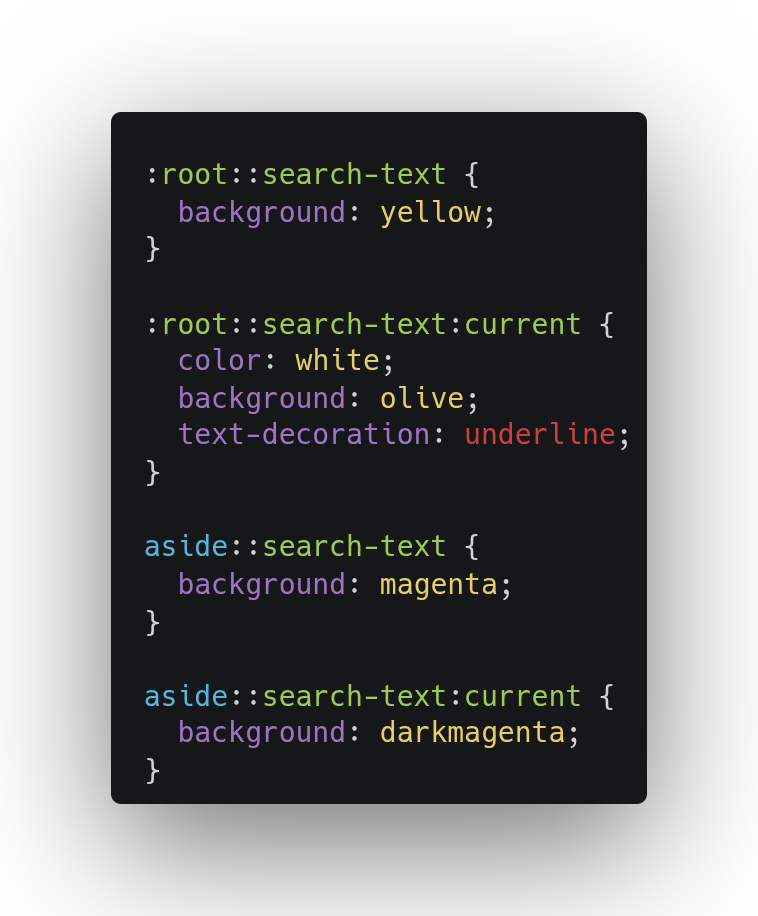
You can now easily customize find-in-page with the new ::search-text pseudo-element, that is shipping in Chromium 144.0.7547. 🚀

Screenshot of the following CSS as an example of how to customize find-in-page: :root::search-text { background: yellow; } :root::search-text:current { color: white; background: olive; text-decoration: underline; } aside::search-text { background: magenta; } aside::search-text:current { background: darkmagenta; text-decoration: underline; }

Find more details on the blog post by Stephen Chenney. Thanks to Bloomberg for sponsoring this work.

December 02, 2025 12:00 AM

December 01, 2025

Alex Bradbury

Minipost: Olmo 3 training cost

Recently I jotted down some notes on LLM inference vs training costs for DeepSeek and I wanted to add on an additional datapoint for training cost based on the recently released Olmo3 models from the Allen Institute for AI ("Ai2"). The model family has 7B and 32B parameter models, with 'Think' variants available for 7B and 32B but so far only a 7B 'Instruct' non-reasoning version (but watch this space). What's particularly interesting about the Olmo models to me is that beyond providing open weights, the training scripts and datasets are openly available as well.

Going by the reported benchmarks at least it's competitive with less open models at a similar size, and importantly they've increased the supported context length from the rather limiting 4k tokens supported by the Olmo 2 series to a much more usable 64k tokens. Given the relatively small size these models are less capable than relatively chunky models like DeepSeek R1/V3.x or Kimi K2, but I've been impressed by the capability of 32B dense models for basic queries, and from my non-scientific testing both the 32B and 7B Olmo3 variants seem to do a reasonable job of summarising things like discussion threads. You can experiment yourself at playground.allenai.org.

Energy required for training Olmo 3

One of the neat things about this level of openness is that it should act as a floor in terms of performance for future models of this size class assuming they're appropriately funded and don't take too many risks chasing novelty. Rerunning the training process with an updated dataset and some minor tweaks is something you could imagine doing on some regular cadence, ideally as a shared endeavour. Imagining this effort in the future, how much energy is required? The initial version of the detailed Olmo 3 technical report unfortunately has little to say on this. We can get a back of the envelope figure in terms of GPU hours for pre-training based on the reported 7700 tokens per second per GPU for the 7B base model and 1900 tokens per second for the 32B base model and the ~6T token dataset. But even better than that, we can just ask the Ai2 folks (sometimes the internet really does work wonderfully!). After asking on their public Discord I was rapidly furnished with this helpful answer:

For some detailed numbers, we measured power consumption throughout training, along with total GPU hours. We used ~234k H100 hours to pretrain the 7B, and ~1.05m H100 hours to pretrain the 32B. 1900 TPS is generally what our trainer is capable of, but with restarts, evaluations, checkpointing, and occasional network issues, the 32B took 1.05m hours. We measured an average power consumption of ~621W while pretraining the 7B and ~649W while pretraining the 32B, and this means that our GPUs consumed ~146MWh for the 7B and ~681MWh for the 32B. We'll include more detailed GPU hour information in a future version of the paper, including for post-training!

Ai2 Olmo 3 team on their Discord.

So that's 0.681 GWh in GPU power draw for pretraining the 32B model and 0.146 GWh in GPU power draw for pretraining the 7B model. As noted in the quote, this is inclusive of restarts, checkpointing etc. But perhaps won't include previous early stage experimentation. I look forward to an updated technical report with full details, but pretraining should cover the bulk of the compute requirements (as a reference point, today's DeepSeek V3.2 paper found it notable that the post-training compute budget exceeded 10% of the pretraining cost).

The 0.681 GWh figure doesn't account for full system power and cooling cost. I'd love to be corrected, but I believe a 1.5x-2x multiplier would be an assumption towards the upper end. But for the sake of this yardstick comparison let's look at a few comparisons based on the reported number:

  • 0.681 GWh of electricity would cost about £180k at UK residential rates (capped at 26.35p per kWh currently). Substantially less in the USA.
  • A larger leisure centre with a pool consumes ~2.5 GWh of energy per year. I don't know if the idea of a "leisure centre" translates outside of the UK, but basically it's a swimming pool plus gym, squash/tennis courts etc.
    • The linked page claims ~2 GWh of energy in gas and 0.5 GWh in electricity. For the gas, to compare like with like you'd need to consider the source of energy for the electricity used for Olmo training.
  • 0.681 GWh is ~0.11% of LHC's annual 600 GWh energy consumption or ~0.05% of CERN's annual consumption.
  • We can estimate a Boeing 787-9 flying from London Heathrow to SFO consumes jet fuel containing ~0.58 GWh of energy.
    • Calculated with 8638km distance, 5.62kg fuel/km (taking the most economic 787-9 long haul figure from this table on Wikipedia and 11.95kWh/kg specific energy of jet fuel).
    • This is a yardstick rather than a direct comparison. A direct comparison to the GWh of electricity used for the GPU compute of the LLM would depend on the source of the electricity. If it was e.g. gas rather than solar/hydro/wind then you'd want to compare the number of GWh consumed to create that electricity which would of course be higher.
    • As a further point of reference, FlightAware indicates 5 separate direct LHR to SFO flights scheduled per day.

More efficient LLM training

We can hope for new breakthroughs, more efficient hardware, better datasets and so on. But here is some work I noticed in the area. Fair warning: this isn't my field, and we have to recognise applying a research result to a production training run is sure to have challenges even if the research suggests the trade-offs are worthwhile. So consider this vague gesticulating about seemingly interesting work that is going on and find someone who knows what they're talking about to confirm the degree to which it is interesting/viable.

  • Mixture of Experts (MoE) models are substantially cheaper to train which is one reason the industry has moved in that direction. The next Ai2 Olmo model is expected to be MoE. The Qwen blog has a graph comparing the relative training cost in GPU hours of the dense Qwen3-32B vs Qwen3-30B-A3b vs Qwen3-Next-80B-A3B, where the latter makes further architectural changes, reporting a 10.7x reduction. ~2.5x of that is going to come from the reduced corpus size (15T tokens down from 36T), but that still leaves plenty of improvement from other factors.
  • Maybe it will be shown viable to train in lower precision such as MXFP8 or even NVFP4, which would allow much more throughput for a similar energy budget. Nvidia have worked to demonstrate this can be effective for both formats (see also this work from MIT).
  • Also from Nvidia, Nemotron Elastic showed a model architecture that allows deriving smaller models without doing a separate pre-training runs.

Finally, the cheapest way to train an LLM from scratch is...to find a way to avoid the need to. For models like Olmo 3 that release the base model and checkpoints, people can apply their own post-training or perform additional pre-training.

Bonus comparison point: Apertus

Apertus is a Swiss project to produce an open LLM, with 70B and 8B models released so far. Their full tech report notes the following "Once a production environment has been set up, we estimate that the model can be realistically trained in approximately 90 days on 4096 GPUs, accounting for overheads. If we assume 560 W power usage per Grace-Hopper module in this period, below the set power limit of 660 W, we can estimate 5 GWh power usage for the compute of the pretraining run."


Article changelog
  • 2025-12-04: Add link to "Four Over Six" NVFP4 training paper.
  • 2025-12-02: Added clarifying note about energy via gas in the leisure centre comparison.
  • 2025-12-01: Initial publication date.

December 01, 2025 12:00 PM

November 30, 2025

Alex Bradbury

Minipost: Benchmarking the Hetzner AX102 vs CCX53

I recently had reason to do a quick comparison of the performance of the Hetzner AX102 dedicated server and the high-end 'dedicated' CCX53 VPS on Hetzner Cloud and thought I may as well write up the results for posterity. I'm incapable of starting a post without some kind of disclaimer so here comes the one for this post: naturally the two products have major differences in terms of flexibility (spin-up/down at will, vs pay a small setup fee and endure a wait time depending on hardware availability). So depending on your use case, your requirements with respect to that flexibility may override any cost differential.

Specs

All costs are exclusive of VAT, assuming the lowest cost data center location, and inclusive of IPv4 address.

AX102:

  • 16 core Ryzen 9 7950X3D (32 threads)
  • 128GB DDR5 RAM
  • 2 x 1.92TB NVMe
  • 104 EUR/month, 39 EUR one-off setup fee.

CCX53

  • Unknown AMD CPU exposing 32vCPU (physical cores? threads?)
  • 128GB RAM
  • 600GB NVMe
  • 192.49 EUR/month maximum charge. 0.3085 EUR per hour (if you keep the same VPS active over the month it won't exceed the monthly price cap, so you effectively get a small discount on the per-hour cost).

Benchmark

Building Clang+LLVM+LLD, everyone's favourite workload! Both systems are running an up to date Arch Linux (more details on setting this up on the CCX53 in the appendix below) with clang 21.1.6. The dedicated machine has the advantage of RAID 0 across the two SSDs, but also has encrypted rootfs configured. I didn't bother to set that up for the CCX53 VPS.

sudo pacman -Syu --needed clang lld cmake ninja wget
LLVM_VER=21.1.6
wget https://github.com/llvm/llvm-project/releases/download/llvmorg-${LLVM_VER}/llvm-project-${LLVM_VER}.src.tar.xz
tar -xvf llvm-project-${LLVM_VER}.src.tar.xz
cd llvm-project-${LLVM_VER}.src

cmake -G Ninja \
  -DLLVM_ENABLE_PROJECTS='clang;lld' \
  -DLLVM_TARGETS_TO_BUILD="all" \
  -DLLVM_CCACHE_BUILD=OFF \
  -DCMAKE_C_COMPILER=clang \
  -DCMAKE_CXX_COMPILER=clang++ \
  -DLLVM_ENABLE_LLD=ON \
  -DCMAKE_BUILD_TYPE=Release \
  -DLLVM_ENABLE_ASSERTIONS=ON \
  -S llvm \
  -B build
time cmake --build build

printf "### Version info ###\n"
clang --version | head -n 1

On both machines, ninja shows 5575 build steps.

Results:

  • AX102
    • 10m27s (627s)
  • CCX53
    • 14m11s (851s, about 1.36x the AX102)

Running the clang and LLVM tests with ./build/bin/llvm-lit -s --order=lexical llvm/test clang/test (which shows 9402 tests) gives:

  • AX102
    • 3m39s (219s)
  • CCX53
    • 4m28s (268s, about 1.24x the AX102)

I ran these multiple times, and in the case of the CCX53 across two different VMs in different regions and saw only a few percentage points variance.

Focusing on the results for build clang/llvm/lld, let's figure out the cost for 1000 from-scratch builds. Not so much as it's a representative workload, but because it gives an easy to compare metric that captures both the difference in price and in performance. So calculating time_per_build_in_hours * 1000 * cost_per_hour:

  • AX102
    • (626.6 / 3600) * 1000 * (104/720) = 25.14 EUR
    • Or if you include the setup fee and assume it's amortised over 12 months:
      • (626.6/3600) * 1000 * ((104 + (39/12))/720) = 25.93 EUR
  • CCX53
    • (850.6 / 3600) * 1000 * (192.49/720) = 63.17 EUR
    • Or using the 0.3085 EUR/hr price which you would pay if you didn't run for the whole month:
      • (850.6 / 3600) * 1000 * 0.3085 = 72.89 EUR

Appendix: CCX53 Arch Linux setup

This could be scripted, but I just created the VPS via their web UI. Then after it was provisioned, used that web UI to have it boot into a rescue system. Then do an Arch bootstrap that roughly mirrors the one I use on a dedicated build machine except that we don't bother with encrypting the rootfs. The CCX* server types at least use UEFI so we can keep using efistub for boot.

First get a bootstrap environment and enter it:

wget http://mirror.hetzner.de/archlinux/iso/latest/archlinux-bootstrap-x86_64.tar.zst
tar -xvf archlinux-bootstrap-x86_64.tar.zst --numeric-owner
sed -i '1s;^;Server=https://mirror.hetzner.de/archlinux/$repo/os/$arch\n\n;' root.x86_64/etc/pacman.d/mirrorlist
mount --bind root.x86_64/ root.x86_64/ # See <https://bugs.archlinux.org/task/46169>
printf "About to enter bootstrap chroot\n===============================\n"
./root.x86_64/bin/arch-chroot root.x86_64/

Now set info that will be used throughout the process:

export NEW_HOST_NAME=archvps
export PUBLIC_SSH_KEY="ssh-ed25519 AAAAC3NzaC1lZDI1NTE5AAAAIOfpPQ1j+XLsapAhONAQmvu6TZGT5y8jeziM4Vio1NrA asb@plurp"
export NEW_USER=asb

And now proceed to set up the disks, create filesystems, perform an initial bootstrap and chroot into the new rootfs:

pacman-key --init
pacman-key --populate archlinux
pacman -Sy --noconfirm xfsprogs dosfstools

sfdisk /dev/sda <<EOF
label: gpt

start=1MiB, size=255MiB, type=uefi
start=256MiB, type=linux
EOF

mkfs.fat -F32 /dev/sda1
mkfs.xfs /dev/sda2

mount /dev/sda2 /mnt
mkdir /mnt/boot
mount /dev/sda1 /mnt/boot
pacstrap /mnt base linux linux-firmware efibootmgr \
  xfsprogs dosfstools \
   python3 \
  openssh sudo net-tools git man-db man-pages vim
genfstab -U /mnt >> /mnt/etc/fstab

printf "About to enter newrootfs chroot\n===============================\n"
arch-chroot /mnt

Do final configuration from within the chroot:

sed /etc/locale.gen -i -e "s/^\#en_GB.UTF-8 UTF-8.*/en_GB.UTF-8 UTF-8/"
locale-gen
# Ignore "System has not been booted with systemd" and "Failed to connect to bus" error for next command.
systemd-firstboot --locale=en_GB.UTF-8 --timezone=UTC --hostname="$NEW_HOST_NAME"
ln -s /dev/null /etc/udev/rules.d/80-net-setup-link.rules # disable persistent network names

# No longer need to disable large fallback image as Arch stopped generating it
# by default

printf "efibootmgr before changes:\n==========================\n"
efibootmgr -u
# Set up efistub
efibootmgr \
  --disk /dev/sda \
  --part 1 \
  --create \
  --label 'Arch Linux' \
  --loader /vmlinuz-linux \
  --unicode "root=/dev/sda2 rw initrd=\initramfs-linux.img" \
  --verbose
printf "efibootmgr after changes:\n=========================\n"
efibootmgr -u

mkswap --size=8G --file /swapfile
cat - <<EOF > /etc/systemd/system/swapfile.swap
[Unit]
Description=Swap file

[Swap]
What=/swapfile

[Install]
WantedBy=multi-user.target
EOF
systemctl enable swapfile.swap

cat - <<EOF > /etc/systemd/network/10-eth0.network
[Match]
Name=eth0

[Network]
DHCP=yes
Address=$(ip -6 addr show dev eth0 scope global | grep "scope global" | cut -d' ' -f6)
Gateway=$(ip route show | head -n 1 | cut -d' ' -f 3)
Gateway=fe80::1
EOF
systemctl enable systemd-networkd.service systemd-resolved.service systemd-timesyncd.service
printf "PasswordAuthentication no\n" > /etc/ssh/sshd_config.d/20-no-password-auth.conf
systemctl enable sshd.service
useradd -m -g users -G wheel -s /bin/bash "$NEW_USER"
usermod --pass='!' root # disable root login
chmod +w /etc/sudoers
printf "%%wheel ALL=(ALL) ALL\n" >> /etc/sudoers
chmod -w /etc/sudoers
mkdir "/home/$NEW_USER/.ssh"
printf "%s\n" "$PUBLIC_SSH_KEY" > "/home/$NEW_USER/.ssh/authorized_keys"
chmod 700 "/home/$NEW_USER/.ssh"
chmod 600 "/home/$NEW_USER/.ssh/authorized_keys"
chown -R "$NEW_USER:users" "/home/$NEW_USER/.ssh"

Now set password:

passwd "$NEW_USER"

Then ctrl-d twice and set a symlink for resolv.conf:

ln -sf ../run/systemd/resolve/stub-resolv.conf root.x86_64/mnt/etc/resolv.conf

Finally, reboot.

Remember to ssh-keygen -R $THE_IP_ADDRESS so you don't get ssh host verification errors.


Article changelog
  • 2025-11-30: Initial publication date.

November 30, 2025 12:00 PM

November 29, 2025

Alex Bradbury

Minipost: LLM inference vs training costs for DeepSeek

Tl;dr: Based on published data from DeepSeek, we can estimate it takes something like ~70 days of inference traffic (served by DeepSeek themselves, ignoring any other providers) to match the GPU hours used for the final training run for V3 and R1.

Simon Willison recently reshared some figures on inference costs for LLMs. I couldn't agree more with the comment further down that thread "The big AI labs continue to be infuriatingly opaque about the actual figures for their total electricity and water consumption".

A number of responses wonder about the cost of training. If you accept the reported figures for serving a query, what impact does it have if you amortise the energy spent training the model over the served queries? Mistral did this for their lifecycle analysis but they grouped together "training and inference" and kept confidential the ratio of energy for training vs inference by reporting a figure that combined the training cost with 18 months of usage. The thread reminded me of another datapoint available for DeepSeek that seemed worth writing up. I think this gives some helpful intuition for the amortised cost of training for a widely used model of that size, but to state the obvious any attempt to apply that intuition to other models is totally reliant on how widely used it is.

DeepSeek have published figures both on training and on inference for DeepSeek's website and API users. I will attempt to consistently refer to the figure for training as "final run training cost" to reflect the fact the number of GPU hours used in experimentation and failed attempts isn't reported. For final run training for DeepSeek-R1:

Now for inference, back in February DeepSeek wrote up details of their inference system giving details of cost of serving, profit margin, and load over a 24h period. So yes, we're extrapolating from this datapoint and assuming it's representative. Given the worldwide inference of DeepSeek R1/V3 is surely much larger (being openly licensed there are many vendors who are serving it), I'm not overly worried about this aspect. Their reported average inference serving infrastructure occupancy is 226.75 nodes (each node containing 8 H800 GPUs), meaning 43536 H800 GPU hours per day. At that rate, it will take ~67.5 days of traffic for the same number of H800 GPU hours to be used for inference as for the final training run.

All this to say, for a widely used model of DeepSeek R1 scale when looking at the cost of inference, accounting for the amortised final run training cost is more likely to be a multiplier of 2x or less rather than something much larger. In terms of energy, this does assume that the power draw of the H800 GPUs while running inference is similar to the draw during training. And to underline again, the reported training cost surely doesn't include experimentation, aborted runs etc.


Article changelog
  • 2025-11-29: Initial publication date.

November 29, 2025 12:00 PM

November 27, 2025

Eri Pazos

interop and mathml core

math { font-size: 2em; } .math-example { display: flex; justify-content: center; align-items: center; & > div { display: inline-grid; grid-template-columns: 1fr 2px 1fr; grid-template-rows: fit-content(0); grid-gap: var(--spacing); & > img { height: 100%; width: auto; border: none; padding: 0.25rem; } @media (width 768px) { grid-template-columns: 1fr; text-align: center; justify-items: center; & > hr { width: 100%; } } } }

Interoperability makes the web better for everyone, allowing users to have a great experience regardless of their choice of browser. We have been working on MathML Core making across browser engines as part of an agreement with the Sovereign Tech Fund. There are some exciting developments and new features!

Interoperability makes the web better for everyone, allowing users to have a great experience regardless of their choice of browser. We have many standards that shape how the internet should work, drafted from consensus between different engine makers and third parties. While having specs on how everything should function is great, we still need to align the different browser implementations. This can be tricky as all of them have their peculiarities, and not all browsers agree on what is a priority for them. The goal of the Interop program is to select a few important features that all engines will prioritize, so users and editors can finally benefit from them.

A few months ago I joined Igalia's web platform team (and I'm really happy about it!). Thanks to an agreement with the Sovereign Tech Fund, this year we will be working on MathML and other important Interop areas.

This post contains MathML examples. Each formula is represented twice. Your browser renders the left one from the HTML code, while on the right there is a pre-printed SVG as a reference of how it should look. Keep in mind that most of these features are either experimental or have just landed, so you may need the latest version of a browser to view them correctly.

A bit of history

MathML was first published in 1998, and it grew to be a gigantic project that sought to define how mathematical notation should be rendered. However, due to its complexity, the implementations of the browser engines were wildly different and incomplete. This meant that editors could not rely on it, since users would see very different content depending on what they were browsing with.

<math>
  <msubsup>
    <mo></mo>
    <mn>0</mn>
    <mn>1</mn>
  </msubsup>
  <mrow>
    <msup>
      <mi>x</mi>
      <mn>2</mn>
    </msup>
    <mo>+</mo>
    <mn>1</mn>
  </mrow>
</math>
∫ 0 1 x 2 + 1
An integral from 0 to 1 of x squared plus one

This is why MathML Core was born. It is a small subset of MathML 3 that is feasible to implement in browsers. It is based on the parts of the specification that are used in practice, adding important implementation details and testing.

To illustrate why this is important, Chromium had support for some parts of MathML when it was forked from WebKit. However, it proved to be very difficult to maintain and complete, so it was removed in 2013. My colleague Frédéric Wang led the effort to create a new implementation based on MathML Core, which was shipped in 2023, a huge milestone for the standard.

We are in a very exciting moment in the MathML history, since all three major browser engines have overlapping support. However, there is still work to be done to align the different implementations so they follow the MathML Core specification. The goal is that one could write formulas on a website and have it look the same everywhere (like Wikipedia, which is now transitioning to native MathML instead of prerendered SVGs).

So, what have we been working on?

RTL mirroring

Some scripts are written from right to left, including Arabic. Browsers should be able to correctly render text and math in either direction, making use of the Unicode BiDi specification and the rtlm font feature. However, the existing implementations either didn't support mirroring or had hacky behaviour that didn't work correctly for all cases. Read this explainer that Frédéric made for a great visualization of the differences.

<link rel="stylesheet" href="https://fred-wang.github.io/MathFonts/XITS/mathfonts.css"/>

<math>
  <mrow>
    <mo>{</mo>
    <mfrac>
      <mn>5</mn>
      <mn>6</mn>
    </mfrac>
    <mo>)</mo>
  </mrow>
  <msqrt>
    <mfrac>
      <mn>3</mn>
      <mn>4</mn>
    </mfrac>
  </msqrt>
  <msub displaystyle="true">
    <mo></mo>
    <mi>C</mi>
  </msub>
</math>

<math dir="rtl">
  <mrow>
    <mo>{</mo>
    <mfrac>
      <mn>٥</mn>
      <mn>٦</mn>
    </mfrac>
    <mo>)</mo>
  </mrow>
  <msqrt>
    <mfrac>
      <mn>٣</mn>
      <mn>٤</mn>
    </mfrac>
  </msqrt>
  <msub displaystyle="true">
    <mo></mo>
    <mi>ج</mi>
  </msub>
</math>
{ 5 6 ) 3 4 ∲ C { ٥ ٦ ) ٣ ٤ ∲ ج
A series of math formulas, first from left to right, then from right to left

There are two cases when it comes to mirroring. If there is a corresponding mirrored character (e.g. opening parenthesis to closing parenthesis), it is called character-level mirroring or Unicode BiDi, and the browser just needs to swap one character for the other. Sadly, this doesn't apply to every operator.

Take the contour clockwise integral. If we just mirror the symbol by applying a reflection symmetry about a vertical line, the arrow is suddenly pointing in the other direction, making it counterclockwise. This changes the meaning of the formula!

Three clockwise integrals: left to right, incorrectly mirrored (arrow pointing to the other side), and right to left

To avoid this, the rtlm font feature can use glyph-level mirroring to provide a different set of correctly mirrored glyphs. Glyphs plural since a math symbol can have different size variants to accommodate multiple contents. Not only that, when the variants are not enough, there are glyphs for assembling arbitrarily long operators.

<link rel="stylesheet" href="https://fred-wang.github.io/MathFonts/XITS/mathfonts.css"/>

<math>
  <msqrt>
    <mspace height="0.8em" width="0.8em" style="background: tomato"></mspace>
  </msqrt>
  <msqrt>
     <mspace height="1.5em" width="0.8em" style="background: gold"></mspace>
  </msqrt>
  <msqrt>
    <mspace height="2.5em" width="0.8em" style="background: mediumseagreen"></mspace>
  </msqrt>
  <msqrt>
    <mspace height="4.5em" width="0.8em" style="background: cornflowerblue"></mspace>
  </msqrt>
</math>

<math dir="rtl">
  <msqrt>
    <mspace height="0.8em" width="0.8em" style="background: tomato"></mspace>
  </msqrt>
  <msqrt>
     <mspace height="1.5em" width="0.8em" style="background: gold"></mspace>
  </msqrt>
  <msqrt>
    <mspace height="2.5em" width="0.8em" style="background: mediumseagreen"></mspace>
  </msqrt>
  <msqrt>
    <mspace height="4.5em" width="0.8em" style="background: cornflowerblue"></mspace>
  </msqrt>
</math>

A series square roots, each taller than the last. First from left to right, then from right to left

No browser engine supported glyph-level mirroring for MathML operators, so we had to implement it in all of them. Thankfully harfbuzz, the underlying font rendering library used by Chromium and Firefox, already supported it. WebKit is a work in progress, since there is more complexity because of different ports using different backends. As for character-level mirroring, Chromium and WebKit did it right, but Firefox applied reflection symmetry instead of replacing the correct pair. The changes in Firefox and Chromium are now stable and ready to be used!

Feature Firefox WebKit Chromium
Character level mirroring (BiDi) ✅✨
Glyph level mirroring (rtlm) ✅✨ 🚧 ✅✨

math-shift and math-depth

Details are important, especially when rendering complex and layered formulas. One may think that a few pixels do not make that much of a difference. However, when you have multiple levels of nesting, offsets, and multiple elements, a slight change can make everything look ugly at best, wrong at worst.

Enter math-shift: compact. Look at this example from the MathML Core spec:

<math display="block">
  <msqrt>
    <msup>
      <mi>x</mi>
      <mn style="color: mediumseagreen">2</mn>
    </msup>
  </msqrt>
  <mo></mo>
  <msup>
    <mi>x</mi>
    <mn style="color: cornflowerblue">2</mn>
  </msup>
</math>
x 2 ≠ x 2
Square root of x squared does not equal x squared. The exponent under the root is lower than the exponent on the right

At first glance, you may not see anything too different. But looking closely, the green "2" on the left is a bit lower than then blue one on the right. It is trying to fit under the square root bar. This is what LaTeX calls cramped mode.

Chromium already supported the definition given by MathML Core, so that left Firefox and WebKit, both of which used hardcoded rules for specific cases in C++ objects. MathML Core takes another approach, and incentivizes using CSS styling rules instead.

Another interesting property is math-depth. It is used to make nested elements, such as those inside fractions, scripts or radicals a bit smaller. That way, if you have an exponent of an exponent of an exponent (of an exponent...), each one is displayed a bit tinier than the last.

<math display="block">
  <msup>
    <mi>A</mi>
    <msup>
      <mi style="color: cornflowerblue">A</mi>
      <msup>
        <mi style="color: mediumseagreen">A</mi>
        <mi style="color: tomato">A</mi>
      </msup>
    </msup>
  </msup>
  <mo>+</mo>
  <mroot>
    <mi>A</mi>
    <mi style="color: mediumseagreen">A</mi>
  </mroot>
  <mo>+</mo>
  <mfrac>
    <mrow>
      <mi>A</mi>
      <mo>+</mo>
      <mfrac>
        <mi style="color: cornflowerblue">A</mi>
        <mi style="color: cornflowerblue">A</mi>
      </mfrac>
    </mrow>
    <mi>A</mi>
  </mfrac>
</math>
A A A A + A A + A + A A A
A variable with nested exponents, each smaller than the last. A radical with index A, smaller than the value inside the root. A nested fraction, whose variables are also displayed smaller.

In this case, Firefox and Chromium already had compliant implementations, so only WebKit needed to catch up. Support for math-depth and the scriptlevel attribute (which allows to modify this depth) has now landed, while a patch for font-size: math (which sets the size of the element based on its depth) is on the way.

Feature Firefox WebKit Chromium
math-shift: compact ✅✨ ✅✨
math-depth ✅✨
font-size: math 🚧
scriptlevel ✅✨

Other work

Rendering unknown elements as mrow

MathML 3 defined 195 elements. MathML Core focuses on about 30, leaving the rest to styling or polyfills. This means deprecating some features that were previously implemented in some browsers, like mfenced, semantics, and maction, as it would be too difficult to make them interoperable right now. To prevent breaking existing content too much, they are rendered like an mrow.

font-family: math

Selecting a good math font is essential for rendering. Stretchy operators, math symbols, and italics are not available with every font, so without one they are presented very poorly. font-family: math is a CSS property that specifies that the content should use a suitable font for mathematics. Previously browsers had a hardcoded list of CSS fallbacks, but now this has been standardized and implemented.

Android doesn't come with a math font installed, so it mixes symbols from different fonts, producing a rather unappealing result:

A math formula containing different symbols, all of them with varying font styling and weights as the result of not having an unified math font family

mathvariant and text-transform: math-auto

Single letter identifiers inside a <mi> tag are treated as variables, and so they should be rendered with fancy italics. This is still supported by MathML Core. However, MathML 3 allows a plethora of transformations using mathvariant, from bold to gothic text. The new spec says that while italic transformation should still happen by default, other text should use the specific Unicode codepoint directly, as it just adds too much complexity for the browser implementation.

text-transform: math-auto is a CSS property applied by default to <mi> elements that enables the italic transformation for them. Setting the new mathvariant attribute to normal will make the text-transform of the element be none, removing the italic styling.

Different stylings of the letter A. Italic, regular, bold italic, bold regular, double struck, script, fraktur, sans serif and monospace

DisplayOperatorMinHeight and Cambria Math

Microsoft made a mistake in Cambria Math, one of the math fonts used in Windows. They switched the DisplayOperatorMinHeight and DelimitedSubFormulaMinHeight, so operators weren't being displayed correctly. Some browsers had a workaround for this, but a more general fix was implemented in harfbuzz, so we removed the workarounds in favour of relying on the upstream library instead.

Animation for math-* properties

When implementing math-shift in Firefox, we noticed that the spec said the new properties are not supposed to be animatable. In the new CSS spec, most properties are defined as animatable (fun!). After some discussion with the MathML Working Group, we decided to change the spec, and we are adding this feature to the browser engines.

@keyframes math-anim { 0% { color: royalblue; math-depth: 1; } 20% { color: mediumseagreen; } 40% { color: gold; } 60% { color: tomato; math-depth: 3; } 80% { color: mediumpurple; } 100% { color: royalblue; math-depth: 1; } } #anim-target { animation: math-anim 5s infinite; } #anim-container { height: 4.5rem; & > math { font-size: 4rem; } }

x 2

Feature Firefox WebKit Chromium
Render unknown elements as mrow ✅✨ ✅✨
font-family: math ✅✨ ✅✨
text-transform: math-auto ✅✨
New mathvariant behaviour 🚧
DisplayOperatorMinHeight fix ✅✨ ✅✨ ✅✨
Animation for math-* properties ✅✨ 🚧 🚧

What's next?

Many of these improvements have already shipped, but our work continues on making mathematics more interoperable in browsers. This includes some exciting new features ahead:

  • Updates to the operator dictionary: MathML Core revamped the existing list of operators and their default layouts. Additionally, there is a new compact form that removes redundancies.
  • More improvements to operator stretching and spacing: There are still some inconsistencies between browsers and some long standing bugs that we would love to tackle.
  • Handling positioned elements and forbidding floats in MathML: Like flex or grid, MathML doesn't create floating children for elements with a math display type. However, they can still have out of flow positioned children. At the moment this isn't consistent across browsers and it is something we want to improve.

Working on MathML is very rewarding, specially because of the people that have helped along the way. I'd like to specially thank my colleague @fredw, reviewers from Mozilla, Apple and Google, and the W3C Math Working Group. Also @delan for reviewing the first draft of this post.

We are very grateful to the Sovereign Tech Fund for supporting this work!

November 27, 2025 12:00 AM

November 24, 2025

Igalia WebKit Team

WebKit Igalia Periodical #48

Update on what happened in WebKit in the week from November 17 to November 24.

In this week's rendition, the WebView snapshot API was enabled on the WPE port, further progress on the Temporal and Trusted Types implementations, and the release of WebKitGTK and WPE WebKit 2.50.2.

Cross-Port 🐱

A WebKitImage-based implementation of WebView snapshot landed this week, enabling this feature on WPE when it was previously only available in GTK. This means you can now use webkit_web_view_get_snapshot (and webkit_web_view_get_snapshot_finish) to get a WebKitImage-representation of your screenshot.

WebKitImage implements the GLoadableIcon interface (as well as GIcon's), so you can get a PNG-encoded image using g_loadable_icon_load.

Remove incorrect early return in Trusted Types DOM attribute handling to align with spec changes.

JavaScriptCore 🐟

The built-in JavaScript/ECMAScript engine for WebKit, also known as JSC or SquirrelFish.

In JavaScriptCore's implementation of Temporal, implemented the with method for PlainMonthDay objects.

In JavaScriptCore's implementation of Temporal, implemented the from and equals methods for PlainMonthDay objects.

Releases 📦️

WebKitGTK 2.50.2 and WPE WebKit 2.50.2 have been released.

These stable releases include a number of patches for security issues, and as such a new security advisory, WSA-2025-0008, has been issued (GTK, WPE).

It is recommend to apply an additional patch that fixes building with the JavaScriptCore “CLoop” interpreter is enabled, which is typicall for architectures where JIT compilation is unsupported. Releases after 2.50.2 will include it and manual patching will no longer be needed.

That’s all for this week!

by Igalia WebKit Team at November 24, 2025 08:12 PM

November 23, 2025

Juan A. Suárez

Major Upgrades to the Raspberry Pi GPU Driver Stack (XDC 2025 Recap)

XDC 2025 happened at the end of September, beginning of October this year, in Kuppelsaal, the historic TU Wien building in Vienna. XDC, The X.Org Developer’s Conference, is truly the premier gathering for open-source graphics development. The atmosphere was, as always, highly collaborative and packed with experts across the entire stack.

I was thrilled to present, together with my workmate Ella Stanforth, on the progress we have made in enhancing the Raspberry Pi GPU driver stack. Representing the broader Igalia Graphics Team that work on this GPU, Ella and I detailed the strides we have made in the OpenGL driver, though part of the improvements affect also the Vulkan driver.

The presentation was divided in two parts. In the first one, we talked about the new features that we were implementing, or are under implementation, mainly to make the driver more closely aligned with OpenGL 3.2. Key features explained were 16-bit Normalized Format support, Robust Context support, and Seamless cubemap implementation.

Beyond these core OpenGL updates, we also highlighted other features, such as NIR printf support, framebuffer fetch or dual source blend, which is important for some game emulators.

The second part was focused on specific work done to improve the performance. Here, we started with different traces from the popular GFXBench application, and explained the main improvements done throughout the year, with a look at how much each of these changes improved the performance for each of the benchmarks (or in average).

At the end, for some benchmarks we nearly doubled the performance compared to last year. I won’t explain here each of the changes done, But I encourage the reader to watch the talk, which is already available.

For those that prefer to check the slides instead of the full video, you can view them here:

Outside of the technical track, the venue’s location provided some excellent down time opportunities to have lunch at different nearby places. I need to highlight here one that I really enjoyed: An’s Kitchen Karlsplatz. This cozy Vietnamese street food spot quickly became one of my favourite places, and I went there a couple of times.

On the last day, I also had the opportunity to visit some of the most recomendable sightseeings spots in Vienna. Of course, one needs more than a half-day to do a proper visit, but at least it helps to spark an interest to write it down to pay a full visit to the city.

Meanwhile, I would like to thank all the conference organizers, as well as all the attendees, and I look forward to see them again.

November 23, 2025 11:00 PM

November 22, 2025

Igalia Compilers Team

Unlocking 15% More Performance: A Case Study in LLVM Optimization for RISC-V

This blog post summarizes a talk given by Mikhail R. Gadelha at the RISC-V Summit North America 2025.

You can also watch the presentation here. And download the full presentation here.

Title slide

Introduction #

In this post, I will walk through the results of a 10-month RISE project we completed in September, focused on improving the performance of the LLVM toolchain for RISC-V.

Since the moment I originally submitted this talk, we have actually squeezed out a bit more performance: what used to be a 15% speed-up is now up to 16% on SPEC CPU® 2017. Small change, but still measurable.

The project targeted the Banana Pi BPI-F3 board, which uses the SpacemiT X60: an in-order, 8-core RISC-V processor supporting the RVA22U64 profile and RVV 1.0, 256-bit vectors.

Our high-level goal was straightforward: to reduce the performance gap between LLVM and GCC for RISC-V. However, there wasn't (and still isn't) one single fix; LLVM is an extremely active codebase where improvements and regressions happen constantly. Instead, we focused on three major contributions:

  1. A full scheduling model for the SpacemiT X60.

  2. Improvements to vectorization across calls.

  3. IPRA support for the RISC-V backend.

Let's walk through each contribution.

1. SpacemiT-X60 Scheduling Model #

By far, our main contribution to the LLVM project was the scheduling model for the Spacemit-X60, but before we delve deeper into the changes, let's understand what a scheduling model is.

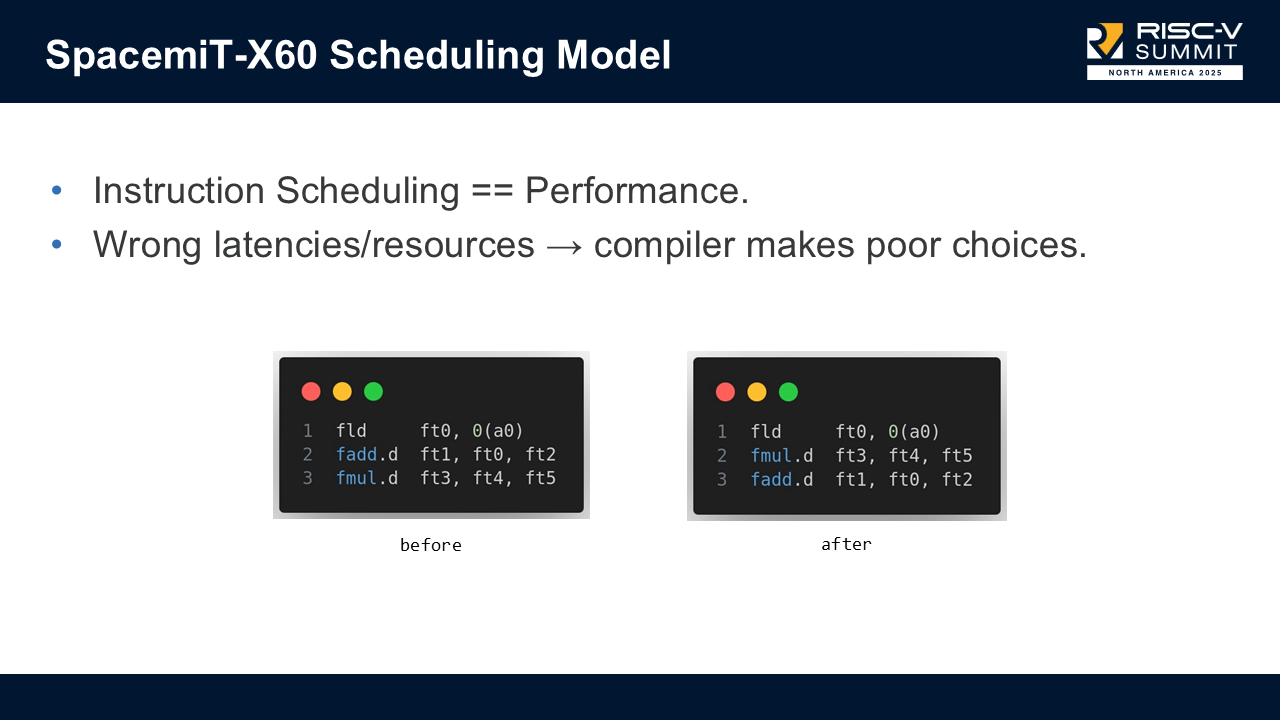
Explaining a scheduling model with an example

Instruction scheduling directly impacts performance, especially on in-order processors. Without accurate instruction latencies, and instruction resource usage, the compiler can make poor scheduling decisions.

In our slides, there is an example where:

load -> uses ft0
fadd -> depends on ft0
fmul -> independent

The above is a possible naive code generated by the compiler, which has latency(load + fadd + fmul). Thanks to an accurate scheduling model the compiler can reason that it is better to emit the following code with latency(max(load, fmul) + fadd).

load -> uses ft0
fmul -> independent of preceding load
fadd -> depends on load

This was just an illustrative example, not something LLVM typically emits, but it demonstrates how missing scheduling information leads to unnecessary stalls.

How we got the latencies and throughput of all instructions

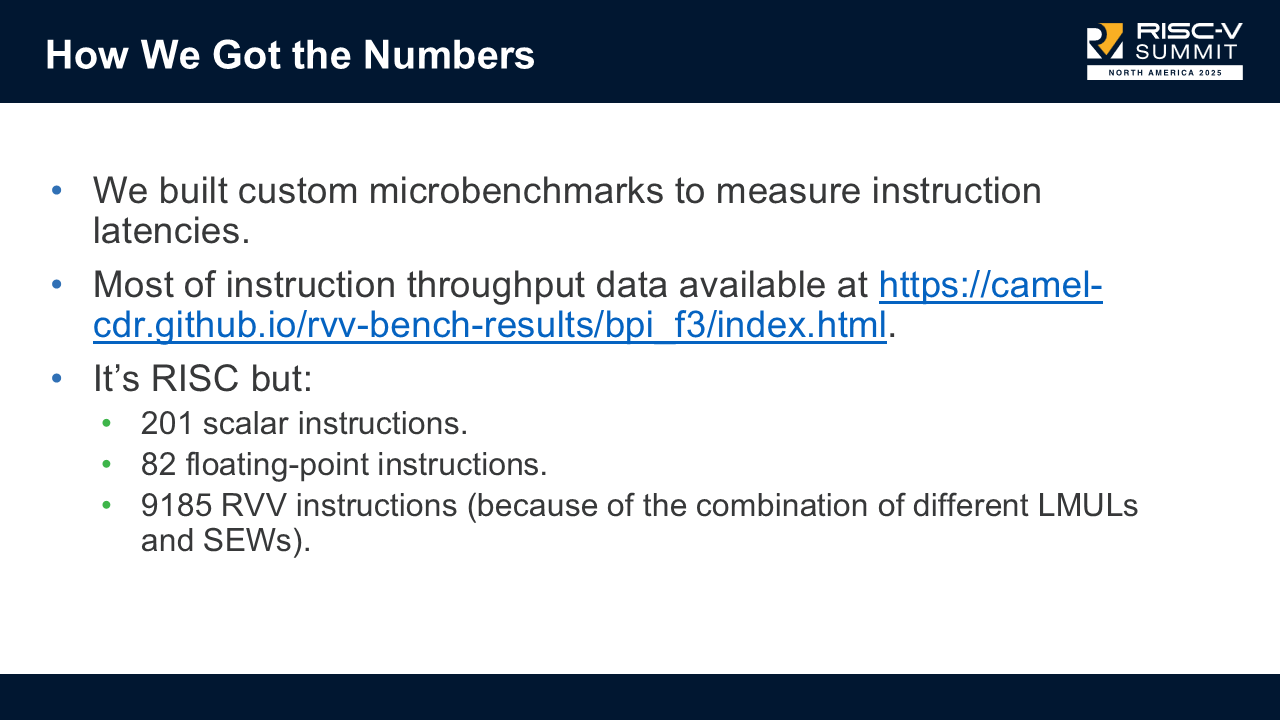
The biggest piece of the work was to actually collect the data on every single instruction supported by the board. To build a correct model, we:

  • wrote custom microbenchmarks to measure latency for every instruction.
  • used throughput data from camel-cdr's RVV benchmark results.
  • tracked all combinations of LMUL × SEW, which leads to:
    • 201 scalar instructions.
    • 82 FP instructions.
    • 9185 RVV "instructions" (combinations).

This resulted in a very, very large spreadsheet, and it took a few month to add all that data in LLVM.

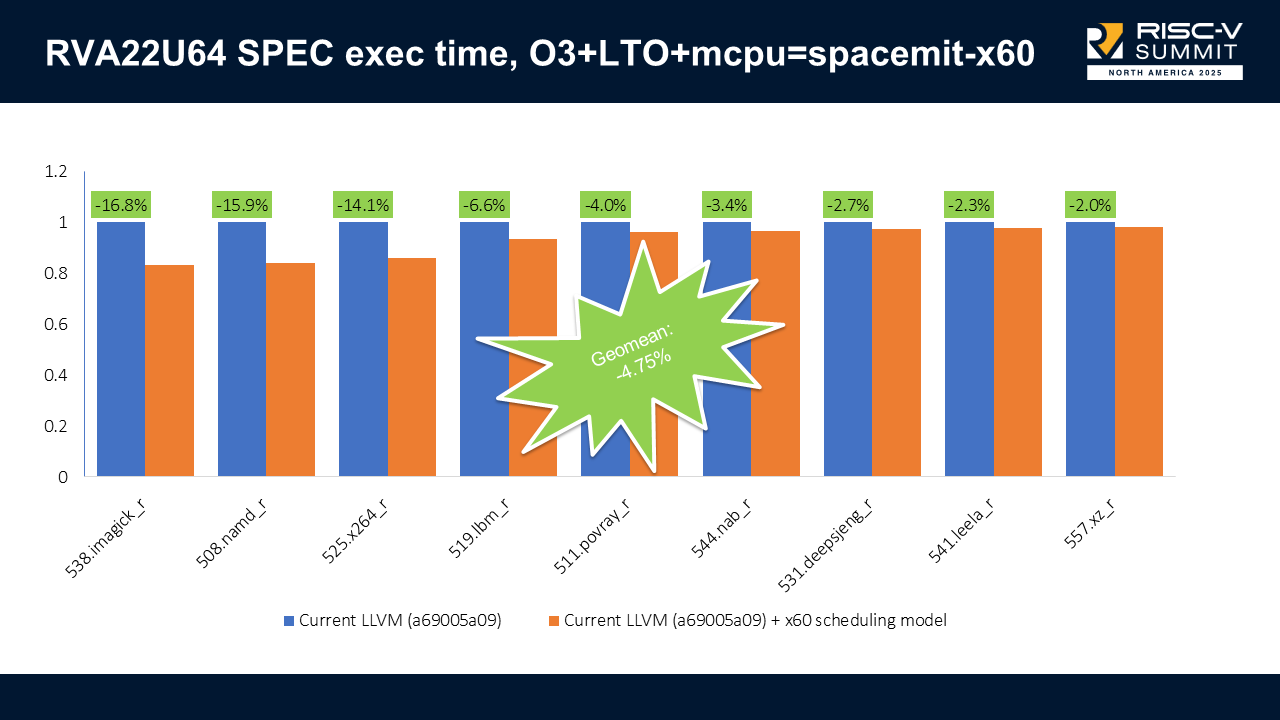
RVA22U64 SPEC execution time results

With scheduling enabled on RVA22U64 (scalar-only), we got up to 16.8% execution time improvements (538.imagick_r) and no regressions. The combined results show a -4.75% geometric mean improvement on execution time.

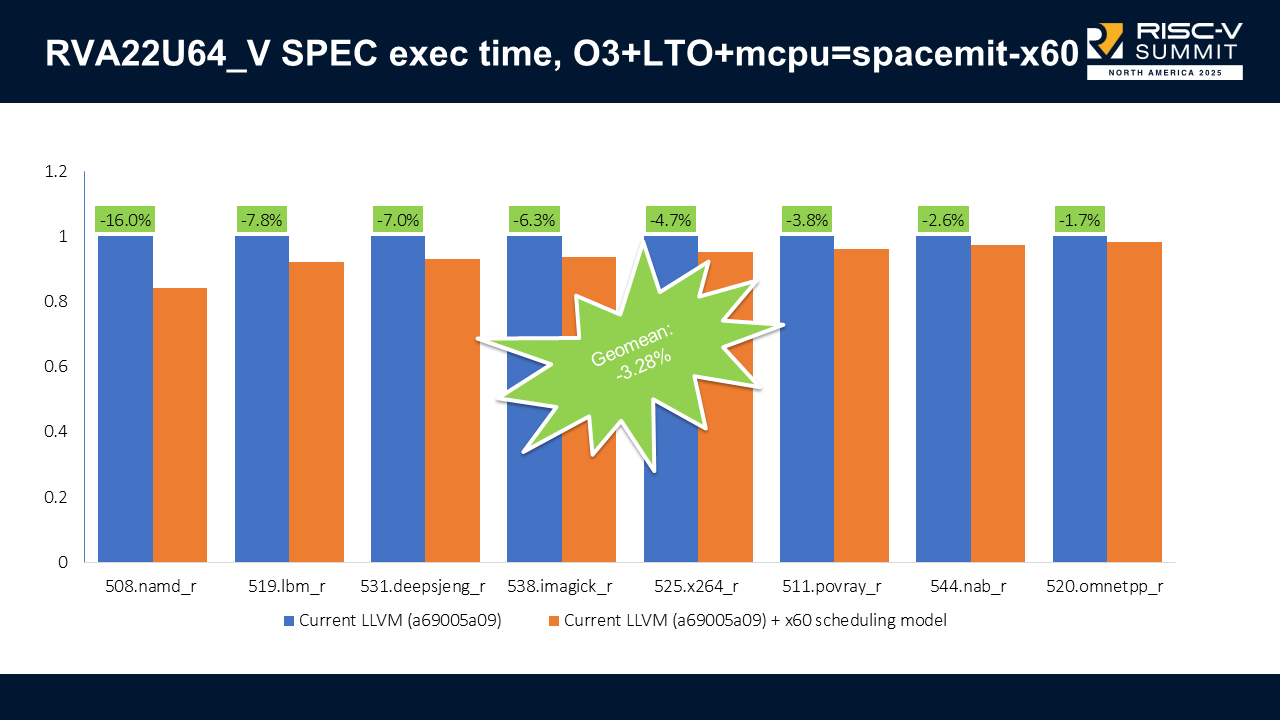
RVA22U64_V SPEC execution time results

When we enable vectors (RVA22U64_V), we got up to 16% improvement (508.namd_r) and no regressions. The combined results show a -3.28% geometric mean improvement on execution time.

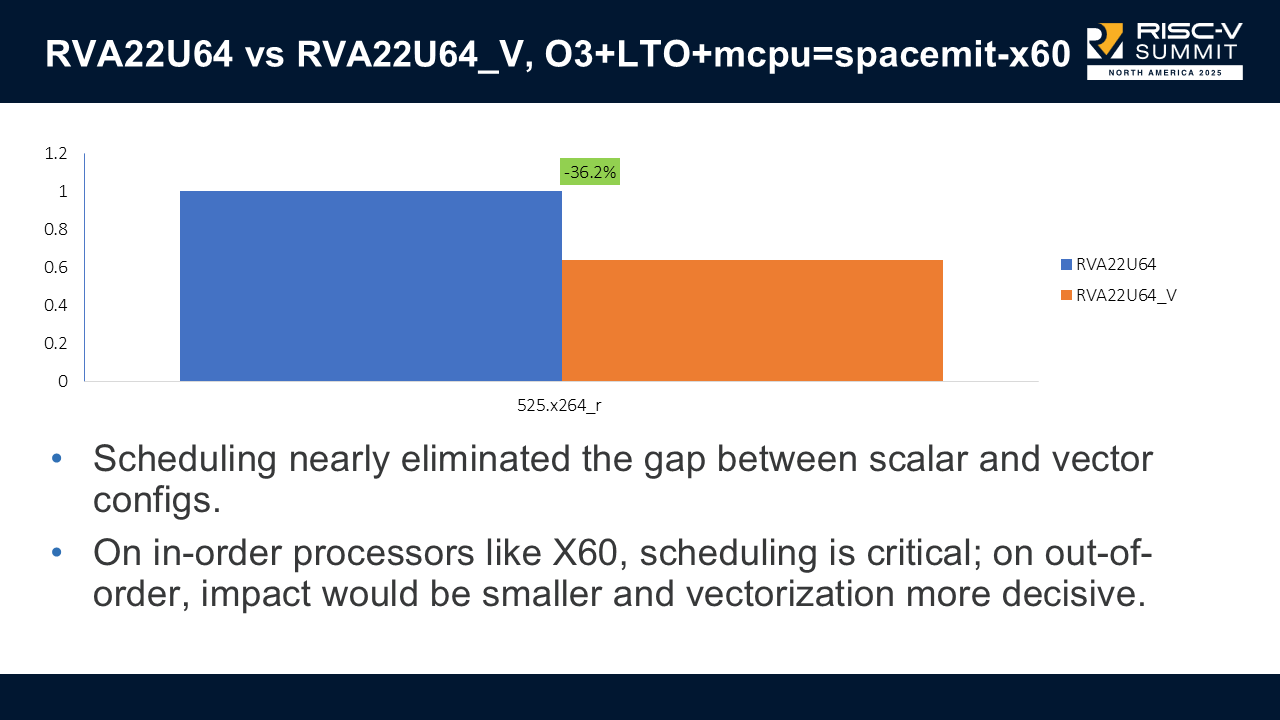
Comparison between RVA22U64 and RVA22U64_V execution time

One surprising result: scheduling nearly eliminated the gap between scalar and vector configurations on the x60; only one SPEC benchmark (x264) still favored the vectorized build.

We suspect this is because the X60 executes instructions in-order; an out-of-order processor should see a larger difference.

2. Improving Vectorization Across Calls #

During benchmarking, we found strange cases where scalar code was faster than vectorized code. The root cause: register spills, especially around function call boundaries.

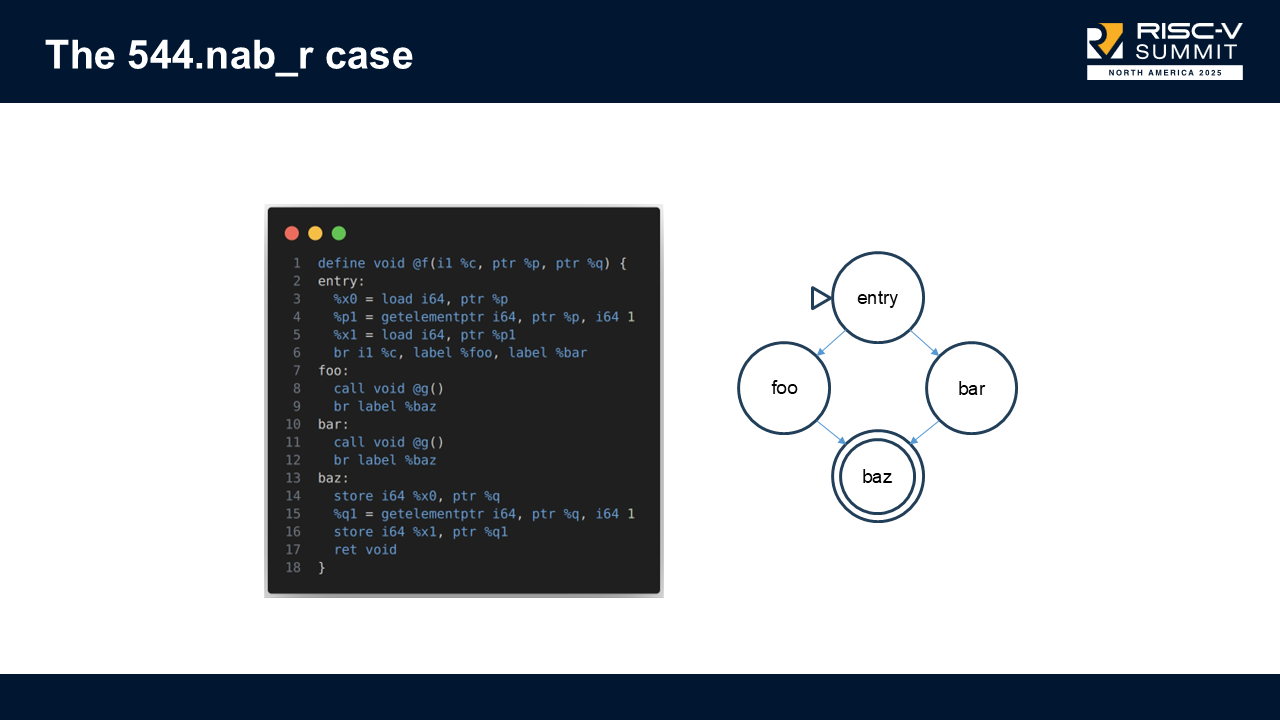
Example: 544.nab_r #

Reduced test from 544.nab_r that triggered the issue

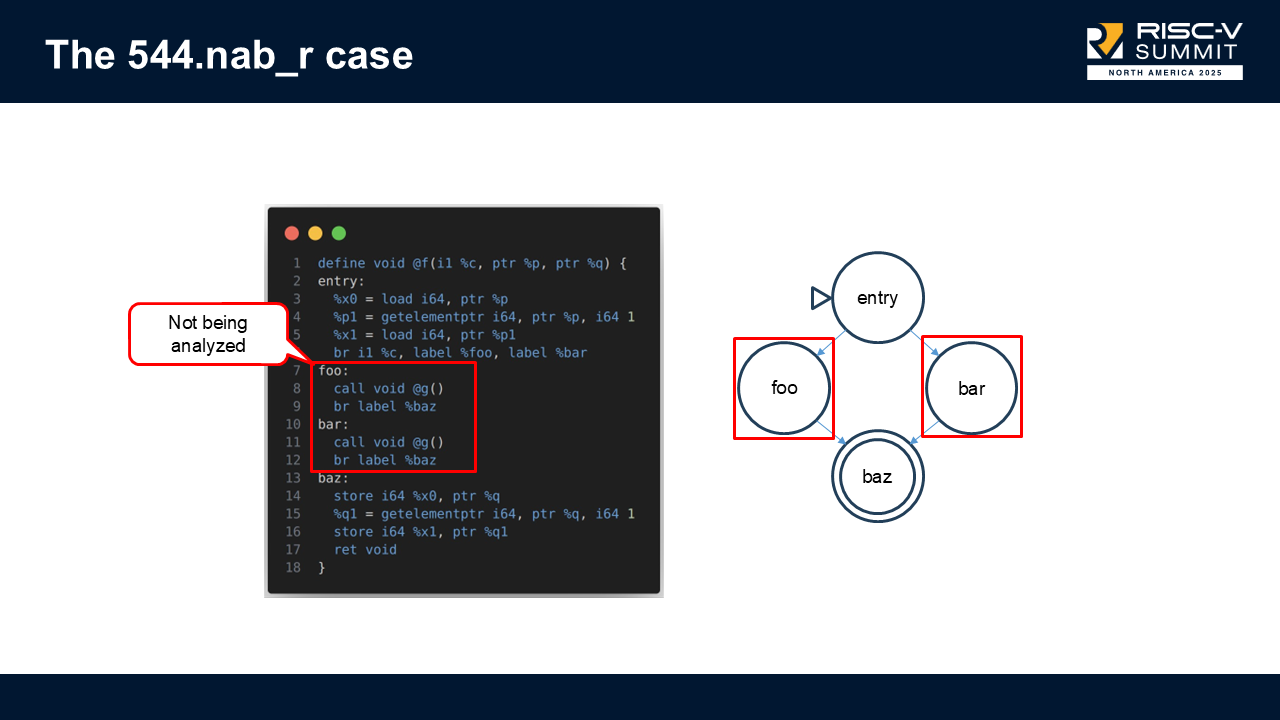
In this function, the SLP vectorizer would look only at the basic blocks performing loads/stores, and ignore the blocks containing function calls in-between blocks.

Previous image but showing which blocks were not being analysed

Because those call blocks weren't considered when computing profitability, the vectorizer assumed vectorization was cheap, but in reality, it caused expensive vector register spills.

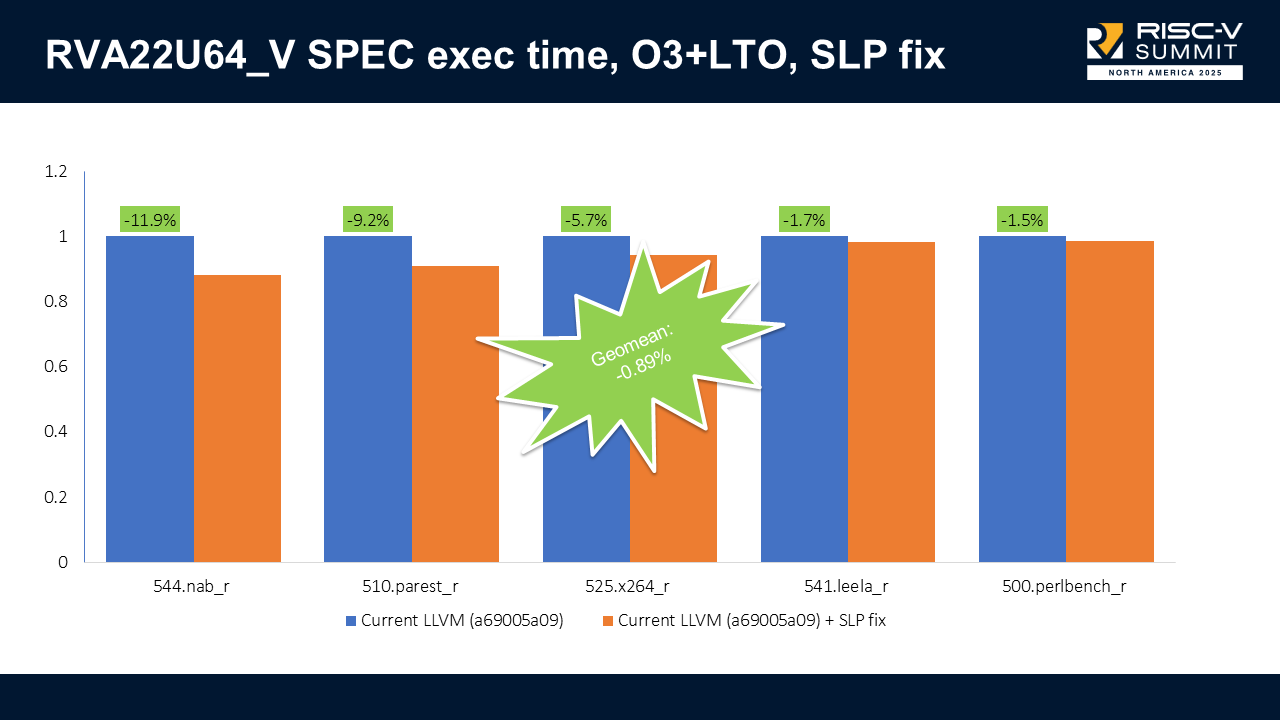
We modified SLP to walk all blocks in the region and estimate the cost properly. This helped: +9.9% faster on 544.nab_r, but hurt compilation time: +6.9% slower on 502.gcc_r. After discussion, Alexey Bataev (SLP vectorizer maintainer) created a refined version that fixed the issue and avoided compilation slowdowns. This shows how the open-source community is important and that collaboration can take us further.

RVA22U64_V SPEC execution time results

With the refined patch, we got up to 11.9% improvement (544.nab_r), no regressions, with negligible compile-time regressions. The combined results show a -3.28% geometric mean improvement on execution time.

Note that we only show results for RVA22U64_V, because the regression only happened when vectors were enabled. Now, the execution time is on par or better than the scalar-only execution time.

3. IPRA Support (Inter-Procedural Register Allocation) #

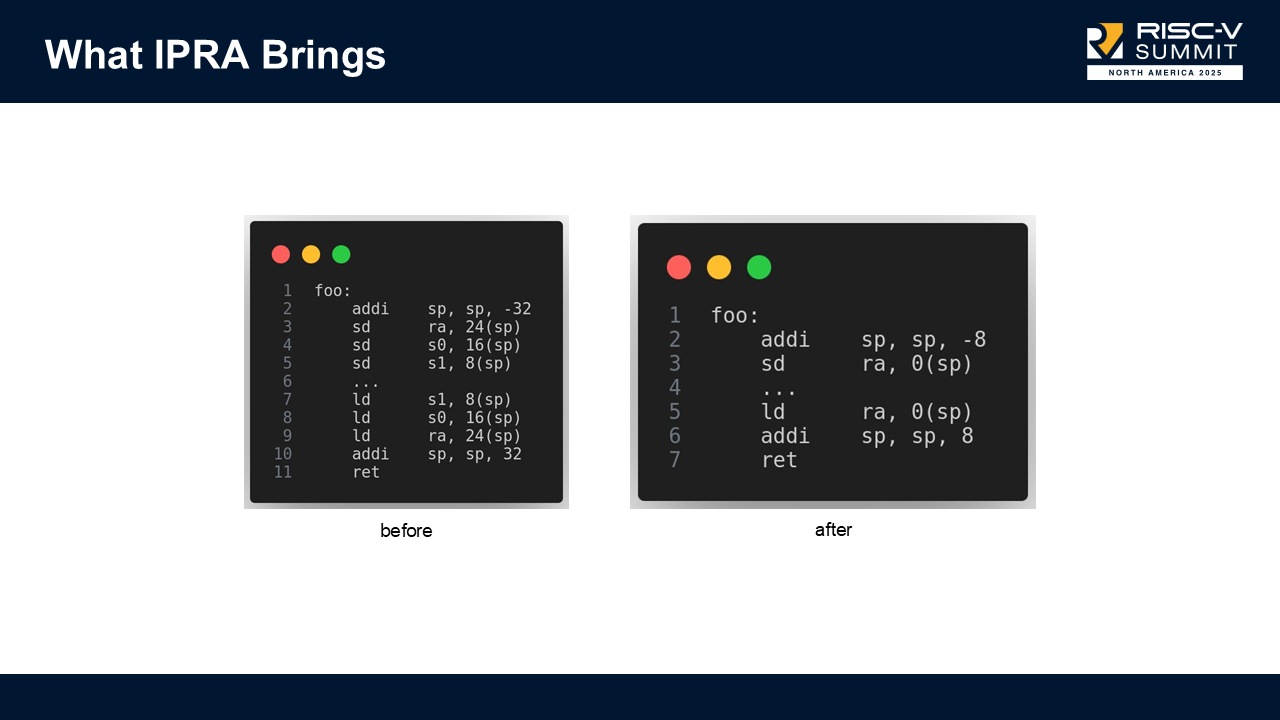
IPRA tracks which registers are actually used across call boundaries. Without it, LLVM spills registers conservatively, including registers that aren’t truly live.

IPRA illustrative example

Let's consider the illustrative example above, and assume s0 and s1 are not live in this function. LLVM will still save and restore these registers when IPRA is disabled. By enabling IPRA, we reduce register pressure and create shorter function prologues and epilogues.

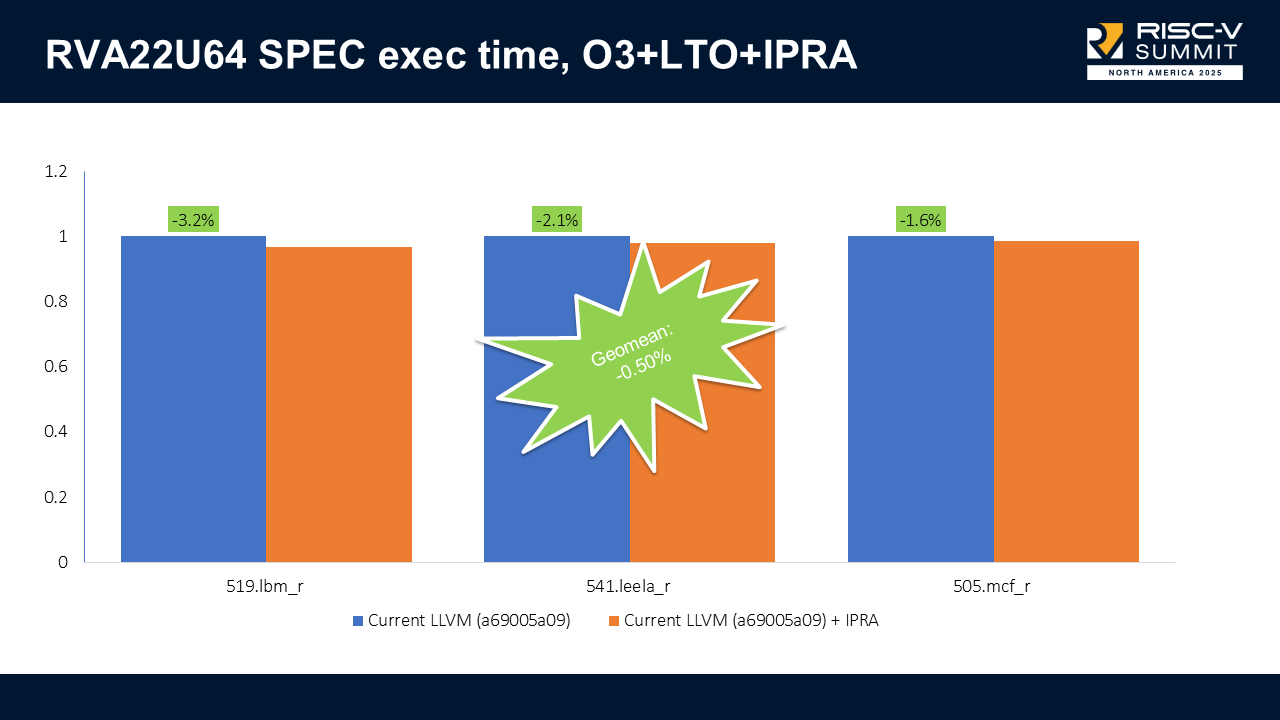
RVA22U64 SPEC execution time results

With IPRA enabled on RVA22U64, we got up to 3.2% execution time improvements (538.lbm_r) and no regressions. The combined results show a -0.50% geometric mean improvement on execution time.

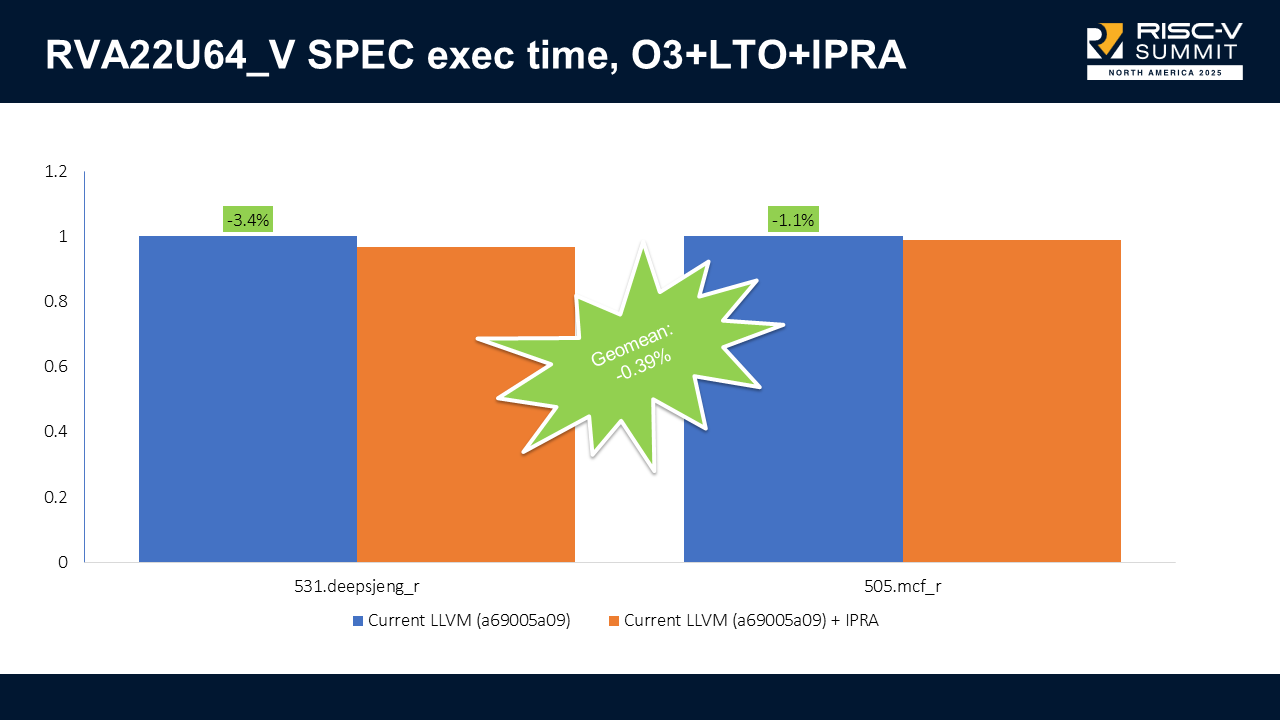
RVA22U64_V SPEC execution time results

When we enable vectors (RVA22U64_V), we got up to 3.4% improvement (508.deepsjeng_r) and no regressions. The combined results show a -0.39% geometric mean improvement on execution time.

Small but consistent wins; however, IPRA can’t be enabled by default due to an open bug, though it does not affect SPEC.

LLVM vs GCC #

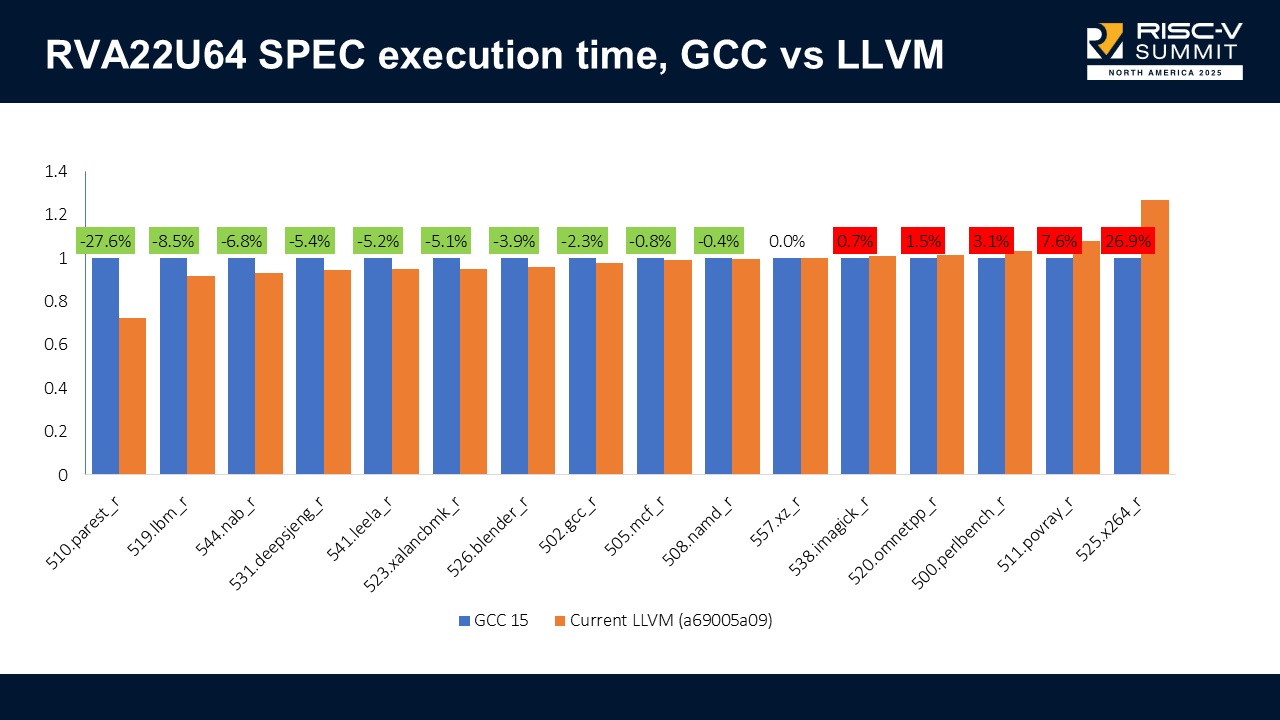
This comparison isn’t perfectly apples-to-apples because LLVM has X60-specific scheduling and GCC does not. Still, it's useful to see progress.

LLVM vs GCC on RVA22U64

On RVA22U64, LLVM can be 27% faster on some benchmarks but also 27% slower on others (notably x264).

RVA22U64_V SPEC execution time results

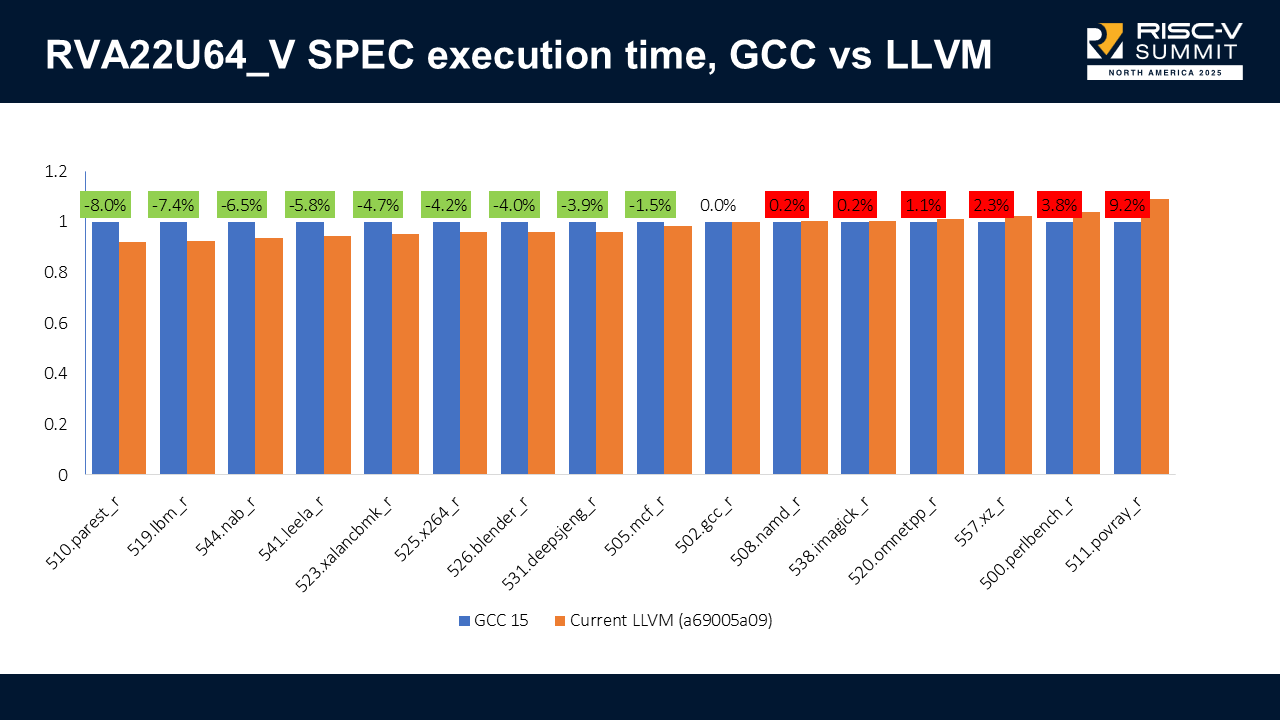
The results when we enable vectors (RVA22U64_V) are similar: LLVM can be 8% faster in some benchmarks but also 9.2% slower in others.

My colleague Luke Lau is currently investigating these results to try to address the cases where we are slower.

What we learned #

  1. Scheduling is absolutely essential on in-order cores: without it, LLVM pessimizes code.

  2. A default in-order scheduling model may be needed. Other backends do this already, and we have a PR open for that at PR#167008.

  3. Many contributions don’t show results until the entire system comes together. When the project started, I spent some time modeling individual instruction, but only when the full model was integrated did we see actual improvements.

  4. Vectorization must be tuned carefully; incorrect cost modeling leads to regressions.

Thank you #

Thank you slide

Thank you for reading!

November 22, 2025 12:00 AM

November 20, 2025

Víctor Jáquez

GStreamer Conference 2025

The GStreamer Conference is an annual gathering that brings together developers, contributors, and users of the GStreamer multimedia framework. It serves as a platform for sharing knowledge, discussing the latest advancements, and fostering collaboration within the open-source multimedia community.

This year’s conference was held in London at the impressive Barbican Center, located within the Barbican Estate, a residential complex rebuilt after World War II in the brutalist architectural style.

Barbican Estate
Barbican Estate in the London City

It was a pleasure to meet in person with the colleagues, from different companies and backgrounds, I usually collaborate with remotely, sharing and discussing their projects and results.

Recently, UbiCast, which generously records and streams the conference, has uploaded all talks of this year conference to their site, exclusively for the GStreamer Conference.

In this blog post, I’ll share the talks delivered by my fellow igalians:

Animate Your Subtimelines in GES #

Direct link

GstVA and GStreamer-VAAPI updates #

Direct link

Time Remapping and GES: Implementation Details and Latest Updates #

Direct link

soothe: a proposal for encoder testing #

Direct link

GstWebRTC in WebKit, current status & plans #

Direct link

VVC/H.266 in GStreamer #

Direct link

Video Reshaping with Skia #

Direct link

Vulkan Video: pipeline update #

Direct link

Following the GStreamer Conference, we hosted our Autumn hackfest at Amazon’s offices in the City of London. This time I worked on GStreamer Vulkan.

This year, two other conferences typically held in the US, FOMS and Demuxed, also took place in London. I attended FOMS, where I discovered the vibrant MOQ project.

Finally, I’d like to thank Centricular for organizing the event, especially Tim-Philipp Müller, and even more particularly Igalia for sponsoring it and allowing me to participate in this project that’s close to my heart.

And that’s all, mates. Cheers!

Pint of Guinness
Pint of Guinness

November 20, 2025 12:00 AM

November 17, 2025

Igalia WebKit Team

WebKit Igalia Periodical #47

Update on what happened in WebKit in the week from November 10 to November 17.

This week's update is composed of a new CStringView internal API, more MathML progress with the implementation of the "scriptlevel" attribute, the removal of the Flatpak-based SDK, and the maintanance update of WPEBackend-fdo.

Cross-Port 🐱

Implement the MathML scriptlevel attribute using math-depth.

Finished implementing CStringView, which is a wrapper around UTF8 C strings. It allows you to recover the string without making any copies and perform string operations safely by taking into account the encoding at compile time.

Releases 📦️

WPEBackend-fdo 1.16.1 has been released. This is a maintenance update which adds compatibility with newer Mesa versions.

Infrastructure 🏗️

Most of the Flatpak-based SDK was removed. Developers are warmly encouraged to use the new SDK for their contributions to the Linux ports, this SDK has been successfully deployed on EWS and post-commits bots.

That’s all for this week!

by Igalia WebKit Team at November 17, 2025 09:22 PM

November 13, 2025

Andy Wingo

the last couple years in v8's garbage collector

Let’s talk about memory management! Following up on my article about 5 years of developments in V8’s garbage collector, today I’d like to bring that up to date with what went down in V8’s GC over the last couple years.

methodololology

I selected all of the commits to src/heap since my previous roundup. There were 1600 of them, including reverts and relands. I read all of the commit logs, some of the changes, some of the linked bugs, and any design document I could get my hands on. From what I can tell, there have been about 4 FTE from Google over this period, and the commit rate is fairly constant. There are very occasional patches from Igalia, Cloudflare, Intel, and Red Hat, but it’s mostly a Google affair.

Then, by the very rigorous process of, um, just writing things down and thinking about it, I see three big stories for V8’s GC over this time, and I’m going to give them to you with some made-up numbers for how much of the effort was spent on them. Firstly, the effort to improve memory safety via the sandbox: this is around 20% of the time. Secondly, the Oilpan odyssey: maybe 40%. Third, preparation for multiple JavaScript and WebAssembly mutator threads: 20%. Then there are a number of lesser side quests: heuristics wrangling (10%!!!!), and a long list of miscellanea. Let’s take a deeper look at each of these in turn.

the sandbox

There was a nice blog post in June last year summarizing the sandbox effort: basically, the goal is to prevent user-controlled writes from corrupting memory outside the JavaScript heap. We start from the assumption that the user is somehow able to obtain a write-anywhere primitive, and we work to mitigate the effect of such writes. The most fundamental way is to reduce the range of addressable memory, notably by encoding pointers as 32-bit offsets and then ensuring that no host memory is within the addressable virtual memory that an attacker can write. The sandbox also uses some 40-bit offsets for references to larger objects, with similar guarantees. (Yes, a sandbox really does reserve a terabyte of virtual memory).

But there are many, many details. Access to external objects is intermediated via type-checked external pointer tables. Some objects that should never be directly referenced by user code go in a separate “trusted space”, which is outside the sandbox. Then you have read-only spaces, used to allocate data that might be shared between different isolates, you might want multiple cages, there are “shared” variants of the other spaces, for use in shared-memory multi-threading, executable code spaces with embedded object references, and so on and so on. Tweaking, elaborating, and maintaining all of these details has taken a lot of V8 GC developer time.

I think it has paid off, though, because the new development is that V8 has managed to turn on hardware memory protection for the sandbox: sandboxed code is prevented by the hardware from writing memory outside the sandbox.

Leaning into the “attacker can write anything in their address space” threat model has led to some funny patches. For example, sometimes code needs to check flags about the page that an object is on, as part of a write barrier. So some GC-managed metadata needs to be in the sandbox. However, the garbage collector itself, which is outside the sandbox, can’t trust that the metadata is valid. We end up having two copies of state in some cases: in the sandbox, for use by sandboxed code, and outside, for use by the collector.

The best and most amusing instance of this phenomenon is related to integers. Google’s style guide recommends signed integers by default, so you end up with on-heap data structures with int32_t len and such. But if an attacker overwrites a length with a negative number, there are a couple funny things that can happen. The first is a sign-extending conversion to size_t by run-time code, which can lead to sandbox escapes. The other is mistakenly concluding that an object is small, because its length is less than a limit, because it is unexpectedly negative. Good times!

oilpan

It took 10 years for Odysseus to get back from Troy, which is about as long as it has taken for conservative stack scanning to make it from Oilpan into V8 proper. Basically, Oilpan is garbage collection for C++ as used in Blink and Chromium. Sometimes it runs when the stack is empty; then it can be precise. But sometimes it runs when there might be references to GC-managed objects on the stack; in that case it runs conservatively.

Last time I described how V8 would like to add support for generational garbage collection to Oilpan, but that for that, you’d need a way to promote objects to the old generation that is compatible with the ambiguous references visited by conservative stack scanning. I thought V8 had a chance at success with their new mark-sweep nursery, but that seems to have turned out to be a lose relative to the copying nursery. They even tried sticky mark-bit generational collection, but it didn’t work out. Oh well; one good thing about Google is that they seem willing to try projects that have uncertain payoff, though I hope that the hackers involved came through their OKR reviews with their mental health intact.

Instead, V8 added support for pinning to the Scavenger copying nursery implementation. If a page has incoming ambiguous edges, it will be placed in a kind of quarantine area for a while. I am not sure what the difference is between a quarantined page, which logically belongs to the nursery, and a pinned page from the mark-compact old-space; they seem to require similar treatment. In any case, we seem to have settled into a design that was mostly the same as before, but in which any given page can opt out of evacuation-based collection.

What do we get out of all of this? Well, not only can we get generational collection for Oilpan, but also we unlock cheaper, less bug-prone “direct handles” in V8 itself.

The funny thing is that I don’t think any of this is shipping yet; or, if it is, it’s only in a Finch trial to a minority of users or something. I am looking forward in interest to seeing a post from upstream V8 folks; whole doctoral theses have been written on this topic, and it would be a delight to see some actual numbers.

shared-memory multi-threading

JavaScript implementations have had the luxury of a single-threadedness: with just one mutator, garbage collection is a lot simpler. But this is ending. I don’t know what the state of shared-memory multi-threading is in JS, but in WebAssembly it seems to be moving apace, and Wasm uses the JS GC. Maybe I am overstating the effort here—probably it doesn’t come to 20%—but wiring this up has been a whole thing.

I will mention just one patch here that I found to be funny. So with pointer compression, an object’s fields are mostly 32-bit words, with the exception of 64-bit doubles, so we can reduce the alignment on most objects to 4 bytes. V8 has had a bug open forever about alignment of double-holding objects that it mostly ignores via unaligned loads.

Thing is, if you have an object visible to multiple threads, and that object might have a 64-bit field, then the field should be 64-bit aligned to prevent tearing during atomic access, which usually means the object should be 64-bit aligned. That is now the case for Wasm structs and arrays in the shared space.

side quests

Right, we’ve covered what to me are the main stories of V8’s GC over the past couple years. But let me mention a few funny side quests that I saw.

the heuristics two-step

This one I find to be hilariousad. Tragicomical. Anyway I am amused. So any real GC has a bunch of heuristics: when to promote an object or a page, when to kick off incremental marking, how to use background threads, when to grow the heap, how to choose whether to make a minor or major collection, when to aggressively reduce memory, how much virtual address space can you reasonably reserve, what to do on hard out-of-memory situations, how to account for off-heap mallocated memory, how to compute whether concurrent marking is going to finish in time or if you need to pause... and V8 needs to do this all in all its many configurations, with pointer compression off or on, on desktop, high-end Android, low-end Android, iOS where everything is weird, something called Starboard which is apparently part of Cobalt which is apparently a whole new platform that Youtube uses to show videos on set-top boxes, on machines with different memory models and operating systems with different interfaces, and on and on and on. Simply tuning the system appears to involve a dose of science, a dose of flailing around and trying things, and a whole cauldron of witchcraft. There appears to be one person whose full-time job it is to implement and monitor metrics on V8 memory performance and implement appropriate tweaks. Good grief!

mutex mayhem

Toon Verwaest noticed that V8 was exhibiting many more context switches on MacOS than Safari, and identified V8’s use of platform mutexes as the problem. So he rewrote them to use os_unfair_lock on MacOS. Then implemented adaptive locking on all platforms. Then... removed it all and switched to abseil.

Personally, I am delighted to see this patch series, I wouldn’t have thought that there was juice to squeeze in V8’s use of locking. It gives me hope that I will find a place to do the same in one of my projects :)

ta-ta, third-party heap

It used to be that MMTk was trying to get a number of production language virtual machines to support abstract APIs so that MMTk could slot in a garbage collector implementation. Though this seems to work with OpenJDK, with V8 I think the churn rate and laser-like focus on the browser use-case makes an interstitial API abstraction a lose. V8 removed it a little more than a year ago.

fin

So what’s next? I don’t know; it’s been a while since I have been to Munich to drink from the source. That said, shared-memory multithreading and wasm effect handlers will extend the memory management hacker’s full employment act indefinitely, not to mention actually landing and shipping conservative stack scanning. There is a lot to be done in non-browser V8 environments, whether in Node or on the edge, but it is admittedly harder to read the future than the past.

In any case, it was fun taking this look back, and perhaps I will have the opportunity to do this again in a few years. Until then, happy hacking!

by Andy Wingo at November 13, 2025 03:21 PM

November 10, 2025

Igalia WebKit Team

WebKit Igalia Periodical #46

Update on what happened in WebKit in the week from November 3 to November 10.

This week brought a hodgepodge of fixes in Temporal and multimedia, a small addition to the public API in preparation for future work, plus advances in WebExtensions, WebXR, and Android support.

Cross-Port 🐱

The platform-independent part of the WebXR Hit Test Module has been implemented. The rest, including the FakeXRDevice mock implementation used for testing will be done later.

On the WebExtensions front, parts of the WebExtensionCallbackHandler code have been rewritten to use more C++ constructs and helper functions, in preparation to share more code among the different WebKit ports.
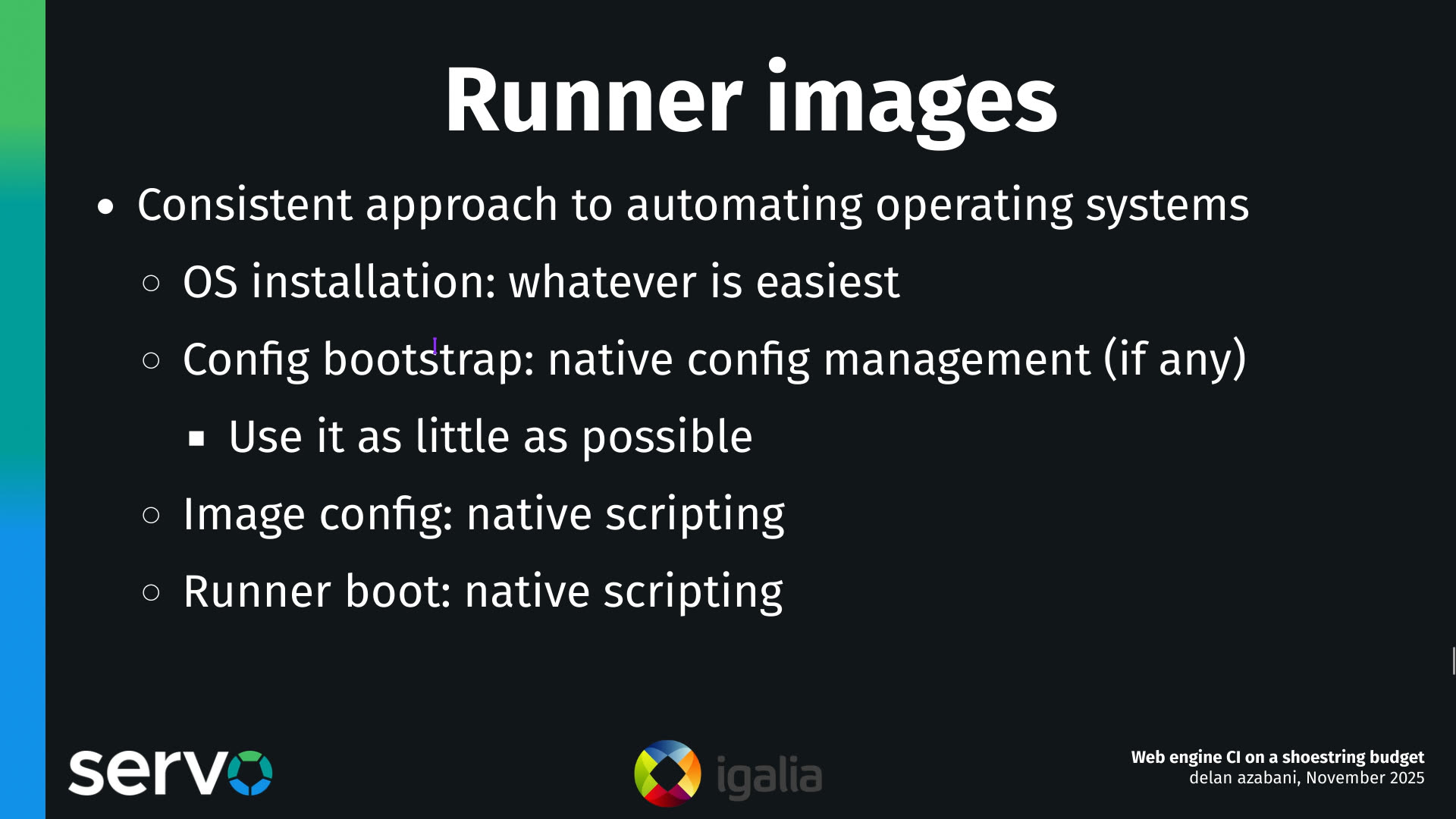
A new WebKitImage utility class landed this week. This image abstraction is one of the steps towards delivering a new improved API for page favicons, and it is also expected to be useful for the WebExtensions work, and to enable the webkit_web_view_get_snapshot() API for the WPE port.
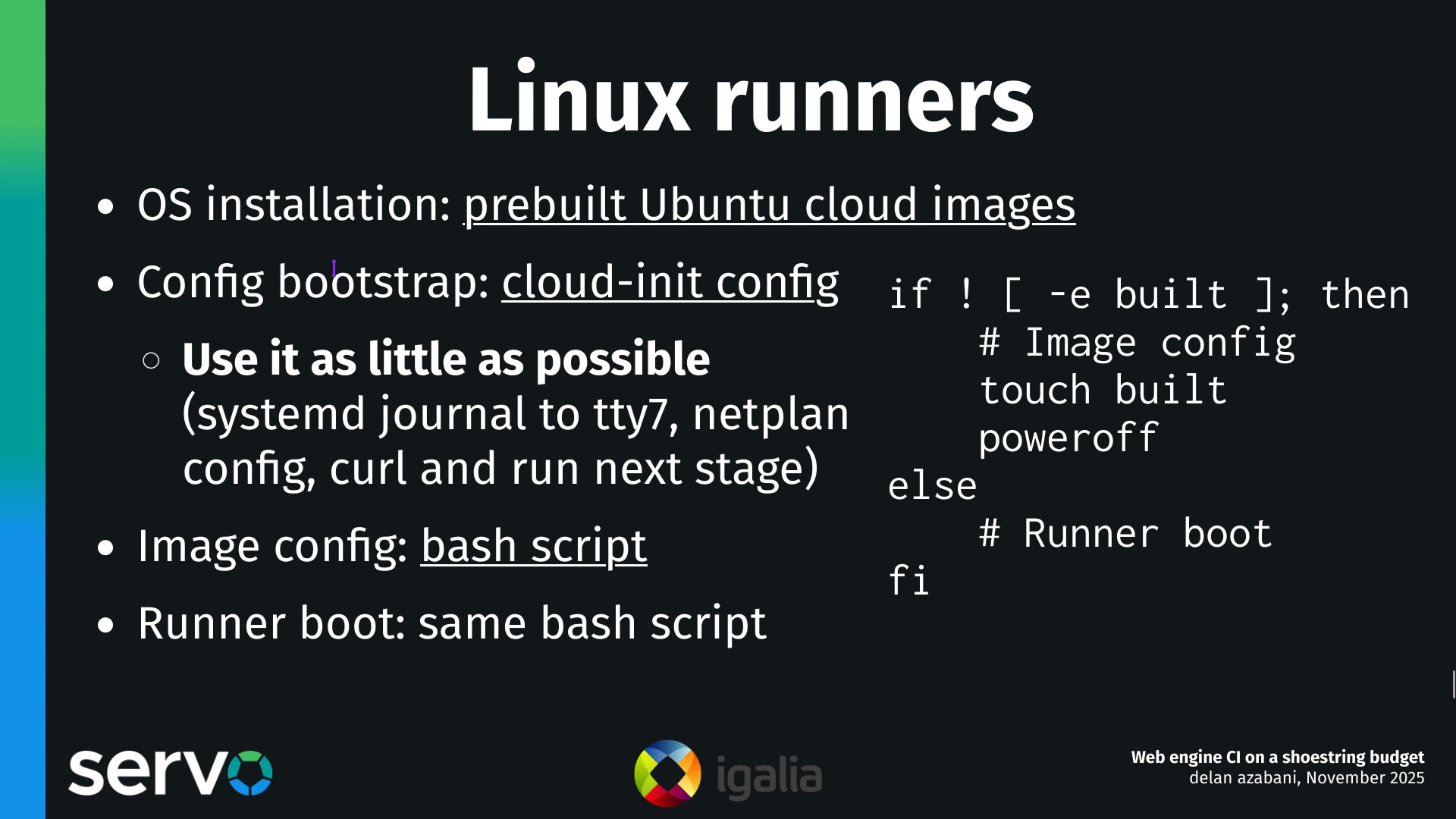
Multimedia 🎥

GStreamer-based multimedia support for WebKit, including (but not limited to) playback, capture, WebAudio, WebCodecs, and WebRTC.

Videos with BT2100-PQ colorspace are now tone-mapped to SDR in WebKit's compositor, ensuring colours do not appear washed out.

Lots of deadlock fixes this week, one among many in the MediaStream GStreamer source element.

Video frame rendering to WebGL was fixed. Another pending improvement is GPU-to-GPU texture copies, which might be coming soon.

JavaScriptCore 🐟

The built-in JavaScript/ECMAScript engine for WebKit, also known as JSC or SquirrelFish.

JavaScriptCore's implementation of Temporal received a number of improvements this week:

  • Fixed a bug that would cause wrong results when adding a duration with a very large microseconds or nanoseconds value to a PlainTime.

  • Fixed a rounding bug of Instant values.

  • Fixed a bug that resulted in incorrect printing of certain Instant values before the Epoch.

  • Fixed a bug that resulted in wrong results instead of exceptions when a date addition operation would result in an out-of-range date.

WPE WebKit 📟

WPE Android 🤖

Adaptation of WPE WebKit targeting the Android operating system.

One of the last pieces needed to have the WPEPlatform API working on Android has been merged: a custom platform EGL display implementation, and enabling the default display as fallback.

Community & Events 🤝

The dates for the next Web Engines Hackfest have been announced: it will take place from Monday, June 15th to Wednesday, June 17th. As it has been the case in the last years, it will be possible to attend both on-site, and remotely for those who cannot to travel to A Coruña.

The video recording for Adrian Pérez's “WPE Android 🤖 State of the Bot” talk from this year's edition of the WebKit Contributors' Meeting has been published. This was an update on what the Igalia WebKit team has been done during the last year to improve WPE WebKit on Android, and what is coming up next.

That’s all for this week!

by Igalia WebKit Team at November 10, 2025 11:04 PM

November 03, 2025

Melissa Wen

Kworkflow at Kernel Recipes 2025

Franks drawing of Melissa Wen with Kernel Recipes mascots around

This was the first year I attended Kernel Recipes and I have nothing but say how much I enjoyed it and how grateful I’m for the opportunity to talk more about kworkflow to very experienced kernel developers. What I mostly like about Kernel Recipes is its intimate format, with only one track and many moments to get closer to experts and people that you commonly talk online during your whole year.

In the beginning of this year, I gave the talk Don’t let your motivation go, save time with kworkflow at FOSDEM, introducing kworkflow to a more diversified audience, with different levels of involvement in the Linux kernel development.

At this year’s Kernel Recipes I presented the second talk of the first day: Kworkflow - mix & match kernel recipes end-to-end.

The Kernel Recipes audience is a bit different from FOSDEM, with mostly long-term kernel developers, so I decided to just go directly to the point. I showed kworkflow being part of the daily life of a typical kernel developer from the local setup to install a custom kernel in different target machines to the point of sending and applying patches to/from the mailing list. In short, I showed how to mix and match kernel workflow recipes end-to-end.

As I was a bit fast when showing some features during my presentation, in this blog post I explain each slide from my speaker notes. You can see a summary of this presentation in the Kernel Recipe Live Blog Day 1: morning.


Introduction

First slide: Kworkflow by Melissa Wen

Hi, I’m Melissa Wen from Igalia. As we already started sharing kernel recipes and even more is coming in the next three days, in this presentation I’ll talk about kworkflow: a cookbook to mix & match kernel recipes end-to-end.

Second slide: About Melissa Wen, the speaker of this talk

This is my first time attending Kernel Recipes, so lemme introduce myself briefly.

  • As I said, I work for Igalia, I work mostly on kernel GPU drivers in the DRM subsystem.
  • In the past, I co-maintained VKMS and the v3d driver. Nowadays I focus on the AMD display driver, mostly for the Steam Deck.
  • Besides code, I contribute to the Linux kernel by mentoring several newcomers in Outreachy, Google Summer of Code and Igalia Coding Experience. Also, by documenting and tooling the kernel.

Slide 3: and what's this cookbook called Kwokflow? - with kworkflow logo and KR penguin

And what’s this cookbook called kworkflow?

Kworkflow (kw)

Slide 4: text below

Kworkflow is a tool created by Rodrigo Siqueira, my colleague at Igalia. It’s a single platform that combines software and tools to:

  • optimize your kernel development workflow;
  • reduce time spent in repetitive tasks;
  • standardize best practices;
  • ensure that deployment data flows smoothly and reliably between different kernel workflows;

Slide 5: kworkflow is mostly a voluntary work

It’s mostly done by volunteers, kernel developers using their spare time. Its features cover real use cases according to kernel developer needs.

Slide 6: Mix & Match the daily life of a kernel developer

Basically it’s mixing and matching the daily life of a typical kernel developer with kernel workflow recipes with some secret sauces.

First recipe: A good GPU driver for my AMD laptop

Slide 7: Let's prepare our first recipe

So, it’s time to start the first recipe: A good GPU driver for my AMD laptop.

Slide 8: Ingredients and Tools

Before starting any recipe we need to check the necessary ingredients and tools. So, let’s check what you have at home.

With kworkflow, you can use:

Slide 9: kw device and kw remote

  • kw device: to get information about the target machine, such as: CPU model, kernel version, distribution, GPU model,

  • kw remote: to set the address of this machine for remote access

Slide 11: kw config

  • kw config: you can configure kw with kw config. With this command you can basically select the tools, flags and preferences that kw will use to build and deploy a custom kernel in a target machine. You can also define recipients of your patches when sending it using kw send-patch. I’ll explain more about each feature later in this presentation.

Slide 13: kw kernel-config-manager

  • kw kernel-config manager (or just kw k): to fetch the kernel .config file from a given machine, store multiple .config files, list and retrieve them according to your needs.

Slide 15: Preparation

Now, with all ingredients and tools selected and well portioned, follow the right steps to prepare your custom kernel!

First step: Mix ingredients with kw build or just kw b

Slide 16: kw build

  • kw b and its options wrap many routines of compiling a custom kernel.
    • You can run kw b -i to check the name and kernel version and the number of modules that will be compiled and kw b --menu to change kernel configurations.
    • You can also pre-configure compiling preferences in kw config regarding kernel building. For example, target architecture, the name of the generated kernel image, if you need to cross-compile this kernel for a different system and which tool to use for it, setting different warning levels, compiling with CFlags, etc.
    • Then you can just run kw b to compile the custom kernel for a target machine.

Second step: Bake it with kw deploy or just kw d

Slide 18: kw deploy

After compiling the custom kernel, we want to install it in the target machine. Check the name of the custom kernel built: 6.17.0-rc6 and with kw s SSH access the target machine and see it’s running the kernel from the Debian distribution 6.16.7+deb14-amd64.

As with building settings, you can also pre-configure some deployment settings, such as compression type, path to device tree binaries, target machine (remote, local, vm), if you want to reboot the target machine just after deploying your custom kernel, and if you want to boot in the custom kernel when restarting the system after deployment.

If you didn’t pre-configured some options, you can still customize as a command option, for example: kw d --reboot will reboot the system after deployment, even if I didn’t set this in my preference.

With just running kw d --reboot I have installed the kernel in a given target machine and rebooted it. So when accessing the system again I can see it was booted in my custom kernel.

Third step: Time to taste with kw debug

Slide 20: kw debug

  • kw debug wraps many tools for validating a kernel in a target machine. We can log basic dmesg info but also tracking events and ftrace.
    • With kw debug --dmesg --history we can grab the full dmesg log from a remote machine, if you use the --follow option, you will monitor dmesg outputs. You can also run a command with kw debug --dmesg --cmd="<my command>" and just collect the dmesg output related to this specific execution period.
    • In the example, I’ll just unload the amdgpu driver. I use kw drm --gui-off to drop the graphical interface and release the amdgpu for unloading it. So I run kw debug --dmesg --cmd="modprobe -r amdgpu" to unload the amdgpu driver, but it fails and I couldn’t unload it.

Cooking Problems

Slide 22: kw patch-hub

Oh no! That custom kernel isn’t tasting good. Don’t worry, as in many recipes preparations, we can search on the internet to find suggestions on how to make it tasteful, alternative ingredients and other flavours according to your taste.

With kw patch-hub you can search on the lore kernel mailing list for possible patches that can fix your kernel issue. You can navigate in the mailing lists, check series, bookmark it if you find it relevant and apply it in your local kernel tree, creating a different branch for tasting… oops, for testing. In this example, I’m opening the amd-gfx mailing list where I can find contributions related to the AMD GPU driver, bookmark and/or just apply the series to my work tree and with kw bd I can compile & install the custom kernel with this possible bug fix in one shot.

As I changed my kw config to reboot after deployment, I just need to wait for the system to boot to try again unloading the amdgpu driver with kw debug --dmesg --cm=modprobe -r amdgpu. From the dmesg output retrieved by kw for this command, the driver was unloaded, the problem is fixed by this series and the kernel tastes good now.

If I’m satisfied with the solution, I can even use kw patch-hub to access the bookmarked series and marking the checkbox that will reply the patch thread with a Reviewed-by tag for me.

Second Recipe: Raspberry Pi 4 with Upstream Kernel

Slide 25: Second Recipe RPi 4 with upstream kernel

As in all recipes, we need ingredients and tools, but with kworkflow you can get everything set as when changing scenarios in a TV show. We can use kw env to change to a different environment with all kw and kernel configuration set and also with the latest compiled kernel cached.

I was preparing the first recipe for a x86 AMD laptop and with kw env --use RPI_64 I use the same worktree but moved to a different kernel workflow, now for Raspberry Pi 4 64 bits. The previous compiled kernel 6.17.0-rc6-mainline+ is there with 1266 modules, not the 6.17.0-rc6 kernel with 285 modules that I just built&deployed. kw build settings are also different, now I’m targeting a arm64 architecture with a cross-compiled kernel using aarch64-linu-gnu- cross-compilation tool and my kernel image calls kernel8 now.

Slide 27: kw env

If you didn’t plan for this recipe in advance, don’t worry. You can create a new environment with kw env --create RPI_64_V2 and run kw init --template to start preparing your kernel recipe with the mirepoix ready.

I mean, with the basic ingredients already cut…

I mean, with the kw configuration set from a template.

And you can use kw remote to set the IP address of your target machine and kw kernel-config-manager to fetch/retrieve the .config file from your target machine. So just run kw bd to compile and install a upstream kernel for Raspberry Pi 4.

Third Recipe: The Mainline Kernel Ringing on my Steam Deck (Live Demo)

Slide 30: Third Recipe - The Mainline Kernel Ringing on my Steam Deck

Let’s show you how easy is to build, install and test a custom kernel for Steam Deck with Kworkflow. It’s a live demo, but I also recorded it because I know the risks I’m exposed to and something can go very wrong just because of reasons :)

Report: how was the live demo

For this live demo, I took my OLED Steam Deck to the stage. I explained that, if I boot mainline kernel on this device, there is no audio. So I turned it on and booted the mainline kernel I’ve installed beforehand. It was clear that there was no typical Steam Deck startup audio when the system was loaded.

Franks drawing of Melissa Wen doing a demo of kworkflow with the Steam Deck

As I started the demo in the kw environment for Raspberry Pi 4, I first moved to another environment previously used for Steam Deck. In this STEAMDECK environment, the mainline kernel was already compiled and cached, and all settings for accessing the target machine, compiling and installing a custom kernel were retrieved automatically.

My live demo followed these steps:

  1. With kw env --use STEAMDECK, switch to a kworkflow environment for Steam Deck kernel development.

  2. With kw b -i, shows that kw will compile and install a kernel with 285 modules named 6.17.0-rc6-mainline-for-deck.

  3. Run kw config to show that, in this environment, kw configuration changes to x86 architecture and without cross-compilation.

  4. Run kw device to display information about the Steam Deck device, i.e. the target machine. It also proves that the remote access - user and IP - for this Steam Deck was already configured when using the STEAMDECK environment, as expected.

  5. Using git am, as usual, apply a hot fix on top of the mainline kernel. This hot fix makes the audio play again on Steam Deck.

  6. With kw b, build the kernel with the audio change. It will be fast because we are only compiling the affected files since everything was previously done and cached. Compiled kernel, kw configuration and kernel configuration is retrieved by just moving to the “STEAMDECK” environment.

  7. Run kw d --force --reboot to deploy the new custom kernel to the target machine. The --force option enables us to install the mainline kernel even if mkinitcpio complains about missing support for downstream packages when generating initramfs. The --reboot option makes the device reboot the Steam Deck automatically, just after the deployment completion.

  8. After finishing deployment, the Steam Deck will reboot on the new custom kernel version and made a clear resonant or vibrating sound. [Hopefully]

Finally, I showed to the audience that, if I wanted to send this patch upstream, I just needed to run kw send-patch and kw would automatically add subsystem maintainers, reviewers and mailing lists for the affected files as recipients, and send the patch to the upstream community assessment. As I didn’t want to create unnecessary noise, I just did a dry-run with kw send-patch -s --simulate to explain how it looks.

What else can kworkflow already mix & match?

In this presentation, I showed that kworkflow supported different kernel development workflows, i.e., multiple distributions, different bootloaders and architectures, different target machines, different debugging tools and automatize your kernel development routines best practices, from development environment setup and verifying a custom kernel in bare-metal to sending contributions upstream following the contributions-by-e-mail structure. I exemplified it with three different target machines: my ordinary x86 AMD laptop with Debian, Raspberry Pi 4 with arm64 Raspbian (cross-compilation) and the Steam Deck with SteamOS (x86 Arch-based OS). Besides those distributions, Kworkflow also supports Ubuntu, Fedora and PopOS.

Now it’s your turn: Do you have any secret recipes to share? Please share with us via kworkflow.


November 03, 2025 09:30 PM

Igalia WebKit Team

WebKit Igalia Periodical #45

Update on what happened in WebKit in the week from October 27 to November 3.

A calmer week this time! This week we have the GTK and WPE ports implementing the RunLoopObserver infrastructure, which enables more sophisticated scheduling in WebKit Linux ports, as well as more information in webkit://gpu. On the Trusted Types front, the timing of check was changed to align with spec changes.

Cross-Port 🐱

Implemented the RunLoopObserver infrastructure for GTK and WPE ports, a critical piece of technology previously exclusive to Apple ports that enables sophisticated scheduling features like OpportunisticTaskScheduler for optimal garbage collection timing.

The implementation refactored the GLib run loop to notify clients about activity-state transitions (BeforeWaiting, Entry, Exit, AfterWaiting), then moved from timer-based to observer-based layer flushing for more precise control over rendering updates. Finally support was added to support cross-thread scheduling of RunLoopObservers, allowing the ThreadedCompositor to use them, enabling deterministic composition notifications across thread boundaries.

Changed timing of Trusted Types checks within DOM attribute handling to align with spec changes.

Graphics 🖼️

The webkit://gpu page now shows more information like the list of preferred buffer formats, the list of supported buffer formats, threaded rendering information, number of MSAA samples, view size, and toplevel state.

It is also now possible to make the page autorefresh every the given amount of seconds by passing a ?refresh=<seconds> parameter in the URL.

That’s all for this week!

by Igalia WebKit Team at November 03, 2025 07:16 PM

October 30, 2025

Andy Wingo

wastrel, a profligate implementation of webassembly

Hey hey hey good evening! Tonight a quick note on wastrel, a new WebAssembly implementation.

a wasm-to-native compiler that goes through c

Wastrel compiles Wasm modules to standalone binaries. It does so by emitting C and then compiling that C.

Compiling Wasm to C isn’t new: Ben Smith wrote wasm2c back in the day and these days most people in this space use Bastien Müller‘s w2c2. These are great projects!

Wastrel has two or three minor differences from these projects. Let’s lead with the most important one, despite the fact that it’s as yet vaporware: Wastrel aims to support automatic memory managment via WasmGC, by embedding the Whippet garbage collection library. (For the wingolog faithful, you can think of Wastrel as a Whiffle for Wasm.) This is the whole point! But let’s come back to it.

The other differences are minor. Firstly, the CLI is more like wasmtime: instead of privileging the production of C, which you then incorporate into your project, Wastrel also compiles the C (by default), and even runs it, like wasmtime run.

Unlike wasm2c (but like w2c2), Wastrel implements WASI. Specifically, WASI 0.1, sometimes known as “WASI preview 1”. It’s nice to be able to take the wasi-sdk‘s C compiler, compile your program to a binary that uses WASI imports, and then run it directly.

In a past life, I once took a week-long sailing course on a 12-meter yacht. One thing that comes back to me often is the way the instructor would insist on taking in the bumpers immediately as we left port, that to sail with them was no muy marinero, not very seamanlike. Well one thing about Wastrel is that it emits nice C: nice in the sense that it avoids many useless temporaries. It does so with a lightweight effects analysis, in which as temporaries are produced, they record which bits of the world they depend on, in a coarse way: one bit for the contents of all global state (memories, tables, globals), and one bit for each local. When compiling an operation that writes to state, we flush all temporaries that read from that state (but only that state). It’s a small thing, and I am sure it has very little or zero impact after SROA turns locals into SSA values, but we are vessels of the divine, and it is important for vessels to be C worthy.

Finally, w2c2 at least is built in such a way that you can instantiate a module multiple times. Wastrel doesn’t do that: the Wasm instance is statically allocated, once. It’s a restriction, but that’s the use case I’m going for.

on performance

Oh buddy, who knows?!? What is real anyway? I would love to have proper perf tests, but in the meantime, I compiled coremark using my GCC on x86-64 (-02, no other options), then also compiled it with the current wasi-sdk and then ran with w2c2, wastrel, and wasmtime. I am well aware of the many pitfalls of benchmarking, and so I should not say anything because it is irresponsible to make conclusions from useless microbenchmarks. However, we’re all friends here, and I am a dude with hubris who also believes blogs are better out than in, and so I will give some small indications. Please obtain your own salt.

So on coremark, Wastrel is some 2-5% percent slower than native, and w2c2 is some 2-5% slower than that. Wasmtime is 30-40% slower than GCC. Voilà.

My conclusion is, Wastrel provides state-of-the-art performance. Like w2c2. It’s no wonder, these are simple translators that use industrial compilers underneath. But it’s neat to see that performance is close to native.

on wasi

OK this is going to sound incredibly arrogant but here it is: writing Wastrel was easy. I have worked on Wasm for a while, and on Firefox’s baseline compiler, and Wastrel is kinda like a baseline compiler in shape: it just has to avoid emitting boneheaded code, and can leave the serious work to someone else (Ion in the case of Firefox, GCC in the case of Wastrel). I just had to use the Wasm libraries I already had and make it emit some C for each instruction. It took 2 days.

WASI, though, took two and a half weeks of agony. Three reasons: One, you can be sloppy when implementing just wasm, but when you do WASI you have to implement an ABI using sticks and glue, but you have no glue, it’s all just i32. Truly excruciating, it makes you doubt everything, and I had to refactor Wastrel to use C’s meager type system to the max. (Basically, structs-as-values to avoid type confusion, but via inline functions to avoid overhead.)

Two, WASI is not huge but not tiny either. Implementing poll_oneoff is annoying. And so on. Wastrel’s WASI implementation is thin but it’s still a couple thousand lines of code.

Three, WASI is underspecified, and in practice what is “conforming” is a function of what the Rust and C toolchains produce. I used wasi-testsuite to burn down most of the issues, but it was a slog. I neglected email and important things but now things pass so it was worth it maybe? Maybe?

on wasi’s filesystem sandboxing

WASI preview 1 has this “rights” interface that associated capabilities with file descriptors. I think it was an attempt at replacing and expanding file permissions with a capabilities-oriented security approach to sandboxing, but it was only a veneer. In practice most WASI implementations effectively implement the sandbox via a permissions layer: for example the process has capabilities to access the parents of preopened directories via .., but the WASI implementation has to actively prevent this capability from leaking to the compiled module via run-time checks.

Wastrel takes a different approach, which is to use Linux’s filesystem namespaces to build a tree in which only the exposed files are accessible. No run-time checks are necessary; the system is secure by construction. He says. It’s very hard to be categorical in this domain but a true capabilities-based approach is the only way I can have any confidence in the results, and that’s what I did.

The upshot is that Wastrel is only for Linux. And honestly, if you are on MacOS or Windows, what are you doing with your life? I get that it’s important to meet users where they are but it’s just gross to build on a corporate-controlled platform.

The current versions of WASI keep a vestigial capabilities-based API, but given that the goal is to compile POSIX programs, I would prefer if wasi-filesystem leaned into the approach of WASI just having access to a filesystem instead of a small set of descriptors plus scoped openat, linkat, and so on APIs. The security properties would be the same, except with fewer bug possibilities and with a more conventional interface.

on wtf

So Wastrel is Wasm to native via C, but with an as-yet-unbuilt GC aim. Why?

This is hard to explain and I am still workshopping it.

Firstly I am annoyed at the WASI working group’s focus on shared-nothing architectures as a principle of composition. Yes, it works, but garbage collection also works; we could be building different, simpler systems if we leaned in to a more capable virtual machine. Many of the problems that WASI is currently addressing are ownership-related, and would be comprehensively avoided with automatic memory management. Nobody is really pushing for GC in this space and I would like for people to be able to build out counterfactuals to the shared-nothing orthodoxy.

Secondly there are quite a number of languages that are targetting WasmGC these days, and it would be nice for them to have a good run-time outside the browser. I know that Wasmtime is working on GC, but it needs competition :)

Finally, and selfishly, I have a GC library! I would love to spend more time on it. One way that can happen is for it to prove itself useful, and maybe a Wasm implementation is a way to do that. Could Wastrel on wasm_of_ocaml output beat ocamlopt? I don’t know but it would be worth it to find out! And I would love to get Guile programs compiled to native, and perhaps with Hoot and Whippet and Wastrel that is a possibility.

Welp, there we go, blog out, dude to bed. Hack at y’all later and wonderful wasming to you all!

by Andy Wingo at October 30, 2025 10:19 PM

October 29, 2025

Eric Meyer

Custom Asidenotes

Previously on meyerweb, I crawled through a way to turn parenthetical comments into sidenotes, which I called “asidenotes”.  As a recap, these are inline asides in parentheses, which is something I like to do.  The constraints are that the text has to start inline, with its enclosing parentheses as part of the static content, so that the parentheses are present if CSS isn’t applied, but should lose those parentheses when turned into asidenotes, while also adding a sentence-terminating period when needed.

At the end of that post, I said I wouldn’t use the technique I developed, because the markup was too cluttered and unwieldy, and there were failure states that CSS alone couldn’t handle.  So what can we do instead?  Extend HTML to do things automatically!

If you’ve read my old post “Blinded By the DOM Light”, you can probably guess how this will go.  Basically, we can write a little bit of JavaScript to take an invented element and Do Things To It™.  What things?  Anything JavaScript makes possible.

So first, we need an element, one with a hyphen in the middle of its name (because all custom elements require an interior hyphen, similar to how all custom properties and most custom identifiers in CSS require two leading dashes).  Something like:

<aside-note>(actual text content)</aside-note>

Okay, great!  Thanks to HTML’s permissive handling of unrecognized elements, this completely new element will be essentially treated like a <span> in older browsers.  In newer browsers, we can massage it.

class asideNote extends HTMLElement {
	connectedCallback() {
		let marker = document.createElement('sup');
		marker.classList.add('asidenote-marker');
		this.after(marker);
	}
}
customElements.define("aside-note",asideNote);

With this in place, whenever a supporting browser encounters an <aside-note> element, it will run the JS above.  Right now, what that does is insert a <sup> element just after the <aside-note>.

“Whoa, wait a minute”, I thought to myself at this point. “There will be browsers (mostly older browser versions) that understand custom elements, but don’t support anchor positioning.  I should only run this JS if the browser can position with anchors, because I don’t want to needlessly clutter the DOM.  I need an @supports query, except in JS!” And wouldn’t you know it, such things do exist.

class asideNote extends HTMLElement {
	connectedCallback() {
		if (CSS.supports('bottom','anchor(top)')) {
			let marker = document.createElement('sup');
			marker.classList.add('asidenote-marker');
			this.after(marker);
		}
	}
}

That will yield the following DOM structure:

<aside-note>(and brower versions)</aside-note><sup></sup>

That’s all we need to generate some markers and do some positioning, as was done in my previous post.  To wit:

@supports (anchor-name: --main) {
	#thoughts {
		anchor-name: --main;
	}
	#thoughts article {
		counter-reset: asidenotes;
	}
	#thoughts article sup {
		font-size: 89%;
		line-height: 0.5;
		color: inherit;
		text-decoration: none;
	}
	#thoughts article aside-note::after,
	#thoughts article aside-note + sup::before {
		content: counter(asidenotes);
	}
	#thoughts article aside-note {
		counter-increment: asidenotes;
		position: absolute;
		anchor-name: --asidenote;
		top: max(anchor(top), calc(anchor(--asidenote bottom, 0px) + 0.67em));
		bottom: auto;
		left: calc(anchor(--main right) + 4em);
		max-width: 23em;
		margin-block: 0.15em 0;
		text-wrap: balance;
		text-indent: 0;
		font-size: 89%;
		line-height: 1.25;
		list-style: none;
	}
	#thoughts article aside-note::before {
		content: counter(asidenotes);
		position: absolute;
		top: -0.4em;
		right: calc(100% + 0.25em);
	}
	#thoughts article aside-note::first-letter {
		text-transform: uppercase;
	}
}

I went through a lot of that CSS in the previous post, so jump over there to get details on what all that means if the above has you agog.  I did add a few bits of text styling like an explicit line height and slight size reduction, and changed all the asidenote classes there to aside-note elements here, but nothing is different with the positioning and such.

Let’s go back to the JavaScript, where we can strip off the leading and trailing parentheses with relative ease.

class asideNote extends HTMLElement {
	connectedCallback() {
		if (CSS.supports('bottom','anchor(top)')) {
			let marker = document.createElement('sup');
			marker.classList.add('asidenote-marker');
			this.after(marker);
			let inner = this.innerText;
			if (inner.slice(0,1) == '(' && inner.slice(-1) == ')') {
				inner = inner.slice(1,inner.length-1);}
			this.innerText = inner;
		}
	}
}

This code looks at the innerText of the asidenote, checks to see if it both begins and ends with parentheses (which all asidenotes should!), and then if so, it strips them out of the text and sets the <aside-note>’s innerText to be that stripped string.  I decided to set it up so that the stripping only happens if there are balanced parentheses because if there aren’t, I’ll see that in the post preview and fix it before publishing.

I still haven’t added the full stop at the end of the asidenotes, nor have I accounted for asidenotes that end in punctuation, so let’s add in a little bit more code to check for and do that:

class asideNote extends HTMLElement {
	connectedCallback() {
		if (CSS.supports('bottom','anchor(top)')) {
			let marker = document.createElement('sup');
			marker.classList.add('asidenote-marker');
			this.after(marker);
			let inner = this.innerText;
			if (inner.slice(0,1) == '(' && inner.slice(-1) == ')') {
				inner = inner.slice(1,inner.length-1);}
			if (!isLastCharSpecial(inner)) {
				inner += '.';}
			this.innerText = inner;
		}
	}
}
function isLastCharSpecial(str) {
	const punctuationRegex = /[!/?/‽/.\\]/;
	return punctuationRegex.test(str.slice(-1));
}

And with that, there is really only one more point of concern: what will happen to my asidenotes in mobile contexts?  Probably be positioned just offscreen, creating a horizontal scrollbar or just cutting off the content completely.  Thus, I don’t just need a supports query in my JS.  I also need a media query.  It’s a good thing those also exist!

class asideNote extends HTMLElement {
	connectedCallback() {
		if (CSS.supports('bottom','anchor(top)') &&
			window.matchMedia('(width >= 65em)').matches) {
			let marker = document.createElement('sup');
			marker.classList.add('asidenote-marker');
			this.after(marker);

Adding that window.matchMedia to the if statement’s test means all the DOM and content massaging will be done only if the browser understands anchor positioning and the window width is above 65 ems, which is my site’s first mobile media breakpoint that would cause real layout problems.  Otherwise, it will leave the asidenote content embedded and fully parenthetical.  Your breakpoint will very likely differ, but the principle still holds.

The one thing about this JS is that the media query only happens when the custom element is set up, same as the support query.  There are ways to watch for changes to the media environment due to things like window resizes, but I’m not going to use them here.  I probably should, but I’m still not going to.

So: will I use this version of asidenotes on meyerweb?  I might, Rabbit, I might.  I mean, I’m already using them in this post, so it seems like I should just add the JS to my blog templates and the CSS to my stylesheets so I can keep doing this sort of thing going forward.  Any objections?  Let’s hear ’em!

@supports (anchor-name: --main) { @media (width >= 65em) { #thoughts { anchor-name: --main; } #thoughts article { counter-reset: asidenotes; } #thoughts article aside-note::before, #thoughts article aside-note + sup::before { content: counter(asidenotes); } #thoughts article aside-note { counter-increment: asidenotes; position: absolute; anchor-name: --sidenote; top: max(calc(anchor(--sidenote bottom, 0px) + 0.67em), anchor(top)); bottom: auto; left: calc(anchor(--main right) + 4em); max-width: 23em; text-wrap: balance; margin-block: 0.15em 0; text-indent: 0; font-size: 89%; line-height: 1.25; list-style: none; } #thoughts article aside-note::before { position: absolute; top: -0.4em; right: calc(100% + 0.25em); } #thoughts article aside-note::first-letter { text-transform: uppercase; } #thoughts article sup { font-size: 89%; line-height: 0.5; color: inherit; text-decoration: none; } } }

Have something to say to all that? You can add a comment to the post, or email Eric directly.

by Eric Meyer at October 29, 2025 01:19 PM

October 28, 2025

Igalia WebKit Team

WebKit Igalia Periodical #44

Update on what happened in WebKit in the week from October 21 to October 28.

This week has again seen a spike in activity related to WebXR and graphics performance improvements. Additionally, we got in some MathML additions, a fix for hue interpolation, a fix for WebDriver screenshots, development releases, and a blog post about memory profiling.

Cross-Port 🐱

Support for WebXR Layers has seen the very first changes needed to have them working on WebKit. This is expected to take time to complete, but should bring improvements in performance, rendering quality, latency, and power consumption down the road.

Work has started on the WebXR Hit Test Module, which will allow WebXR experiences to check for real world surfaces. The JavaScript API bindings were added, followed by an initial XRRay implementation. More work is needed to actually provide data from device sensors.

Now that the WebXR implementation used for the GTK and WPE ports is closer to the Cocoa ones, it was possible to unify the code used to handle opaque buffers.

Implemented the text-transform: math-auto CSS property, which replaces the legacy mathvariant system and is used to make identifiers italic in MathML Core.

Implemented the math-depth CSS extension from MathML Core.

Graphics 🖼️

The hue interpolation method for gradients has been fixed. This is expected to be part of the upcoming 2.50.2 stable release.

Usage of Multi-Sample Antialiasing (MSAA) has been enabled when using GPU rendering, and then further changed to use dynamic MSAA to improve performance.

Paths that contain a single arc, oval, or line have been changed to use a specialized code path, resulting in improved performance.

WebGL content rendering will be handled by a new isolated process (dubbed “GPU Process”) by default. This is the first step towards moving more graphics processing out of the process that handles processing Web content (the “Web Process”), which will result in increased resilience against buggy graphics drivers and certain kinds of malicious content.

The internal webkit://gpu page has been improved to also display information about the graphics configuration used in the rendering process.

WPE WebKit 📟

WPE Platform API 🧩

New, modern platform API that supersedes usage of libwpe and WPE backends.

The new WPE Platform, when using Skia (the default), now takes WebDriver screenshots in the UI Process, using the final assembled frame that was sent to the system compositor. This fixes the issues of some operations like 3D CSS animations that were not correctly captured in screenshots.

Releases 📦️

The first development releases for the current development cycle have been published: WebKitGTK 2.51.1 and WPE WebKit 2.51.1. These are intended to let third parties test upcoming features and improvements and as such bug reports for those are particularly welcome in Bugzilla. We are particularly interested in reports related to WebGL, now that it is handled in an isolated process.

Community & Events 🤝

Paweł Lampe has published a blog post that discusses GTK/WPE WebKit memory profiling using industry-standard tools and a built-in "Malloc Heap Breakdown" WebKit feature.

That’s all for this week!

by Igalia WebKit Team at October 28, 2025 02:31 PM

Eric Meyer

Parenthetical Asidenotes

It’s not really a secret I have a thing for sidenotes, and thus for CSS anchored positioning.  But a thing I realized about myself is that most of my sidenotes are likely to be tiny asides commenting on the main throughline of the text, as opposed to bibliographic references or other things that usually become actual footnotes or endnotes.  The things I would sidenote currently get written as parenthetical inline comments (you know, like this).  Asidenotes, if you will.

Once I had realized that, I wondered: could I set up a way to turn those parenthetical asides into asidenotes in supporting browsers, using only HTML and CSS?  As it turns out, yes, though not in a way I would actually use.  In fact, the thing I eventually arrived at is pretty terrible.

Okay, allow me to explain.

To be crystal clear about this, here’s how I would want one of these parenthetical asides to be rendered in browsers that don’t support anchored positioning, and then how to render in those that do (which are, as I write this, recent Chromium browsers and Safari Technology Previews; see theanchor() MDN page for the latest):

A parenthetical sitting inline (top) and turned into an asidenote (bottom).

My thinking is, the parenthetical text should be the base state, with some HTML to flag the bit that’s an asidenote, and then CSS is applied in supporting browsers to lay out the text as an asidenote.  There is a marker pair to allow an unambiguous association between the two, which is tricky, because that marker should not be in the base text, but should appear when styled.

I thought for a minute that I would wrap these little notes in <aside>s, but quickly realized that would probably be a bad idea for accessibility and other reasons.  I mean, I could use CSS to cast the <aside> to an inline box instead of its browser-default block box, but I’d need to label each one separately, be very careful with roles, and so on and so on.  It was just the wrong tool, it seemed to me.  (Feel free to disagree with me in the comments!)

So, I started with this:

<span class="asidenote">(Feel free to disagree with me in the comments!)</span>

That wasn’t going to be enough, though, because I can certainly position this <span>, but there’s nothing available to leave a maker behind when I do!  Given the intended result, then, there needs to be something in the not-positioned text that serves in that role (by which I mean a utility role, not an ARIA role).  Here’s where my mind went:

<span class="asidenote">(by which I mean a utility role, not an ARIA role)</span><sup></sup>

The added <sup> is what will contain the marker text, like 1 or a or whatever.

This seemed like it was the minimum viable structure, so I started writing some styles.  These asidenotes would be used in my posts, and I’d want the marker counters to reset with each blog post, so I built the selectors accordingly:

@supports not (anchor-name: --main) {
	#thoughts article .asidenote + sup {
		display: none;
	}
} 
@supports (anchor-name: --main) {
	#thoughts {
		anchor-name: --main;
	}
	#thoughts article {
		counter-reset: asidenotes;
	}
	#thoughts article :is(.asidenote::before, .asidenote + sup::before) {
		content: counter(asidenotes);
	}
}

So far, I’ve set a named anchor on the <main> element (which has an id of thoughts) that encloses a page’s content, reset a counter on each <article>, and inserted that counter as the ::before content for both the asidenotes’ <span>s and the <sup>s that follow them.  That done, it’s time to actually position the asidenotes:

	#thoughts article .asidenote {
		counter-increment: asidenotes;
		position: absolute;
		anchor-name: --sidenote;
		top: max(calc(anchor(--sidenote bottom, 0px) + 0.67em), anchor(top));
		bottom: auto;
		left: calc(anchor(--main right) + 4em);
		max-width: 23em;
		margin-block: 0.15em 0;
		text-wrap: balance;
		text-indent: 0;
	}

Here, each class="asidenote" element increments the asidenotes counter by one, and then the asidenote is absolutely positioned so its top is placed at the larger value of two-thirds of an em below the bottom of the previous asidenote, if any; or else the top of its implicit anchor, which, because I didn’t set an explicit named anchor for it in this case, seems to be the place it would have occupied in the normal flow of the text.  This latter bit is long-standing behavior in absolute positioning of inline elements, so it makes sense.  I’m just not sure it fully conforms to the specification, though it’s particularly hard for me to tell in this case.

Moving on!  The left edge of the asidenote is set 4em to the right of the right edge of --main and then some formatting stuff is done to keep it balanced and nicely sized for its context.  Some of you will already have seen what’s going to happen here.

An asidenote with some typographic decoration it definitely should not have in this context.

Yep, the parentheses came right along with the text, and in general the whole thing looks a little odd.  I could certainly argue that these are acceptable design choices, but it’s not what I want to see.  I want the parentheses to go away when laid out as a asidenote, and also capitalize the first letter if it isn’t already, plus close out the text with a full stop.

And this is where the whole thing tipped over into “I don’t love this” territory.  I can certainly add bits of text before and after an element’s content with pseudo-elements, but I can’t subtract bits of text (not without JavaScript, anyway).  The best I can do is suppress their display, but for that, I need structure.  So I went this route with the markup and CSS:

<span class="asidenote"><span>(</span>by which I mean a utility role, not an ARIA role<span>)</span></span><sup></sup>
	#thoughts article .asidenote span:is(:first-child, :last-child) {
		display: none;
	}

I could have used shorter elements like <b> or <i>, and then styled them to look normal, but nah.  I don’t love the clutter, but <span> makes more sense here.

With those parentheses gone, I can uppercase the the first visible letter and full-stop the end of each asidenote like so:

	#thoughts article .asidenote::first-letter {
		text-transform: uppercase;
	}
	#thoughts article .asidenote::after {
		content: ".";
	}

Then I do a little styling of the asidenote’s marker:

	#thoughts article .asidenote::before {
		content: counter(asidenotes);
		position: absolute;
		top: -0.4em;
		right: calc(100% + 0.25em);
	}
} /* closes out the @supports block */

…and that’s more or less it (okay, yes, there are a few other tweaks to the markers and their sizes and line heights and asidenote text size and blah blah blah, but let’s not clutter up the main points by slogging through all that).  With that, I get little asides that are parenthetical in the base text, albeit with a bunch of invisible-to-the-user markup clutter, that will be progressively enhanced into full asidenotes where able.

There’s an extra usage trap here, as well: if I always generate a full stop at the end, it means I should never end my asidenotes with a question mark, exclamation point, interrobang, or other sentence-ending character.  But those are things I like to do!

So, will I use this on meyerweb?  Heck to the no.  The markup clutter is much more annoying than the benefit, it fumbles on some pretty basic use cases, and I don’t really want to go to the lengths of creating weird bespoke text macros  —  or worse, try to fork and extend a local Markdown parser to add some weird bespoke text pattern  —  just to make this work.  If CSS had a character selector that let me turn off the parentheses without needing the extras <span>s, and some kind of outside-the-element generated content, then maybe yes.  Otherwise, no, this is not how I’d do it, at least outside this post.  At the very least, some JavaScript is needed to remove bits of text and decide whether to append the full stop.

Given that JS is needed, how would I do it?  With custom elements and the Light DOM, which I’ll document in the next post.  Stay tuned!

@supports not (anchor-name: --main) { #thoughts article .asidenote + sup { display: none; } } @supports (anchor-name: --main) { #thoughts { anchor-name: --main; } #thoughts article { counter-reset: asidenotes; } #thoughts article .asidenote::before, #thoughts article .asidenote + sup::before { content: counter(asidenotes); } #thoughts article .asidenote + sup { font-size: 89%; line-height: 0.5; color: inherit; text-decoration: none; } #thoughts article .asidenote span:is(:first-child, :last-child) { display: none; } #thoughts article .asidenote { counter-increment: asidenotes; position: absolute; anchor-name: --asidenote; top: max(anchor(top), calc(anchor(--asidenote bottom, 0px) + 0.67em)); bottom: auto; left: calc(anchor(--main right) + 4em); max-width: 23em; text-wrap: balance; margin-block: 0.15em 0; text-indent: 0; font-size: 89%; line-height: 1.25; list-style: none; } #thoughts article .asidenote::before { position: absolute; top: -0.4em; right: calc(100% + 0.25em); } #thoughts article .asidenote::first-letter { text-transform: uppercase; } #thoughts article .asidenote::after { content: "."; } }

Have something to say to all that? You can add a comment to the post, or email Eric directly.

by Eric Meyer at October 28, 2025 01:04 PM

October 24, 2025

Pawel Lampe

Tracking WebKit's memory allocations with Malloc Heap Breakdown

One of the main constraints that embedded platforms impose on the browsers is a very limited memory. Combined with the fact that embedded web applications tend to run actively for days, weeks, or even longer, it’s not hard to imagine how important the proper memory management within the browser engine is in such use cases. In fact, WebKit and WPE in particular receive numerous memory-related fixes and improvements every year. Before making any changes, however, the areas to fix/improve need to be narrowed down first. Like any C++ application, WebKit memory can be profiled using a variety of industry-standard tools. Although such well-known tools are really useful in the majority of use cases, they have their limits that manifest themselves when applied on production-grade embedded systems in conjunction with long-running web applications. In such cases, a very useful tool is a debug-only feature of WebKit itself called malloc heap breakdown, which this article describes.

Industry-standard memory profilers #

When it comes to profiling memory of applications on linux systems, the 2 outstanding tools used usually are Massif (Valgrind) and Heaptrack.

Massif (Valgrind) #

Massif is a heap profiler that comes as part of the Valgrind suite. As its documentation states:

It measures how much heap memory your program uses. This includes both the useful space, and the extra bytes allocated for book-keeping and alignment purposes. It can also measure the size of your program’s stack(s), although it does not do so by default.

Using Massif with WebKit is very straightforward and boils down to a single command:

Malloc=1 valgrind --tool=massif --trace-children=yes WebKitBuild/GTK/Debug/bin/MiniBrowser '<URL>'
  • The Malloc=1 environment variable set above is necessary to instruct WebKit to enable debug heaps that use the system malloc allocator.

Given some results are generated, the memory usage over time can be visualized using massif-visualizer utility. An example of such a visualization is presented in the image below:

TODO.

While Massif has been widely adopted and used for many years now, from the very beginning, it suffered from a few significant downsides.

First of all, the way Massif instruments the profiled application introduces significant overhead that may slow down the application up to 2 orders of magnitude. In some cases, such overhead makes it simply unusable.

The other important problem is that Massif is snapshot-based, and hence, the level of detail is not ideal.

Heaptrack #

Heaptrack is a modern heap profiler developed as part of KDE. The below is its description from the git repository:

Heaptrack traces all memory allocations and annotates these events with stack traces. Dedicated analysis tools then allow you to interpret the heap memory profile to:

  • find hotspots that need to be optimized to reduce the memory footprint of your application
  • find memory leaks, i.e. locations that allocate memory which is never deallocated
  • find allocation hotspots, i.e. code locations that trigger a lot of memory allocation calls
  • find temporary allocations, which are allocations that are directly followed by their deallocation

At first glance, Heaptrack resembles Massif. However, a closer look at the architecture and features shows that it’s much more than the latter. While it’s fair to say it’s a bit similar, in fact, it is a significant progression.

Usage of Heaptrack to profile WebKit is also very simple. At the moment of writing, the most suitable way to use it is to attach to a certain running WebKit process using the following command:

heaptrack -p <PID>

while the WebKit needs to be run with system malloc, just like in Massif case:

WEBKIT_DISABLE_SANDBOX_THIS_IS_DANGEROUS=1 Malloc=1 WebKitBuild/GTK/Debug/bin/MiniBrowser '<URL>'
  • If profiling of e.g. web content process startup is essential, it’s then recommended also to use WEBKIT2_PAUSE_WEB_PROCESS_ON_LAUNCH=1, which adds 30s delay to the process startup.

When the profiling session is done, the analysis of the recordings is done using:

heaptrack --analyze <RECORDING>

The utility opened with the above, shows various things, such as the memory consumption over time:

TODO.

flame graphs of memory allocations with respect to certain functions in the code:

TODO.

etc.

As Heaptrack records every allocation and deallocation, the data it gathers is very precise and full of details, especially when accompanied by stack traces arranged into flame graphs. Also, as Heaptrack does instrumentation differently than e.g. Massif, it’s usually much faster in the sense that it slows down the profiled application only up to 1 order of magnitude.

Shortcomings on embedded systems #

Although the memory profilers such as above are really great for everyday use, their limitations on embedded platforms are:

  • they significantly slow down the profiled application — especially on low-end devices,
  • they effectively cannot be run for a longer period of time such as days or weeks, due to memory consumption,
  • they are not always provided in the images — and hence require additional setup,
  • they may not be buildable out of the box on certain architectures — thus requiring extra patching.

While the above limitations are not always a problem, usually at least one of them is. What’s worse, usually at least one of the limitations turns into a blocking problem. For example, if the target device is very short on memory, it may be basically impossible to run anything extra beyond the browser. Another example could be a situation where the application slowdown due to the profiler usage, leads to different application behavior, such as a problem that originally reproduced 100% of the time, does not reproduce anymore etc.

Malloc heap breakdown in WebKit #

Profiling the memory of WebKit while addressing the above problems points towards a solution that does not involve any extra tools, i.e. instrumenting WebKit itself. Normally, adding such an instrumentation to the C++ application means a lot of work. Fortunately, in the case of WebKit, all that work is already done and can be easily enabled by using the Malloc heap breakdown.

In a nutshell, Malloc heap breakdown is a debug-only feature that enables memory allocation tracking within WebKit itself. Since it’s built into WebKit, it’s very lightweight and very easy to build, as it’s just about setting the ENABLE_MALLOC_HEAP_BREAKDOWN build option. Internally, when the feature is enabled, WebKit switches to using debug heaps that use system malloc along with the malloc zone API to mark objects of certain classes as belonging to different heap zones and thus allowing one to track the allocation sizes of such zones.

As the malloc zone API is specific to BSD-like OSes, the actual implementations (and usages) in WebKit have to be considered separately for Apple and non-Apple ports.

Malloc heap breakdown on Apple ports #

Malloc heap breakdown was originally designed only with Apple ports in mind, with the reason being twofold:

  1. The malloc zone API is provided virtually by all platforms that Apple ports integrate with.
  2. MacOS platforms provide a great utility called footprint that allows one to inspect per-zone memory statistics for a given process.

Given the above, usage of malloc heap breakdown with Apple ports is very smooth and as simple as building WebKit with the ENABLE_MALLOC_HEAP_BREAKDOWN build option and running on macOS while using the footprint utility:

Footprint is a macOS specific tool that allows the developer to check memory usage across regions.

For more details, one should refer to the official documentation page.

Malloc heap breakdown on non-Apple ports #

Since all of the non-Apple WebKit ports are mostly being built and run on non-BSD-like systems, it’s safe to assume the malloc zone API is not offered to such ports by the system itself. Because of the above, for many years, malloc heap breakdown was only available for Apple ports.

Fortunately, with the changes introduced in 2025, such as: 294667@main (+ fix 294848@main), 301702@main, and improvements such as: 294848@main, 299555@main, 301695@main, 301709@main, 301712@main, 301839@main, 301861@main, the malloc heap breakdown integrates also with non-Apple ports and is stable as of main@a235408c2b4eb12216d519e996f70828b9a45e19.

The idea behind the integration for non-Apple ports is to provide a simple WebKit-internal library that provides a fake <malloc/malloc.h> header along with simple implementation that provides malloc_zone_*() function implementations as proxy calls to malloc(), calloc(), realloc() etc. along with a tracking mechanism that keeps references to memory chunks. Such an approach gathers all the information needed to be reported later on.

At the moment of writing, the above allows 2 methods of reporting the memory usage statistics periodically:

  • printing to standard output,
  • reporting to sysprof as counters.
Periodic reporting to standard output

By default, when WebKit is built with ENABLE_MALLOC_HEAP_BREAKDOWN, the heap breakdown is printed to the standard output every few seconds for each process. That can be tweaked by setting WEBKIT_MALLOC_HEAP_BREAKDOWN_LOG_INTERVAL=<SECONDS> environment variable.

The results have a structure similar to the one below:

402339 MHB: | PID | "Zone name" | #chunks | #bytes | {
402339 "ExecutableMemoryHandle" 2 32
402339 "AssemblerData" 1 192
402339 "VectorBuffer" 37 16184
402339 "StringImpl" 103 5146
402339 "WeakPtrImplBase" 17 272
402339 "HashTable" 37 9408
402339 "Vector" 1 16
402339 "EmbeddedFixedVector" 1 32
402339 "BloomFilter" 2 65536
402339 "CStringBuffer" 3 86
402339 "Default Zone" 0 0
402339 } MHB: grand total bytes allocated: 9690

Given the allocation statistics per-zone, it’s easy to narrow down the unusual usage patterns manually. The example of a successful investigation is presented in the image below:

TODO.

Moreover, the data presented can be processed either manually or using scripts to create memory usage charts that span as long as the application lifetime so e.g. hours (20+ like below), days, or even longer:

TODO.
Periodic reporting to sysprof

The other reporting mechanism currently supported is reporting periodically to sysprof as counters. In short, sysprof is a modern system-wide profiling tool that already integrates with WebKit very well when it comes to non-Apple ports.

The condition for malloc heap breakdown reporting to sysprof is that the WebKit browser needs to be profiled e.g. using:

sysprof-cli -f -- <BROWSER_COMMAND>

and the sysprof has to be in the latest version possible.

With the above, the memory usage statistics can then be inspected using the sysprof utility and look like in the image below:

TODO.

In the case of sysprof, memory statistics in that case are just a minor addition to other powerful features that were well described in this blog post from Georges.

Caveats #

While malloc heap breakdown is very useful in some use cases — especially on embedded systems — there are a few problems with it.

First of all, compilation with -DENABLE_MALLOC_HEAP_BREAKDOWN=ON is not guarded by any continuous integration bots; therefore, the compilation issues are expected on the latest WebKit main. Fortunately, fixing the problems is usually straightforward. For a reference on what may be causing compilation problems usually, one should refer to 299555@main, which contains a full variety of fixes.

The second problem is that malloc heap breakdown uses WebKit’s debug heaps, and hence the memory usage patterns may be different just because system malloc is used.

The third, and final problem, is that malloc heap breakdown integration for non-Apple ports introduces some overhead as the allocations need to lock/unlock the mutex, and as statistics are stored in the memory as well.

Opportunities #

Although malloc heap breakdown can be considered fairly constrained, in the case of non-Apple ports, it gives some additional possibilities that are worth mentioning.

Because on non-Apple ports, the custom library is used to track allocations (as mentioned at the beginning of the Malloc heap breakdown on non-Apple ports section), it’s very easy to add more sophisticated tracking/debugging/reporting capabilities. The only file that requires changes in such a case is: Source/WTF/wtf/malloc_heap_breakdown/main.cpp.

Some examples of custom modifications include:

  • adding different reporting mechanisms — e.g. writing to a file, or to some other tool,
  • reporting memory usage with more details — e.g. reporting the per-memory-chunk statistics,
  • dumping raw memory bytes — e.g. when some allocations are suspicious.
  • altering memory in-place — e.g. to simulate memory corruption.

Summary #

While the presented malloc heap breakdown mechanism is a rather poor approximation of what industry standard tools offer, the main benefit of it is that it’s built into WebKit, and that in some rare use-cases (especially on embedded platforms), it’s the only way to perform any reasonable profiling.

In general, as a rule of thumb, it’s not recommended to use malloc heap breakdown unless all other methods have failed. In that sense, it should be considered a last resort approach. With that in mind, malloc heap breakdown can be seen as a nice mechanism complementing other tools in the toolbox.

October 24, 2025 12:00 AM

October 23, 2025

Jasmine Tang

Building BRT.nvim - an atuin clone for my neovim workflow

Jasmine builds a tool to shorten her development feedback cycle?!

October 23, 2025 12:00 AM

October 22, 2025

Brian Kardell

The Juice

The Juice

What's worth the squeeze?

Every day, for both my physical and mental heath, I get away from the computer for a while and for a walk (or two) and listen to some podcast. Sometimes a title suprises me.

This week's Shop Talk (#687) is a good example. It's titled "Ben Frain on Responsive Design" and to be honest, I wondered if I'd get anything out of it. Responsive Design... Haven't we been doing that for... Well, a really long time? Sure. And they talk about that.

But what interested me most was more of a sidequest: There were some "spicy" but thoughtful takes. There was some discussion about which things were actually valuable. And how valuable? In what ways? There was discussion about whether some of "the juice was worth the squeeze?"

Was @scope really worth it? Is <picture> as valuable as we thought it would be? What about Container Queries? Or @layer? Or are View Transitions too confusing? Or are you actually using :has as much as you imagined? Honestly, I love hearing some of this discussion from developers because the question isn't "does it have value?" because the answer is "yes, of course". The questions are more like "At what cost?" or "Did we have give something else up in order to get that?" or "Do we sometimes try to land a 'quick win' and then come back and really solve the problem, and sort of make it more confusing?" They are great questions - and reasonable people can disagree!

Projects like Interop are us trying to do our best to balance lots of inputs and help us make good choices. Choosing to prioritize something from a list is, inherently, not choosing something else. This year my friend Jake Archibald put together this prioritization survey tool which lets you try to participate in what is effectively like a step of our process: Order them as you'd personally asign priority if you were in charge. It's hard, and this process is over-simplified in the sense that you are not constrained by the sorts of things real engineering teams are. Maybe you sort 10 items to the top, but half of them are very expensive and also involve the same expertise. Maybe that means that realistically we can only pick 2 of those 10, and then we can also pick several more items outside your "top 10".

There are debatable signals. Only a few people will pick OffscreenCanvas but most people deal with canvas via only a few primary libraries - so it doesn't take much to lift performance of lots of sites. MathML isn't going to make you a lot of money - but actually sharing mathematical text is super important. Or, maybe something seems only mildly valuable, but someone is actually willing to pay for the work to get done. That changes the calculus about what kind of standards effort it will require from engine stewards themselves.

And, at the end of the day, in a way, all of us are speculating about perceived value. The truth is that we often just can't know. Sometimes, only time will tell. Sometimes a feature lands flat, only to take off years later. Sometimes the features we were really excited about turn out to be not so great.

Once upon a time I imagined a future where the web community did a lot more of this kind of discussion, a lot earlier. I imagined that we should be trying to give people answers in terms of polyfills and origin trials and including their actual feedback with time to use it before we went forward.

We have done it more than we did, but not nearly as much as I'd hoped. I still kind of want us to get there. It means standards might go a little slower sometimes, I guess - but you could get solutions and input faster and have more opportunity for course corrections.

Anyway, fun episode. I'd love to hear your critiques too - send them!

October 22, 2025 04:00 AM

October 20, 2025

Igalia WebKit Team

WebKit Igalia Periodical #43

Update on what happened in WebKit in the week from October 13 to October 20.

This week was calmer than previous week but we still had some meaningful updates. We had a Selenium update, improvements to how tile sizes are calculated, and a new Igalian in the list of WebKit committer!

Cross-Port 🐱

Selenium's relative locators are now supported after commit 301445@main. Before, finding elements with locate_with(By.TAG_NAME, "input").above({By.ID: "password"}) could lead to "Unsupported locator strategy" errors.

Graphics 🖼️

A patch landed to compute the layers tile size, using a different strategy depending on whether GPU rendering is enabled, which improved the performance for both GPU and CPU rendering modes.

Community & Events 🤝

Our coworker Philip Chimento gained WebKit committer status!

That’s all for this week!

by Igalia WebKit Team at October 20, 2025 08:35 PM

October 13, 2025

Igalia WebKit Team

WebKit Igalia Periodical #42

Update on what happened in WebKit in the week from October 6 to October 13.

Another week with many updates in Temporal, the automated testing infrastructure is now running WebXR API tests; and WebKitGTK gets a fix for the janky Inspector resize while it drops support for libsoup 2. Last but not least, there are fresh releases of both the WPE and GTK ports including a security fix.

Cross-Port 🐱

Multimedia 🎥

GStreamer-based multimedia support for WebKit, including (but not limited to) playback, capture, WebAudio, WebCodecs, and WebRTC.

When using libwebrtc, support has been added to register MDNS addresses of local networks as ICE candidates, to avoid exposing private addresses.

JavaScriptCore 🐟

The built-in JavaScript/ECMAScript engine for WebKit, also known as JSC or SquirrelFish.

JavaScriptCore's implementation of Temporal received a flurry of improvements:

  • Implemented the toString, toJSON, and toLocaleString methods for the PlainMonthDay type.

  • Brought the implementation of the round method on TemporalDuration objects up to spec. This is the last in the series of patches that refactor TemporalDuration methods to use the InternalDuration type, enabling mathematically precise computations on time durations.

  • Implemented basic support for the PlainMonthDay type, without most methods yet.

  • Brought the implementations of the since and until functions on Temporal PlainDate objects up to spec, improving the precision of computations.

WebKitGTK 🖥️

WebKitGTK will no longer support using libsoup 2 for networking starting with version 2.52.0, due in March 2026. An article in the website has more details and migrations tips for application developers.

Fixed the jittering bug of the docked Web Inspector window width and height while dragging the resizer.

Releases 📦️

WebKitGTK 2.50.1 and WPE WebKit 2.50.1 have been released. These include a number of small fixes, improved text rendering performance, and a fix for audio playback on Instagram.

A security advisory, WSA-2025-0007 (GTK, WPE), covers one security issue fixed in these releases. As usual, we recommend users and distributors to keep their WPE WebKit and WebKitGTK packages updated.

Infrastructure 🏗️

Updated the API test runner to run monado-service without standard input using XRT_NO_STDIN=TRUE, which allows the WPE and GTK bots to start validating the WebXR API.

Submitted a change that allows relaxing the DMA-BUF requirement when creating an OpenGL display in the OpenXRCoordinator, so that bots can run API tests in headless environments that don't have that extension.

That’s all for this week!

by Igalia WebKit Team at October 13, 2025 08:02 PM

October 12, 2025

Luis Henriques

Kernel Recipes 2025

Kernel Recipes Mascot
KernelRecipes Mascot © 2025 by Emma Tizzoni is licensed under CC BY-NC-ND 4.0

Kernel Recipes is an amazing conference and it is unique in several different ways. First of all because it is community-oriented, and the environment is really open and friendly. And then because it has a single track – i.e. all the talks are in the same room – people don't need to choose which talks to attend: they'll attend all of them. Oh, and there was even a person (Anisse Astier) that was doing live blogging. How awesome is that?

This year I managed to attended this conference for the first time, in its usual place: in Paris, in the Cité Internationale campus.

All the sessions were recorded and the videos are available at the conference website so that people can (re)watch them. For this reason, in this post I am not going through all that talks I've watched, but I would like to mention a few of them that I personally (and very subjectively!) found more interesting.

The first two I'd like to mention are those from my Igalian friends, of course! Melissa Wen has done a talk named Kworkflow: Mix & Match Kernel Recipes End-to-end. This talk was about Kernel workflow, which is an interface that glues together a set of tools and scripts into a single unified interface. The other talk from Igalia was delivered by Maíra Canal, and was about the evolution of the Rust programming language usage within the DRM subsystem. Her talk was named A Rusty Odyssey: A Timeline of Rust in the DRM subsystem.

As expected, there were plenty of different areas covered by the talks, but the ones that I found most exciting were those related with memory management. And there were a few of them. The first one was from Lorenzo Stokes (the guy that wrote "the book"!). He delivered the talk Where does my memory come from?, explaining this "simple" thing: what exactly happens when an user-space application does malloc()?

The second talk related with memory management was from Matthew Wilcox, touching different aspects of how reclaiming memory from within the VFS (and in file systems in general) can be tricky. Unsurprisingly, the name of his talk was Filesystem & Memory Reclaim.

The last memory management related talk was from Vlastimil Babka, which talked about the contents of the /proc/vmstat file in a talk named Observing the memory mills running.

The last talk I'd like to mention was Alice Ryhl's So you want to write a driver in Rust? It's not that I'm a huge Rust enthusiast myself, or that I actually know how to program in Rust (I do not!). But it was a nice talk for someone looking for a good excuse to start looking into this programming language and maybe get the missing push to start learning it!

Finally, a Huge Thanks to the organisation (and all the sponsors, of course) as they definitely manage to keep a very high quality conference in such a friendly environment. Looking forward for Kernel Recipes 2026!

October 12, 2025 11:00 PM

October 10, 2025

Olivier Tilloy

A polite URL handler

Yesterday a colleague of mine was asking around for a way to get their GNOME desktop to always ask which browser to use when a third-party application wants to open a hyperlink. Something like that:

App chooser dialog

If no browser has ever been registered as the default handler for the HTTP/HTTPS schemes, then the first time around that dialog would theoretically pop up. But that’s very unlikely. And as another colleague pointed out, there is no setting to enforce the “always ask” option.

So I came up with a relatively self-contained hack to address this specific use case, and I’m sharing it here in case it’s useful to others (who knows?), to my future self, or for your favourite LLM to ingest, chew and regurgitate upon request.

First, drop a desktop file that invokes the OpenURI portal over D-Bus in ~/.local/share/applications:

📝 ~/.local/share/applications/url-opener-always-ask.desktop

[Desktop Entry]
Name=URL opener - always ask
Exec=busctl call --user org.freedesktop.portal.Desktop /org/freedesktop/portal/desktop org.freedesktop.portal.OpenURI OpenURI ssa{sv} "" %u 1 ask b true
NoDisplay=true
Type=Application

Then, make that wrapper the default scheme handler for HTTP and HTTPS:

$ for scheme in http https; do \
gio mime x-scheme-handler/${scheme} url-opener-always-ask.desktop; \
done

And you’re all set!

Note that a slightly annoying side effect is that your preferred browser will likely complain that it’s not the default any longer.

You can at any time revert to associating these schemes to your preferred browser, e.g.:

$ xdg-settings set default-web-browser firefox.desktop

Note that I mentioned GNOME at the beginning of this post, but this should work in any desktop environment that provides an XDG desktop portal backend for the OpenURI interface.

✏️ EDIT: My colleague Philippe told me about Junction, a dedicated tool that addresses this very use case, with a much broader scope. It appears to be GNOME-specific, and is neatly packaged as a flatpak. An interesting project worth checking out.

October 10, 2025 12:00 AM

October 06, 2025

Igalia WebKit Team

WebKit Igalia Periodical #41

Update on what happened in WebKit in the week from September 29 to October 6.

Another exciting weekful of updates, this time we have a number of fixes on MathML, content secutiry policy, and Aligned Trusted types, public API for WebKitWebExtension has finally been added, and fixed enumeration of speaker devices. In addition to that, there's ongoing work to improved compatibility for broken AAC audio streams in MSE, a performance improvement to text rendering with Skia was merged, and fixed multi-plane DMA-BUF handling in WPE. Last but not least, The 2026 edition of the Web Engines Hackfest has been announced! It will take place from June 15th to the 17th.

Cross-Port 🐱

Fixed rendering for unknown elements in MathML.

Fixed incorrect parsing of malformed require-trusted-types-for CSP directive.

Align reporting of Trusted Types violations with spec in case of multiple Content-Security-Policy headers.

Aligned Trusted Types event handler namespace checks with an update to the specification.

Fixed some incorrect handling of null or undefined policy values in Trusted Types.

On the WebExtensions front, the WebKitWebExtension API has finally been added, after porting some more code from Objective-C code to C++.
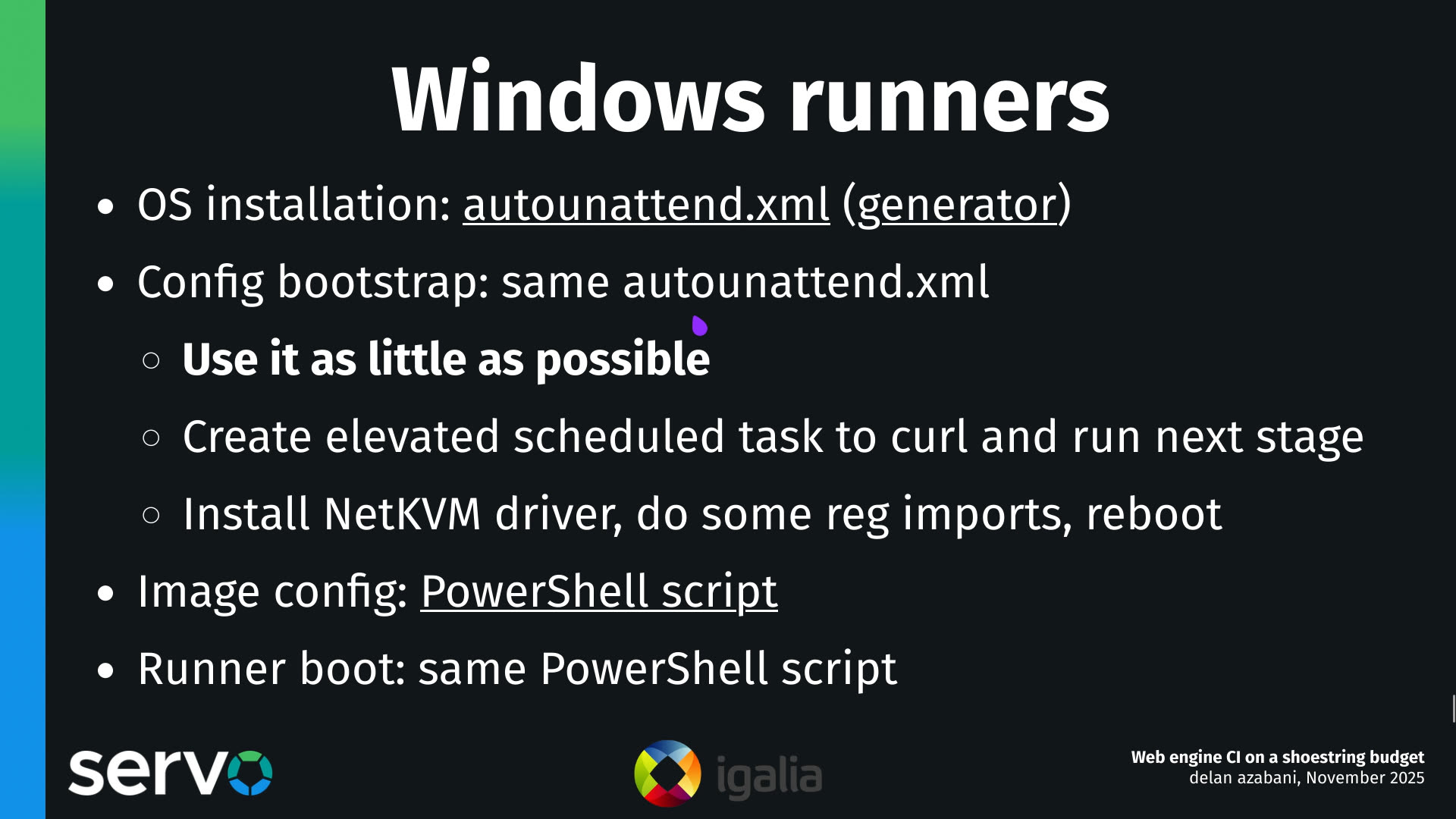
Improved alignment with MathML Core by making mfenced, semantics and maction render like an mrow, ignoring the subscriptshift/superscriptshift legacy attributes and cleaning the User-Agent stylesheet to more closely match the spec.

Multimedia 🎥

GStreamer-based multimedia support for WebKit, including (but not limited to) playback, capture, WebAudio, WebCodecs, and WebRTC.

Speaker device enumeration has been fixed to properly enumerate ALSA PCM devices, while improving audio output device handling in general.

Improved compatibility for broken AAC audio streams in MSE is currently in review.

JavaScriptCore 🐟

The built-in JavaScript/ECMAScript engine for WebKit, also known as JSC or SquirrelFish.

In JavaScriptCore's implementation of Temporal, improved the precision of addition and subtraction on Durations.

In JavaScriptCore's implementation of Temporal, improved the precision of calculations with the total() function on Durations. This was joint work with Philip Chimento.

In JavaScriptCore's implementation of Temporal, continued refactoring addition for Durations to be closer to the spec.

Graphics 🖼️

Landed a patch to build a SkTextBlob when recording DrawGlyphs operations for the GlyphDisplayListCache, which shows a significant improvement in MotionMark “design” test when using GPU rendering.

WPE WebKit 📟

WPE Platform API 🧩

New, modern platform API that supersedes usage of libwpe and WPE backends.

Improved wpe_buffer_import_to_pixels() to work correctly on non-linear and multi-plane DMA-BUF buffers by taking into account their modifiers when mapping the buffers.

Community & Events 🤝

The 2026 edition of the Web Engines Hackfest has been announced, and it will take place from June 15th to the 17th.

That’s all for this week!

by Igalia WebKit Team at October 06, 2025 08:20 PM

October 03, 2025

Iago Toral

XDC 2025

It has been a while since my last post, I know. Today I just want to thank Igalia for continuing to give me and many other Igalians the opportunity to attend XDC. I had a great time in Vienna where I was able to catch up with other Mesa developers (including Igalians!) I rarely have the opportunity to see face to face. It is amazing to see how Mesa continues to gain traction and interest year after year, seeing more actors and vendors getting involved in one way or another… the push for open source drivers in the industry is real and it is fantastic to see it happening.

I’d also like to thank the organization, I know all the work that goes into making these things happen, so big thanks to everyone who was involved, and to the speakers, the XDC program is getting better every year.

Looking forward to next year already 🙂

by Iago Toral at October 03, 2025 06:58 AM

October 01, 2025

Brian Kardell

Under-investment

Under-investment

A lot more words on a short statement I made last week on social media...

A couple of weeks ago I posted on social media that

It never ceases to amaze me how much stuff there is on the web platform that needs more attention than it gets in practice, despite vendors spending tons already.

Dave Rupert replied asking

could you itemize that list? i'd be curious. seems like new shiny consumes a lot of the efforts.

I said "no" at the time because it's true it would be a very long list and exceptionally time consuming task if exhaustive, but... It is probably worth rattling off a bunch that I know more or less off the top of my head from experience - so here goes (in no particular order)... I'll comment on a few:

Big general areas...

There are certain areas of focus that just always get shoved to the back burner.

Print

It's almost absurd to me that printing and print related APIs have the problems and concerns that they still do given that so much of enterprise and government are web based. For example: Will your images be loaded? Who knows! Did you know there is a .print() and it doesn't act the same in several respects as choosing print from the menu? Shouldn't the browser support many of the CSS based features that print pioneered? Like... paging? Or at least actually investing in considering it in the browser at the same time could have helped us determine if those were even good ideas or shape APIs.

Accessibility

In theory all of the processes are supposed to help create standards and browsers that are accessible - in practice, we miss on this more often than is comfortable to admit. This is mainly because - for whatever reason - so much of this, from reviews to testing to standards work in designing APIs in the first place, is largely done by volunteers or people disconnected from vendors themselves and just trying to keep up. My colleague Alice Boxhall wrote a piece that touches on this, and more.

Internationalization

Probably in better shape than accessibility in many ways, but the same basic sorts of things apply here.

Testing Infrastructure

The amount of things that we are incapable of actually testing is way higher than we should be comfortable with. The web actually spent the first 15 years or so of its life without any actual shared testing like web platform tests. Today, lots and lots of that infrastructure is just Google provided, so not community owned or anything.

Forgotten tech

Then there aere are certain big, important projects that were developed and have been widely deployed for ten, or even close to twenty years at this point, but were maybe a little wonky or buggy and then just sort of walked away from.

SVG

After some (like Amelia) doing amazing work to begin to normalize SVG and CSS, the working group effectively disbanded for years with very little investment from vendors.

MathML

From its integration in HTML5 until today, almost none of the work done in browsers has been by the browser vendors themselves. Google is the only vendor who has even joined the working group, and not so much to participate as an org as much as to allow someone interested on their own to participate.

Web Speech

Google and others were so excited to do this back in (checks watch)... 2012. But they did it too early, and in a community group. It's not even a Recommendation Track thing. I can easily see an argument to be made that this is the result of things swinging pretty far in the other direction - this is more than a decade after W3C had put together the W3C Speech Interface Framework with lots of XML. But meanwhile there is simple and obvious bugs and improvements that can and should be made - there is lots of be rethought here and very little invested from then till now.

The "wish list"

There is a long list of things that we, as a larger community, aren't investing in in the sense of wider particpation and real funding from browsers, but I think we should... Here are a few of my top ones:

Study of the web (and ability to)

The HTTPArchive and chrome status are about the best tools we have, but they're again mainly Google - but even other data sources are biased and incomplete. Until 2019 the study of elements on the web was just running a regexp on home pages in the archive. Until just a year or two ago our study of CSS was kind of similar. It just feels like we should have more here.

Polyfill ability for CSS

A number of us have been saying this for a long time. Even some small things could go a long way here (like, just really exposing what's parsed). After a lot of efforts we got Houdini, which should have helped answer a lot of this. It fizzled out after choosing probably the least interesting first project in my opinion. I don't know that we were looking at it just right, or that we would have done the right things - but I know that not really investing in trying isn't going to get it done either. To be really honest, I'd like a more perfect polyfill story for HTML as well. Once upon a time there was discussion down that road, but when <std-toast>-gate happened, all of the connected discussions died along with it. That's a shame. We are getting there slowly with some important things like custom media queries and so on, but a lot of these things we were starting to pitch a decade ago.

Protocols

The web has thus far been built a very particular way - but there are many ideas (distributed web ideas, for example) which it's very hard for the web to currently adapt toward because it's full of hard problems that really need involvement from vendors. I'd love to see many of those ideas really have an opportunity to take off, but I don't see good evolutionary paths to allow something to really do that. We had some earlier ideas like protocol handlers and content handlers for how this might work. Unfortunately content handlers were removed, and prototcol handlers are extremely limited and incomplete. Trying to imagine how a distributed web could work is pretty difficult with the tools we have. Perhaps part of this is related other items on my list like powerful features or monetization

"Web Views" / "Powerful features"

A ton of stuff is built with web technology as apps to get around some of the things that are currently difficult security-wide or privacy wise in the browser itself. Maybe that's how it should be, maybe it isn't. I'm not here to say "ship all the fugu stuff" or something, but it it definitely seems silly that there aren't some efforts to even think "above" the browser engines and standardize some APIs, a bit in the vein of what is now the Winter TC. What people are doing today doesn't seem better. I guesss there is a common theme here that I'd like to really invest in finding better ways to let the platform evolve a bit on its own and then pick it up and run with it.

"monetization"

I mean, this is a really tough one for so many reasons, both tehnical and political, but I just don't see a thing that could have bigger impact than a way to pay creators that isn't limited to ads and a way to fund new ideas. It just seems at the very core of a lot of things. I put it in quotes because I don't mean specifically the proposal called web monetization. There are lots of other ideas and a wide range of attempts happening, some of them seem less directly like money and more like ways to express licencing agreements or earn discounts.

Maps

We seem to have mostly just written off maps entirely as something which you just rely on Google Maps or Apple Maps for. That's a shame because there has been interest at several levels - there was a joint OGC/W3C workshop a few years ago, and many ideas. Almost all of them would benefit more than just those few proprietary map systems. There are even simple primitive ideas like adding the concept of pan and zoom to the platform, maybe in CSS. Surely we can do better than where things are right now, but who is going to invest to get it there?

There's a long list

There's way more things we could list here... Drag and drop needs work and improvements. Editing (see Contenteditable/execCommand/EditContext) is terribly hard. Given the importance, you'd think it would be one of the bigger areas of investment, but it's not really. Hit testing is a big area that needs defining. I mean, you can see that this year we got 134 focus area proposals for Interop 2026. Those aren't all areas that are under-invested in, exactly, but whatever we choose to focus on there is time and budget we can't spend on the things in this list...

In the past, I might have said documentation, but I feel like were just doing a lot better with that. We also now have the collectively funded, transparent and independent openwebdocs.org which Igalia has helped fund since its inception and, to my mind, is one of the most positive things. So many things on this list even could take a similar approach. It would be great to see.

October 01, 2025 04:00 AM

September 29, 2025

Igalia WebKit Team

WebKit Igalia Periodical #40

Update on what happened in WebKit in the week from September 22 to September 29.

Many news this week! We've got a performance improvement in the Vector implementation, a fix that makes a SVG attribute work similarly to HTML, and further advancements on WebExtension support. We also saw an update to WPE Android, the test infrastructure can now run WebXR tests, WebXR support in WPE Android, and a rather comprehensive blog post about the performance considerations of WPE WebKit with regards to the DOM tree.

Cross-Port 🐱

Vector copies performance was improved across the board, and specially for MSE use-cases

Fixed SVG <a> rel attribute to work the same as HTML  <a>'s.

Work on WebExtension support continues with more Objective-C converted to C++, which allows all WebKit ports to reuse the same utility code in all ports.

Added handling of the visibilityState value for inline WebXR sessions.

Graphics 🖼️

WPE now supports importing pixels from non-linear DMABuf formats since commit 300687@main. This will help the work to make WPE take screenshots from the UIProcess (WIP) instead of from the WebProcess, so they match better what's actually shown on the screen.

Added support for the WebXR passthroughFullyObscured rendering hint when using the OpenXR backend.

WPE WebKit 📟

WPE Platform API 🧩

New, modern platform API that supersedes usage of libwpe and WPE backends.

The build system will now compile WPEPlatform with warning-as-errors in developer builds. This helps catch potential programming errors earlier.

WPE Android 🤖

Adaptation of WPE WebKit targeting the Android operating system.

WPE-Android is being updated to use WPE WebKit 2.50.0. As usual, the ready-to-use packages will arrive in a few days to the Maven Central repository.

Added support to run WebXR content on Android, by using AHarwareBuffer to share graphics buffers between the main process and the content rendering process. This required coordination to make the WPE-Android runtime glue expose the current JavaVM and Activity in a way that WebKit could then use to initialize the OpenXR platform bindings.

Community & Events 🤝

Paweł Lampe has published in his blog the first post in a series about different aspects of Web engines that affect performance, with a focus on WPE WebKit and interesting comparisons between desktop-class hardware and embedded devices. This first article analyzes how “idle” nodes in the DOM tree render measurable effects on performance (pun intended).

Infrastructure 🏗️

The test infrastructure can now run API tests that need WebXR support, by using a dummy OpenXR compositor provided by the Monado runtime, along with the first tests and an additional one that make use of this.

That’s all for this week!

by Igalia WebKit Team at September 29, 2025 08:34 PM

Alicia Boya

Getting perf to work on ARM32 Linux: Part 2, the ISAs

Welcome to the second part in this series on how to get perf to work on ARM32. If you just arrived here and want to know what is perf and why it would be useful, refer to Part 1—it is very brief. If you’re already familiar with perf, you can skip it.

To put it blunty, ARM32 is a bit of a mess. Navigating this mess is a significant part of the difficulty in getting perf working. This post will focus on one of these messy parts: the ISAs, plural.

The ISA (Instruction Set Architecture) of a CPU defines the set of instructions and registers available, as well as how they are encoded in machine code. ARM32 CPUs generally have not one but two coexisting ISAs: ARM and Thumb, with significant differences between each other.

Unlike, let’s say, 32-bit x86 and 64-bit x86 executables running in the same operating system, ARM and Thumb can and often do coexist in the same process and have different sets of instructions and—to a certain extent—registers available, all while targetting the same hardware, and neither ISA being meant as a replacement of the other.

If you’re interested in this series as a tutorial, you can probably skip this one. If, on the other hand, you want to understand these concepts to be better for when they inevitably pop up in your troubleshooting—like it did in mine—keep reading. This post will explain some consequential features of both ARM and Thumb, and how they are used in Linux.

I highly recommend having a look at old ARM manuals for following this post. As it often happens with ISAs, old manuals are much more compact and easier to follow than the than current versions, making them a good choice for grasping the fundamentals. They often also have better diagrams, that were only possible when the CPUs were simpler—the manuals for the ARM7TDMI (a very popular ARMv4T design for microcontrollers from the late 90s) are particularly helpful for introducing the architecture.

Some notable features of the ARM ISA

(Recommended introductory reference: ARM7TDMI Manual (1995), Part 4: ARM Instruction Set. 64 pages, including examples.)

The ARM ISA has a fixed instruction size of 32 bits.

A notable feature of it is that the 4 most significant bits of each instruction contain a condition code. When you see mov.ge in assembly for ARM, that is the regular mov instruction with the condition code 1010 (GE: Greater or Equal). The condition code 1110 (AL: Always) is used for non-conditional instructions.

ARM has 16 directly addressable registers, named r0 to r15. Instructions use 4-bit fields to refer to them.

The ABIs give specific purposes to several registers, but as far as the CPU itself goes, there are very few special registers:

  • r15 is the Program Counter (PC): it contains the address of the instruction about to be executed.
  • r14 is meant to be used as Link Register (LR)—it contains the address a function will jump to on return.
    This is used by the bl (Branch with link) instruction, which before branching, will also update r14 (lr) with the value of r15 (pc), and is the main instruction used for function calls in ARM.

All calling conventions I’m aware of use r13 as a full-descending stack. “Full stack” means that the register points to the last item pushed, rather than to the address that will be used by the next push (“open stack”). “Descending stack” means that as items are pushed, the address in the stack register decreases, as opposed to increasing (“ascending stack”). This is the same type of stack used in x86.

The ARM ISA does not make assumptions about what type of stack programs use or what register is used for it, however. For stack manipulation, ARM has a Store Multiple (stm)/Load Multiple (ldm) instruction, which accepts any register as “stack register” and has flags for whether the stack is full or open, ascending or descending and whether the stack register should be updated at all (“writeback”). The “multiple” in the name comes from the fact that instead of having a single register argument, it operates on a 16 bit field representing all 16 registers. It will load or store all set registers, with lower index registers matched to lower addresses in the stack.

push and pop are assembler aliases for stmfd r13! (Store Multiple Full-Descending on r13 with writeback) and ldmfd r13! (Load Multiple Full-Descending on r13 with writeback) respectively—the exclamation mark means writeback in ARM assembly code.

Some notable features of the Thumb ISA

(Recommended introductory reference: ARM7TDMI Manual (1995), Part 5: Thumb Instruction Set. 47 pages, including examples.)

The Thumb-1 ISA has a fixed instruction size of 16 bits. This is meant to reduce code size, improve cache performance and make ARM32 competitive in applications previously reserved for 16-bit processors. Registers are still 32 bit in size.

As you can imagine, having a fixed 16 bit size for instructions greatly limits what functionality is available: Thumb instructions generally have an ARM counterpart, but often not the other way around.

Most instructions—with the notable exception of the branch instruction—lack condition codes. In this regards it works much more like x86.

The vast majority of instructions only have space for 3 bits for indexing registers. This effectively means Thumb has only 8 registers—so called low registers—available to most instructions. The remaining registers—referred as high registers—are only available in special encodings of few select instructions.

Store Multiple (stm)/Load Multiple(ldm) is largely replaced by push and pop, which here is not an alias but an actual ISA instruction and can only operate on low registers and—as a special case—can push LR and pop PC. The only stack supported is full-descending on r13 and writeback is always performed.

A limited form of Store Multiple (stm)/Load Multiple (ldm) with support for arbitrary low register as base is available, but it can only load/store low registers, writeback is still mandatory, and it only supports one addressing mode (“increment after”). This is not meant for stack manipulation, but for writing several registers to/from memory at once.

Switching between ARM and Thumb

(Recommended reading: ARM7TDMI Manual (1995), Part 2: Programmer’s Model. 3.2 Switching State. It’s just a few paragraphs.)

All memory accesses in ARM must be 32-bit aligned. Conveniently, this allows the 4 least significant bit of addresses to be used as flags, and ARM CPUs make use of this.

When branching with the bx (Branch with exchange) instruction, the least significant bit of the register holding the branch address indicates whether the CPU should swich after the jump to ARM mode (0) or Thumb mode (1).

It’s important to note that this bit in the address is just a flag: Thumb instructions lie in even addresses in memory.

As a result, ARM and Thumb code can coexist in the same program and applications can use libraries compiled with each other mode. This is far from an esoteric feature; as an example, buildroot always compiles glibc in ARM mode, even if Thumb is used for the rest of the system.

The Thumb-2 extension

(Recommended reference: ARM Architecture Reference Manual: Thumb-2 Supplement (2005)—This one is already much longer, but it’s nevertheless the documentation for when Thumb-2 was introduced)

Thumb-2 is an extension of the original Thumb ISA. Instructions are no longer fixed 16 bits in size, but instead instructions have variable size (16 or 32 bits).

This allows to reintroduce a lot of functionality that was previously missing in Thumb but only pay for the increased code size in instructions that require it. For instance, push now can save high registers, but it will become a 32-bit instruction when doing so.

Just like in Thumb-1, most instructions still lack condition codes. Instead, Thumb-2 introduces a different mechanism for making instructions conditional: the If-Then (it) instruction. it receives a 4 bit condition code (same as in ARM) and a clever 4 bit “mask”. The it instruction makes execution of the following up to 4 instructions conditional on either the condition or its negation. The first instruction is never negated.

An “IT block” is the sequence of instructions made conditional by a previous it instruction.

For instance, the 16-bit instruction ittet ge means: make the next 2 instructions conditional on “greater or equal”, the following instruction conditional on “less than (i.e. not greater or equal)”, and the following instruction conditional on “greater or equal”. ite eq would make the following instruction be conditional on “equal” and the following instruction conditional on “not equal”.

The IT block deprecation mess: Some documentation pages of ARM will state that it instructions followed by 32 bit instructions, or by more than one instruction, are deprecated. According to clang commits from 2022, this decision has been since reverted. The current (2025) version of the ARM reference manual for the A series of ARM CPUs remains vague about this, claiming “Many uses of the IT instruction are deprecated for performance reasons” but doesn’t claim any specific use as deprecated in that same page. Next time you see gcc or GNU Assembler complaining about a certain IT block being “performance deprecated”, this is what that is about.

Assembly code compatibility

Assemblers try to keep ARM and Thumb as mutually interchangeable where possible, so that it’s possible to write assembly code that can be assembled as either as long as you restrict your code to instructions available in both—something much more feasible since Thumb-2.

For instance, you can still use it instructions in code you assemble as ARM. The assembler will do some checks to make sure your IT block would work in Thumb the same as it would do if it was ARM conditional instructions and then ignore it. Conversely, instructions inside an IT block need to be tagged with the right condition code for the assembler to not complain, even if those conditions are stripped when producing Thumb.

What determines if code gets compiled as ARM or Thumb

If you try to use a buildroot environment, one of the settings you can tweak (Target options/ARM instruction set) is whether ARM or Thumb-2 should be used as default.

When you build gcc from source one of the options you can pass to ./configure is --with-mode=arm (or similarly, --with-mode=thumb). This determines which one is used by default—that is, if the gcc command line does not specify either. In buildroot, when “Toolchain/Toolchain type” is configured to use “Buildroot toolchain”, buildroot builds its own gcc and uses this option.

To specify which ISA to use for a particular file you can use the gcc flags -marm or -mthumb. In buildroot, when “Toolchain/Toolchain type” is configured to use “External toolchain”—in which case the compiler is not compiled from source—either of these flags is added to CFLAGS as a way to make it the default for packages built with buildroot scripts.

A mode can also be overriden on a per-function-basis with __attribute__((target("thumb")). This is not very common however.

GNU Assembler and ARM vs Thumb

In GNU Assembler, ARM or Thumb is selected with the .arm or .thumb directives respectively—alternatively, .code 16 and .code 32 respectively have the same effect.

Each functions that starts with Thumb code must be prefaced with the .thumb_func directive. This is necessary so that the symbol for the function includes the Thumb bit, and therefore branching to the function is done in the correct mode.

ELF object files

There are several ways ELF files can encode the mode of a function, but the most common and most reliable is to check the addresses of the symbols. ELF files use the same “lowest address bit means Thumb” convention as the CPU.

Unfortunately, while tools like objdump need to figure the mode of functions in order to e.g. disassemble them correctly, I have not found any high level flag in either objdump or readelf to query this information. Instead, here you can have a couple of Bash one liners using readelf.

syms_arm() { "${p:-}readelf" --syms --wide "$@" |grep -E '^\s*[[:digit:]]+: [0-9a-f]*[02468ace]\s+\S+\s+(FUNC|IFUNC)\s+'; }
syms_thumb() { "${p:-}readelf" --syms --wide "$@" |grep -E '^\s*[[:digit:]]+: [0-9a-f]*[13579bdf]\s+\S+\s+(FUNC|IFUNC)\s+|THUMB_FUNC'; }
  1. The regular expression matches on the parity of the address.
  2. $p is an optional variable I assign to my compiler prefix (e.g. /br/output/host/bin/arm-buildroot-linux-gnueabihf-).
    Note however that since the above commands just use readelf, they will work even without a cross-compiling toolchain.
  3. THUMB_FUNC is written by readelf when a symbol has type STT_ARM_TFUNC. This is another mechanism I’m aware object files can use for marking functions as Thumb, so I’ve included it for completion; but I have not found any usages of it in the wild.

If you’re building or assembling debug symbols, ranges of ARM and Thumb code are also marked with $a and $t symbols respectively. You can see them with readelf --syms. This has the advantage—at least in theory—of being able to work even in the presence of ARM and Thumb mixed in the same function.

Closing remarks

I hope someone else finds this mini-introduction to ARM32 useful. Now that we have an understanding of the ARM ISAs, in the next part we will go one layer higher and discuss the ABIs (plural again, tragically!)—that is, what expectations have functions of each other as they call one another.

In particular, we are interested in how the different ABIs handle—or not—frame pointers, which we will need in order for perf to do sampling profiling of large applications on low end devices with acceptable performance.

by aboya at September 29, 2025 10:42 AM

September 26, 2025

Pawel Lampe

WPE performance considerations: DOM tree

Designing performant web applications is not trivial in general. Nowadays, as many companies decide to use web platform on embedded devices, the problem of designing performant web applications becomes even more complicated. Typical embedded devices are orders of magnitude slower than desktop-class ones. Moreover, the proportion between CPU and GPU power is commonly different as well. This usually results in unexpected performance bottlenecks when the web applications designed with desktop-class devices in mind are being executed on embedded environments.

In order to help web developers approach the difficulties that the usage of web platform on embedded devices may bring, this blog post initiates a series of articles covering various performance-related aspects in the context of WPE WebKit usage on embedded devices. The coverage in general will include:

  • introducing the demo web applications dedicated to showcasing use cases of a given aspect,
  • benchmarking and profiling the WPE WebKit performance using the above demos,
  • discussing the causes for the performance measured,
  • inferring some general pieces of advice and rules of thumb based on the results.

This article, in particular, discusses the overhead of nodes in the DOM tree when it comes to layouting. It does that primarily by investigating the impact of idle nodes that introduce the least overhead and hence may serve as a lower bound for any general considerations. With the data presented in this article, it should be clear how the DOM tree size/depth scales in the case of embedded devices.

DOM tree #

Historically, the DOM trees emerging from the usual web page designs were rather limited in size and fairly shallow. This was the case as there were no reasons for them to be excessively large unless the web page itself had a very complex UI. Nowadays, not only are the DOM trees much bigger and deeper, but they also tend to contain idle nodes that artificially increase the size/depth of the tree. The idle nodes are the nodes in the DOM that are active yet do not contribute to any visual effects. Such nodes are usually a side effect of using various frameworks and approaches that conceptualize components or services as nodes, which then participate in various kinds of processing utilizing JavaScript. Other than idle nodes, the DOM trees are usually bigger and deeper nowadays, as there are simply more possibilities that emerged with the introduction of modern APIs such as Shadow DOM, Anchor positioning, Popover, and the like.

In the context of web platform usage on embedded devices, the natural consequence of the above is that web designers require more knowledge on how the particular browser performance scales with the DOM tree size and shape. Before considering embedded devices, however, it’s worth to take a brief look at how various web engines scale on desktop with the DOM tree growing in depth.

Desktop considerations #

To measure the impact of the DOM tree depth on the performance, the random-number-changing-in-the-tree.html?vr=0&ms=1&dv=0&ns=0 demo can be used to perform a series of experiments with different parameters.

In short, the above demo measures the average duration of a benchmark function run, where the run does the following:

  • changes the text of a single DOM element to a random number,
  • forces a full tree layout.

Moreover, the demo allows one to set 0 or more parent idle nodes for the node holding text, so that the layout must consider those idle nodes as well.

The parameters used in the URL above mean the following:

  • vr=0 — the results are reported to the console. Alternatively (vr=1), at the end of benchmarking (~23 seconds), the result appears on the web page itself.
  • ms=1 — the results are reported in “milliseconds per run”. Alternatively (ms=0), “runs per second” are reported instead.
  • dv=0 — the idle nodes are using <span> tag. Alternatively, (dv=1) <div> tag is used instead.
  • ns=N — the N idle nodes are added.

The idea behind the experiment is to check how much overhead is added as the number of extra idle nodes (ns=N) in the DOM tree increases. Since the browsers used in the experiments are not fair to compare due to various reasons, instead of concrete numbers in milliseconds, the results are presented in relative terms for each browser separately. It means that the benchmarking result for ns=0 serves as a baseline, and other results show the relative duration increase to that baseline result, where, e.g. a 300% increase means 3 times the baseline duration.

The results for a few mainstream browsers/browser engines (WebKit GTK MiniBrowser [09.09.2025], Chromium 140.0.7339.127, and Firefox 142.0) and a few experimental ones (Servo [04.07.2024] and Ladybird [30.06.2024]) are presented in the image below:

Idle nodes overhead on mainstream browsers.

As the results show, trends among all the browsers are very close to linear. It means that the overhead is very easy to assess, as usually N times more idle nodes will result in N times the overhead. Moreover, up until 100-200 extra idle nodes in the tree, the overhead trends are very similar in all the browsers except for experimental Ladybird. That in turn means that even for big web applications, it’s safe to assume the overhead among the browsers will be very much the same. Finally, past the 200 extra idle nodes threshold, the overhead across browsers diverges. It’s very likely due to the fact that the browsers are not optimizing such cases as a result of a lack of real-world use cases.

All in all, the conclusion is that on desktop, only very large / specific web applications should be cautious about the overhead of nodes, as modern web browsers/engines are very well optimized for handling substantial amounts of nodes in the DOM.

Embedded device considerations #

When it comes to the embedded devices, the above conclusions are no longer applicable. To demonstrate that, a minimal browser utilizing WPE WebKit is used to run the demo from the previous section both on desktop and NXP i.MX8M Plus platforms. The latter is a popular choice for embedded applications as it has quite an interesting set of features while still having strong specifications, which may be compared to those of Raspberry Pi 5. The results are presented in the image below:

Idle nodes overhead compared between desktop and embedded devices.

This time, the Y axis presents the duration (in milliseconds) of a single benchmark run, and hence makes it very easy to reason about overhead. As the results show, in the case of the desktop, 100 extra idle nodes in the DOM introduce barely noticeable overhead. On the other hand, on an embedded platform, even without any extra idle nodes, the time to change and layout the text is already taking around 0.6 ms. With 10 extra idle nodes, this duration increases to 0.75 ms — thus yielding 0.15 ms overhead. With 100 extra idle nodes, such overhead grows to 1.3 ms.

One may argue if 1.3 ms is much, but considering an application that e.g. does 60 FPS rendering, the time at application disposal each frame is below 16.67 ms, and 1.3 ms is ~8% of that, thus being very considerable. Similarly, for the application to be perceived as responsive, the input-to-output latency should usually be under 20 ms. Again, 1.3 ms is a significant overhead for such a scenario.

Given the above, it’s safe to state that the 20 extra idle nodes should be considered the safe maximum for embedded devices in general. In case of low-end embedded devices i.e. ones comparable to Raspberry Pi 1 and 2, the maximum should be even lower, but a proper benchmarking is required to come up with concrete numbers.

Inline vs block #

While the previous subsection demonstrated that on embedded devices, adding extra idle nodes as parents must usually be done in a responsible way, it’s worth examining if there are nuances that need to be considered as well.

The first matter that one may wonder about is whether there’s any difference between the overhead of idle nodes being inlines (display: inline) or blocks (display: block). The intuition here may be that, as idle nodes have no visual impact on anything, the overhead should be similar.

To verify the above, the demo from Desktop considerations section can be used with dv parameter used to control whether extra idle nodes should be blocks (1, <div>) or inlines (0, <span>). The results from such experiments — again, executed on NXP i.MX8M Plus — are presented in the image below:

Comparison of overhead of idle nodes being inline or block elements.

While in the safe range of 0-20 extra idle nodes the results are very much similar, it’s evident that in general, the idle nodes of block type are actually introducing more overhead.

The reason for the above is that, for layout purposes, the handling of inline and block elements is very different. The inline elements sharing the same line can be thought of as being flattened within so called line box tree. The block elements, on the other hand, have to be represented in a tree.

To show the above visually, it’s interesting to compare sysprof flamegraphs of WPE WebProcess from the scenarios comprising 20 idle nodes and using either <span> or <div> for idle nodes:

idle <span> nodes:
Sysprof flamegraph of WPE WebProcess layouting inline elements.
idle <div> nodes:
Sysprof flamegraph of WPE WebProcess layouting block elements.

The first flamegraph proves that there’s no clear dependency between the call stack and the number of idle nodes. The second one, on the other hand, shows exactly the opposite — each of the extra idle nodes is visible as adding extra calls. Moreover, each of the extra idle block nodes adds some overhead thus making the flamegraph have a pyramidal shape.

Whitespaces #

Another nuance worth exploring is the overhead of text nodes created because of whitespaces.

When the DOM tree is created from the HTML, usually a lot of text nodes are created just because of whitespaces. It’s because the HTML usually looks like:

<span>
<span>
(...)
</span>
</span>

rather than:

<span><span>(...)</span></span>

which makes sense from the readability point of view. From the performance point of view, however, more text nodes naturally mean more overhead. When such redundant text nodes are combined with idle nodes, the net outcome may be that with each extra idle node, some overhead will be added.

To verify the above hypothesis, the demo similar to the above one can be used along with the above one to perform a series of experiments comparing the approach with and without redundant whitespaces: random-number-changing-in-the-tree-w-whitespaces.html?vr=0&ms=1&dv=0&ns=0. The only difference between the demos is that the w-whitespaces one creates the DOM tree with artificial whitespaces, simulating as-if it was written in the formatted document. The comparison results from the experiments run on NXP i.MX8M Plus are presented in the image below:

Overhead of redundant whitespace nodes.

As the numbers suggest, the overhead of redundant text nodes is rather small on a per-idle-node basis. However, as the number of idle nodes scales, so does the overhead. Around 100 extra idle nodes, the overhead is noticeable already. Therefore, a natural conclusion is that the redundant text nodes should rather be avoided — especially as the number of nodes in the tree becomes significant.

Parents vs siblings #

The last topic that deserves a closer look is whether adding idle nodes as siblings is better than adding them as parent nodes. In theory, having extra nodes added as siblings should be better as the layout engine will have to consider them, yet it won’t mark them with a dirty flag and hence it won’t have to layout them.

As in other cases, the above can be examined using a series of experiments run on NXP i.MX8M Plus using the demo from Desktop considerations section and comparing against either random-number-changing-before-siblings.html?vr=0&ms=1&dv=0&ns=0 or random-number-changing-after-siblings.html?vr=0&ms=1&dv=0&ns=0 demo. As both of those yield similar results, any of them can be used. The results of the comparison are depicted in the image below:

Overhead of idle nodes added as parents vs as siblings.

The experiment results corroborate the theoretical considerations made above — idle nodes added as siblings indeed introduce less layout overhead. The savings are not very large from a single idle node perspective, but once scaled enough, they are beneficial enough to justify DOM tree re-organization (if possible).

Conclusions #

The above experiments mostly emphasized the idle nodes, however, the results can be extrapolated to regular nodes in the DOM tree. With that in mind, the overall conclusion to the experiments done in the former sections is that DOM tree size and shape has a measurable impact on web application performance on embedded devices. Therefore, web developers should try to optimize it as early as possible and follow the general rules of thumb that can be derived from this article:

  1. Nodes are not free, so they should always be added with extra care.
  2. Idle nodes should be limited to ~20 on mid-end and ~10 on low-end embedded devices.
  3. Idle nodes should be inline elements, not block ones.
  4. Redundant whitespaces should be avoided — especially with idle nodes.
  5. Nodes (especially idle ones) should be added as siblings.

Although the above serves as great guidance, for better results, it’s recommended to do the proper browser benchmarking on a given target embedded device — as long as it’s feasible.

Also, the above set of rules is not recommended to follow on desktop-class devices, as in that case, it can be considered a premature optimization. Unless the particular web application yields an exceptionally large DOM tree, the gains won’t be worth the time spent optimizing.

September 26, 2025 12:00 AM

September 22, 2025

Igalia WebKit Team

WebKit Igalia Periodical #39

Update on what happened in WebKit in the week from September 15 to September 22.

The first release in a new stable series is now out! And despite that, the work continues on WebXR, multimedia reliability, and WebExtensions support.
Cross-Port 🐱

Fixed running WebXR tests in the WebKit build infrastructure, and made a few more of them run. This both increases the amount of WebXR code covered during test runs, and helps prevent regressions in the future.
As part of the ongoing work to get WebExtensions support in the GTK and WPE WebKit ports, a number of classes have been converted from Objective-C to C++, in order to use share their functionality among all ports.
Multimedia 🎥

GStreamer-based multimedia support for WebKit, including (but not limited to) playback, capture, WebAudio, WebCodecs, and WebRTC.

A number of multimedia-related memory leaks have been plugged. These have been found thanks to the GStreamer leak tracer.

Releases 📦️

WebKitGTK 2.50.0 and WPE WebKit 2.50.0 are now available. These are the first releases of a new stable series, and are the result of the last six months of work. This development cycle focused on rendering performance improvements, improved support for font features, and more. New public API has been added to obtain the theme color declared by Web pages.

For those longer to integrate newer releases, which we know can be a longer process when targeting embedded devices, we have also published WPE WebKit 2.48.7 with a few stability and security fixes.

Accompanying these releases there is security advisory WSA-2025-0006 (GTK, WPE), with information about solved security issues. As usual, we encourage everybody to use the most recent versions where such issues are known to be fixed.

Bug reports are always welcome at the WebKit Bugzilla.

That’s all for this week!

by Igalia WebKit Team at September 22, 2025 11:12 PM

September 18, 2025

Manuel Rego

Servo: A new web engine written in Rust

Last weekend we had the opportunity to talk about Servo at GOSIM Hangzhou 2025. This was my first time in Asia, a long trip going there but a wonderful experience nevertheless.

My talk was Servo: A new web engine written in Rust and it was an introductory talk about the Servo project focusing on the evolution since 2023 when Igalia took over the project maintenance. The talk was trying to answer a few questions:

  • What’s Servo?
  • Is it really a “new” web engine?
  • What makes Servo special?
  • What’s the project vision?
  • How can you help?

Manuel Rego during his Servo talk at GOSIM Hangzhou 2025

Myself during my Servo talk at GOSIM Hangzhou 2025

In addition, my colleagues Martin Robinson and Oriol Brufau were also at GOSIM talking about Servo layout engine with their talk A Dive Into the Servo Layout System.

In this blog post I’m going to go over all the slides of the talk and describe the different things I was explaining during the presentation A kind of a reader view of the talk. If you want to check the slides yourself, they’re available online, and the talk recording too.

Video of my Servo talk at GOSIM Hangzhou 2025

Servo: A new web engine written in Rust #

Slide 1

To start the presentation I take the chance to ask the audience about how many knew Servo (just a few); and Chrome, Safari and Firefox (most of them).

About me #

Slide 2

Next a quick introduction about myself and Igalia, nothing very new or fancy here compared to other previous talks I’ve done. Main highlights are that I’m Servo Technical Steering Committee (TSC) chair since 2023, I’m not working on the project as a developer but I’m helping with the coordination efforts. And regarding Igalia that we’re an open source consultancy, with a flat structure, and top contributors to the main web rendering engines.

What’s Servo? ❓ #

Slide 3

First section tries to briefly explain what is Servo, specially for the people that don’t know the project yet and looking into clarifying the question about if it’s a browser, a web engine, or both.

Web Browser vs Web Rendering Engine 🛠️ #

Slide 4

Here the goal is to shortly describe the difference between a web browser and a web rendering engine. If you are confused about these two terms, the browser is the application that you use, the one that has a URL bar, tabs, bookmarks, history, etc. It’s a graphical chrome that allows you to browse the web. The rendering engine is the one in charge of converting the HTML plus the rest of resources (styles, JavaScript, etc.) into a visual representation that is displayed in your screen, a piece of the browser.

I also mention of browsers vs rendering engines, like Chrome and Blink, Safari and WebKit, or Firefox and Gecko.

Regarding Servo there are two things which are both equally true:

  • Servo is a web rendering engine written in Rust
  • Servo can be used to develop a browser

See it in action! 🎬 #

Slide 5

Here we see a video of Servo running, so the audience can understand what it is even better. The video shows servoshell (our minimal browser to test Servo) and stars by browsing servo.org. Then it opens Wikipedia, searches for Python, and opens the Python programming language page. From there it clicks on the Python website, and browses a little bit the documentation. Finally it opens Baidu maps, and searches for the GOSIM conference venue.
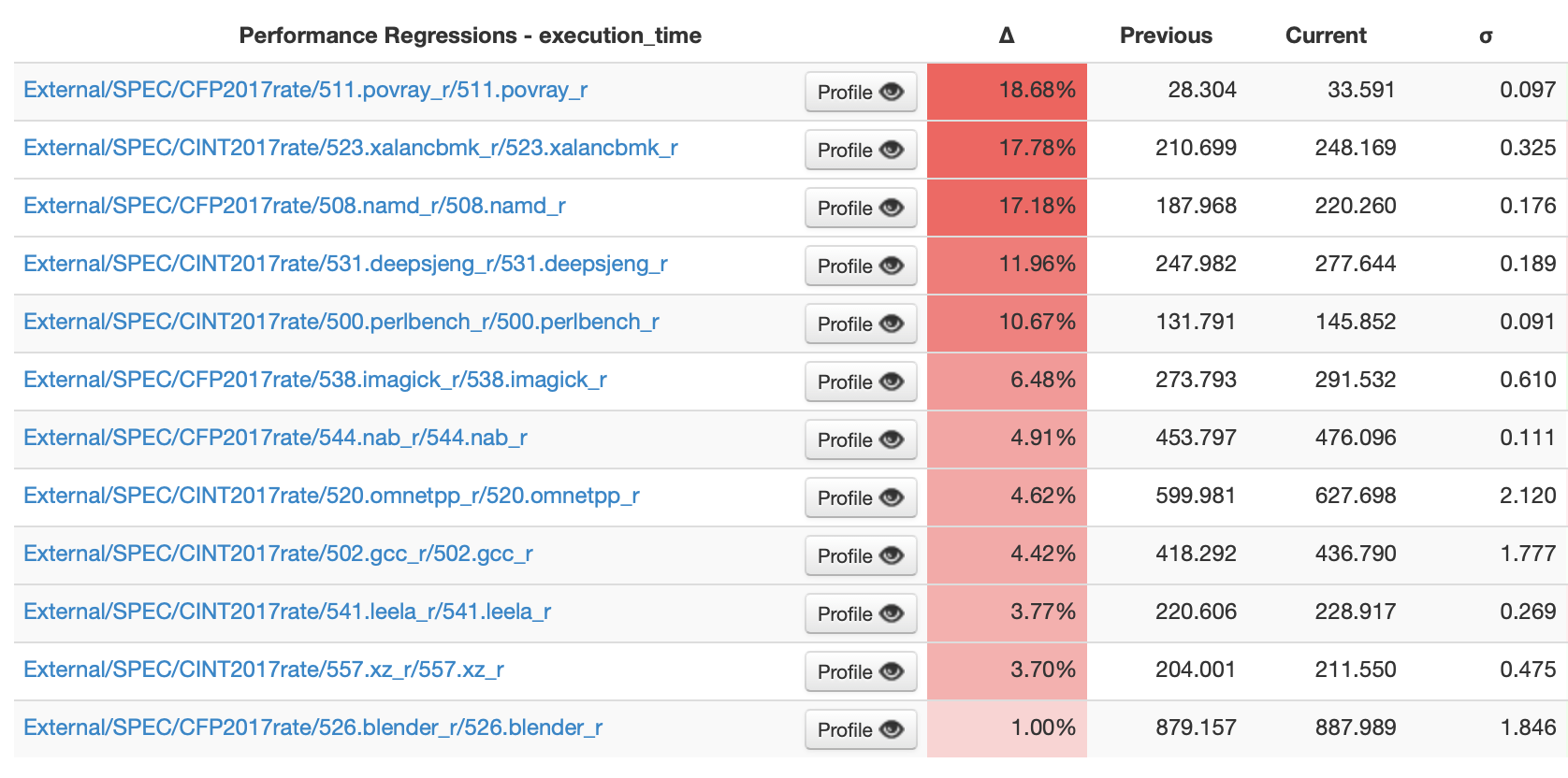
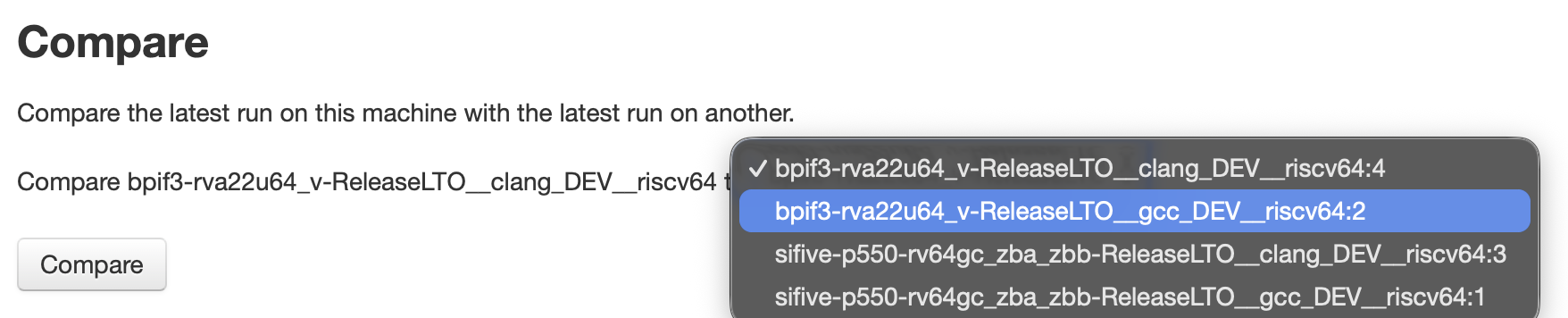
Is it really a “new” web engine? 🆕 #

Slide 6

The idea of this section was to review Servo’s history and evolution on the recent years.

Servo’s history 📜 #

Slide 7

This is a brief summary of Servo’s project history. The project was started by Mozilla in 2012, at that time they were developing the Rust language itself (somehow Mozilla used Servo, a web rendering engine, as a testing project to check that Rust language was good enough). In any case we cannot consider it really “new”, but Servo is way younger than other web engines that started decades before.
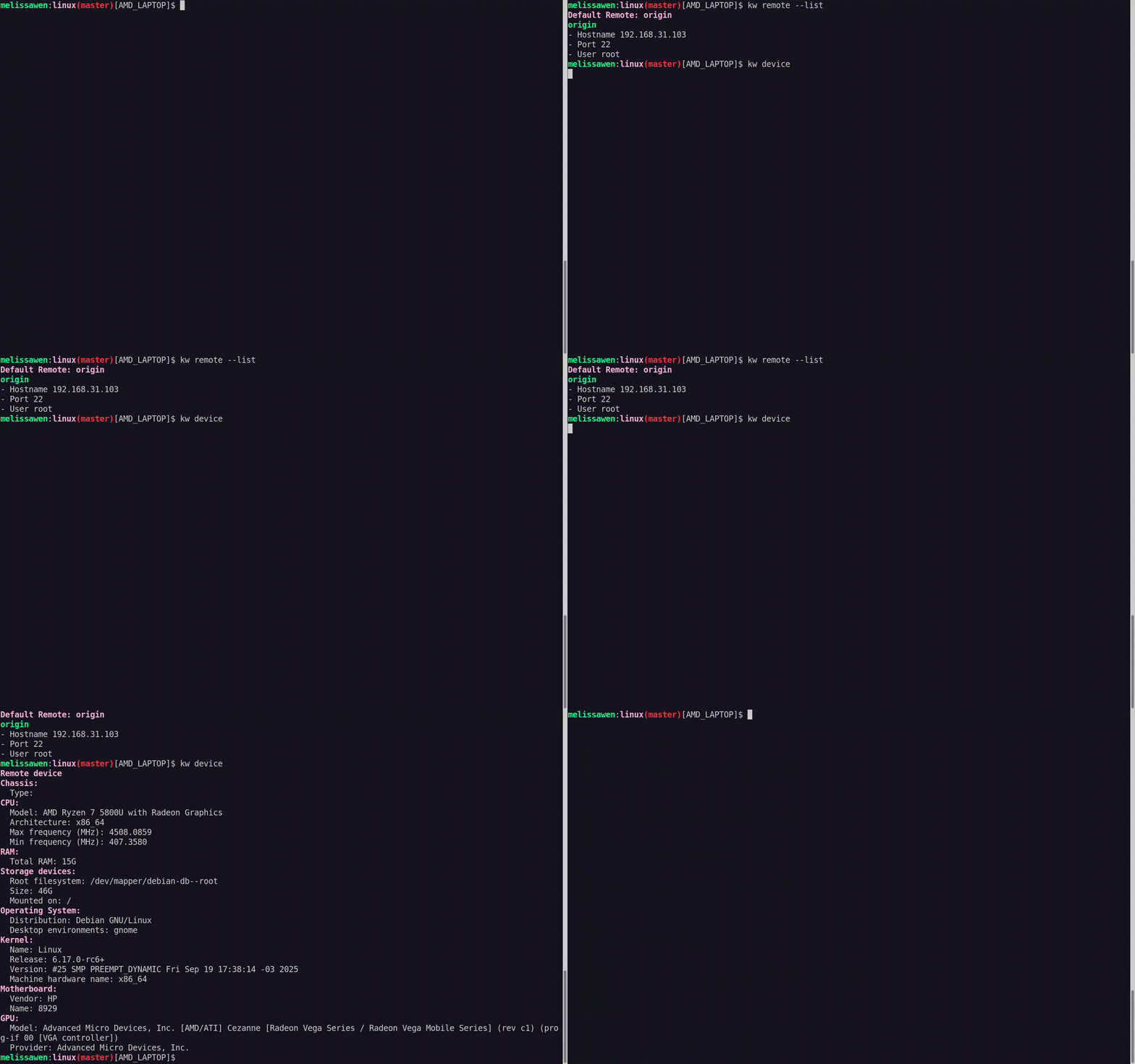
In 2020, Mozilla layoff the whole Servo team, and transferred the project to Linux Foundation. That very same year the Servo team had started the work in a new layout engine. The layout engine is an important and complex part of a web engine, it’s the one that calculates the size and position of the different elements of the website. Servo was starting a new layout engine, closer to the specifications language and with similar principles to what other vendors were also doing (Blink with LayoutNG and WebKit with Layout Formatting Context). This was done due to problems in the design of the original layout engine, which prevented to implement properly some CSS features like floats. So, from the layout engine point of view, Servo is quite a “new” engine.

In 2023, Igalia took over Servo project maintenance, with the main goal to bring the project back to life after a couple of years with minimal activity. That very same year the project joined Linux Foundation Europe in an attempt to regain interest from a broader set of the industry.

A highlight is that the project community has been totally renewed and Servo’s activity these days is growing and growing.

Commits stats 📊 #

Slide 8

We take a look to the commits stats from GitHub, which show what was explained before. A very low period of activity between 2021 and 2022; and the recent renewed activity on the project.

PRs stats (no bots) 📈 #

Slide 9

If we zoom a bit the previous chart, we can look into the PRs merged since 2018 (not commits, as a PR can have multiple commits the chart differs a little bit from previous one). The chart also removes the PRs that are done by bots (like dependabot and servo-wpt-sync). Taking a look here we see that the last years have been very good for Servo, we’re now way over the numbers from 2018; almost doubling them in number of merged PRs, average monthly contributors, and average monthly contributors with more than 10 PRs merged in a month. Next is the same data in a table format:

2018 2019 2020 2021 2022 2023 2024 2025
PRs 1,188 986 669 118 65 776 1,771 1,983
Contributors 27.33 27.17 14.75 4.92 2.83 11.33 26.33/td> 41.33
Contributors ≥ 10 2.58 1.67 1.17 0.08 0.00 1.58 4.67 6.33

Legend:

  • PRs: total numbers of PRs merged.
  • Contributors: average number of contributors per month.
  • Contributors ≥ 10: average number of contributors that have merged more than 10 PRs per month.

WPT pass-rates ✅ #

Slide 10

Then we check the WPT pass-rates. WPT is the web platform tests suite, which all the web engines use and share. It consists in almost 2 millions subtests and the chart shows the evolution for Servo since April 2023 (when we started measuring this). It shows that the situation in 2023 was pretty bad, but today Servo is passing more than 1.7 million subtests (a 92.7% of the tests that we run, there are some tests skipped that we don’t count here).

If you are curious about this chart and want to learn more you can visit servo.org/wpt.

New layout engine 🌱 #

Slide 11

Reflecting more on the layout engine, we show a comparison between how google.com was rendered in 2023 (no logo, no text on the buttons, missing text, no icons, etc.) vs in 2025 (which looks way closer to what you can see in any other browser).

This emphasize the evolution of the new layout engine, and somehow re-states the concept of how “new” is Servo from that perspective.

What makes Servo special? 💎 #

Slide 12

In this section we try to highlight the features of Servo that make this project something special and unique.

Rust 🦀 #

Slide 13

First and foremost, Servo is written in Rust which has two very special characteristics:

  • Memory safety: Which means that you get less vulnerabilities related to wrong memory usage in your applications. We link to a small external audit that was run in a part of Servo and didn’t identify any important issue.
  • Concurrency: Rust simplifies a lot the usage of parallelism in your applications, allowing you to write faster and more energy-efficient programs.

The highlights here are that Servo is the only web engine written in Rust (while the rest are using C++). And also the only one that is using parallelism all over the place (even when it shares some parts with Firefox like Stylo and WebRender, it’s the only one using parallelism in the layout engine for example).

All this is something that makes Servo unique compared to the rest of alternatives.

Independent 🦋 #

Slide 14

Another relevant characteristic of the project is its independence. Servo is hosted under Linux Foundation Europe and managed openly by the TSC. This is in opposition to other web engines that are controlled by big corporations (like Apple, Google and Mozilla), and share a single source of funding through Google search deals and ads.

On this regard, Servo brings new opportunities looking for a bright future on the open web.

Other features 🧩 #

Slide 15

Other Servo features that are worth mentioning:

  • Embeddable: Servo can be used to be embedded in other applications, it has a WebView API that is under construction. We link to the made with Servo page at servo.org where people can find examples.
  • Modular: Servo has a bunch of crates (libraries) that are widely used in the Rust ecosystem. This modularity brings advantages and benefits the Servo project too. Some of these modules are shared with Firefox as mentioned previously.
  • Cross-platform: Servo supports 5 platforms. Linux, MacOS, and Windows on the desktop; together with Andorid, and OpenHarmony on mobile.

What’s the project vision? 🎯 #

Slide 16

The next section talks about Servo plans and long-term vision, focusing on what the Servo community has been doing recently.

What are we doing today? 📌 #

Slide 17

Servo is transitioning from a R&D project (how Mozilla created it originally) to a production-ready web rendering engine. There is a long path to go and we’re still walking it, the main goal is that the users start considering Servo as a viable alternative for their products.

We describe some of the recent developments. There are many more as the big community is working on many different things, but this is just a small set of relevant things that are being developed.

  • Incremental layout: This is a fundamental feature of any web engine. It’s related to the fact that when you modify something in a website (some text content, some color, etc.), you don’t need to re-layout the whole website and re-compute the position of all the boxes, but only the things that were modified and the ones that can be affected by those changes. Servo has now the basis of incremental layout implemented which has clearly improved performance, though it still has room for further developments.
  • WebDriver support: WebDriver is a spec that all the engines implement, which allows you to automate testing (clicking on a button, input some key strokes, etc.). This is a really nice feature to allow automation of tasks with Servo and improve testing coverage.
  • SVG support: Many many websites use SVG, specially for icons and small images. SVG is a big and complex feature that would deserve its own native implementation, but so far Servo is using a third party library called resvg to add basic SVG support. It has limitations (like animations not working) but it allows to render much better many websites.
  • DevTools improvements: Servo uses Firefox DevTools, this was totally broken in 2023 and there has been ongoing work to bring them back to life, and add support for more features like the networking and debugger panels. More work on this area is still needed in the future.

Organizational updates 🤝 #

Slide 18

From the Servo governance point of view there has also been some changes recently. We have set some limits to the TSC in order to formalize Servo’s status as an independent and consensus-driven project. These changes cap the maximum number of TSC members and also limit the votes from the same organization.

The TSC has also defined different levels of collaboration within the project: contributors, maintainers, TSC members, and administrators. Since this was setup less than a year ago several people have been added to these roles (12 contributors, 22 maintainers, 17 TSC members, and 5 administrators). Thank you all for your amazing work!

You can find more details about this on the Servo project governance repository in GitHub.

Plans 💡 #

Slide 19

This reflects the plans from the Servo community for the next months. The main highlights are:

  • Editability and interactivity enhancements: Things like selecting text or filling forms will be improved thanks to this work.
  • CSS Grid Layout support: This is an important CSS feature that many websites use and its being developed through a third party library called taffy.
  • Improving embedding API: As mentioned earlier this is key for applications that want to embedded Servo. We’re in the process of improving the API so we can have one that covers applications’ needs and allows us releasing versions of Servo to simplify usage.
  • Initial accessibility support: Servo has zero accessibility support so far (only the servoshell application has some basic accessibility). This is a challenging project as usually enabling accessibility support has a performance cost for the end user. We want to experiment with Servo and try to minimize that as much as possible, exploring possibilities of some innovative design that could use parallelism for the accessibility support too.
  • More performance improvements: With incremental layout things have improved a lot, but there are still plenty of work to do in this area where more optimizations can be implemented.

For more details about Servo’s roadmap check the wiki. The Servo community is discussing it these days, so there might be updates in the coming weeks.

Long-term vision 🔭 #

Slide 20

Here we take a look to some years ahead and what we want to do with Servo as a project. Servo’s vision could be summarized as:

  • Leading the embeddable web rendering engines ecosystem: There are plenty of devices that need to render web content, Servo has some features that make it a very appealing solution for these scenarios.
  • Powering innovative applications and frameworks: Following Servo’s R&D approach of exploring new routes, Servo could help to develop applications that try new approaches and benefit from Servo’s unique characteristics.
  • Offering unparalleled performance, stability and modern web standards compliance: Servo aims to be a very performant and stable project that complies with the different web standards.

As a moonshot goal we can envision a general purpose web browser based on Servo, knowing this would require years of investment.

How can you help? 🛟 #

Slide 21

To close the presentation I was mentioning some ways about how people, with different profiles, can help the project.

Join the project 🔗 #

Slide 22

One option is to join the project as a contributor, if you are a developer or an organization interested in Servo, you could join us by visiting our GitHub organization, asking questions or doubts in the Zulip chat, and/or emailing us.

Servo is very welcoming to new contributors and we’re looking into growing a healthy ecosystem around the project.

Test Servo and report issues 🧪 #

Slide 23

Another option as a regular user is to download Servo and report issues or participate in the project discussions at GitHub.

There are nightly binaries so you can easily play with Servo and let us know your experience.

Follow us & spread the word 📢 #

Slide 24

Of course another way of helping the project is to talk about it, and spread the news about the project. We wrote weekly updates on social media, monthly blog posts with very detailed information about progress in the project. Every now and then we also produce some other content, like talks or specific blog posts about some topic.

You can follow Servo at servo.org, Mastodon, Bluesky, and LinkedIn.

Slide 25

And last, but not least, you can donate money to the Servo project as both an individual or an organization. We have two options here: GitHub sponsors and Open Collective. And if you have special needs you can always contact the project or contact Igalia to enquiry about it.

We are very grateful to all the people and companies that have been sponsoring Servo. Next is how we’re using the money so far:

  • Hosting costs: Servo is a big project and we have needs to rent some servers that are used as self-hosted runners to improve CI times. We’re also looking into setting up some dedicated machine to benchmark Servo’s performance.
  • Outreachy internships: Outreachy is an amazing organization that provides internships to participate in open source projects. Servo has been part of Outreachy in the past, and again since 2023. Our recent interns have worked on DevTools enhancements, CI improvements, and better dialogs on servoshell. We have used Servo’s Open Collective money to sponsor one internship so far, and we’re looking into repeating the experience in the future.
  • Improve contribution experience: Since this month we have started funding time from one of the top Servo experts, Josh Matthews (@jdm). The goal is to improve the experience for Servo contributors, Josh will put effort in different areas like reducing friction in the contribution process, removing barriers to contribution, and improving the first-time contribution experience.

Thank you #

Slide 26

Finally closing the talk saying thanks and with a QR code linking to Servo’s homepage.

Questions #

After the talk there was only a question from the audience asking if Mozilla could consider replacing Gecko by Servo once Servo gets mature enough. My answer was that I believe the original plan from Mozilla when they started Servo was that, but since they stopped working on the project is not clear if something like that could happen. It’d be indeed really nice if something like this can happen in the future.

There were a couple of more people that approached me after the talk to comment some bits of it and congratulate us for the work on the project. Thank you all!

September 18, 2025 12:00 AM

September 16, 2025

Umang Jain

Testing out libcamera Software-ISP on RPi3/4

Introduction

In this post, we are going to test libcamera software-isp on RaspberryPi 3/4 hardware. The post is intended for the curious, to test out the SoftISP and perhaps hack on it, on a relatively easy-to-grab hardware platform.

The Software-ISP in libcamera

SoftISP in itself, is quite an independent project in libcamera itself. Currently, the ISP module merged in libcamera mainline, runs on CPU but efforts are in full-swing to develop and merge a GPU-based Software ISP in libcamera [1].

Ideally, you can use SoftwareISP on any platform by just adding the platform matching string, in the list of supportedDevices of simple pipeline handler and setting the SoftwareISP flag as true. We are doing to the same for RPi3/4, in order to test it.

Add ‘unicam’ CSI-2 receiver for RPi 3/4 in the list of simple pipeline handler’s list of supported devices. Additionally, set SoftwareISP flag to true, in order to engage it.

static const SimplePipelineInfo supportedDevices[] = {
    { "dcmipp", {}, false },
    { "imx7-csi", { { "pxp", 1 } }, false },
    { "intel-ipu6", {}, true },
    { "j721e-csi2rx", {}, true },
    { "mtk-seninf", { { "mtk-mdp", 3 } }, false },
    { "mxc-isi", {}, false },
    { "qcom-camss", {}, true },
    { "sun6i-csi", {}, false },
+   { "unicam", {}, true },
};

Build libcamera

We need to build libcamera now, without the Rpi3/4 pipeline handler but with simple pipeline handler. One can specify this by passing -Dpipelines=simple to meson.

($) meson setup -Dpipelines=simple -Dcam=enabled build
($) ninja -C build

The extensive build instructions are stated here .

Tip: You can pass --buildtype=release to meson for an perf-optimised build.

Test the build

Once a camera sensor is connected to RPi3/4 and libcamera has been build, one can easily if the above configuration took effect and you are ready to stream/route the frames from sensor to SoftwareISP.

($) ./build/src/apps/cam/cam --list

Now that you have verified that the camera pipeline is setup successfully, you can be sure that the frames captured by the camera sensor are routed through the SoftwareISP (instead of the bcm2835-isp present on RPi)

($) ./build/src/apps/cam/cam --camera 1 --capture

Tip: Pass one of --display, --sdl or --file=filename options to cam to direct processed frames to one of the sinks.

Oops! Streaming failed?

Oh, well, it did happen to me when the RPi was connected to IMX219 sensor. I happen to debug the issue and found that the simple pipeline handler does not take into sensor transforms into the account during configure(). A patch has been submitted upstream , hopfully should land soon!

Still facing issues? Get in touch at the upstream IRC channel or libcamera mailing list .

Happy hacking!

by email@uajain.com (Umang Jain) at September 16, 2025 07:25 AM

September 15, 2025

Igalia WebKit Team

WebKit Igalia Periodical #38

Update on what happened in WebKit in the week from September 8 to September 15.

The JavaScriptCore implementation of Temporal continues to be polished, as does SVGAElement, and WPE and WebKitGTK accessibility tests can now run (but they are not passing yet).

Cross-Port 🐱

Add support for the hreflang attribute on SVGAElement, this helps to align it with HTMLAnchorElement.

An improvement in harnessing code for A11y tests allowed to unblock many tests marked as Timeout/Skip in WPEWebKit and WebKitGTK ports. These tests are not passing yet, but they are at least running now.

Add suport for the type attribute on SVGAElement.

JavaScriptCore 🐟

The built-in JavaScript/ECMAScript engine for WebKit, also known as JSC or SquirrelFish.

In the JavaScriptCore (JSC) implementation of Temporal, refactored the implementations of the difference operations (since and until) for the TemporalPlainTime type in order to match the spec. This enables further work on Temporal, which is being done incrementally.

That’s all for this week!

by Igalia WebKit Team at September 15, 2025 07:42 PM

September 14, 2025

Eric Meyer

Bookmarklet: Load All GitHub Comments (take 2)

What happened was, I wrote a bookmarklet in early 2024 that would load all of the comments on a lengthy GitHub issue by auto-clicking any “Load more” buttons in the page, and at some point between then and now GitHub changed their markup in a way that broke it, so I wrote a new one.  Here it is:

GitHub issue loader (20250913)

It totals 258 characters of JavaScript, including the ISO-8601-style void marker, which is smaller than the old version.  The old one looked for buttons, checked the .textContent of every single one to find any that said “Load more”, and dispatched a click to each of those.  Then it would do that again until it couldn’t find any more such buttons.  That worked great until GitHub’s markup got changed so that every button has at least three nested <div>s and <span>s inside itself, so now the button elements have no text content of their own.  Why?  Who knows.  Probably something Copilot or Grok suggested.

So, for the new one provided above: when you invoke the bookmarklet, it waits half a second to look for an element on the page with a class value that starts with LoadMore-module__buttonChildrenWrapper.  It then dispatches a bubbling click event to that element, waits two seconds, and then repeats the process.  Once it repeats the process and finds no such elements, it terminates.

I still wish this capability was just provided by GitHub, and maybe if I keep writing about it I’ll manage to slip the idea into the training set of whatever vibe-coding resource hog they decide to add next.  In the meantime, just drag the link above into your toolbar or otherwise bookmark it, use, and enjoy!

(And if they break it again, feel free to ping me by commenting here.)

#ghload {border: 1px solid; padding: 0.75em; background: #FED3; border-radius: 0.75em; display: block; margin-inline: auto; max-width: max-content; margin-block: 1.5em; box-shadow: 0.25em 0.33em 0.67em #0003; text-indent: 0;}

Have something to say to all that? You can add a comment to the post, or email Eric directly.

by Eric Meyer at September 14, 2025 01:48 PM

September 13, 2025

Manuel Rego

Gregory Terzian is talking about how to embed Servo at GOSIM Hangzhou

Gregory Terzian at GOSIM Hangzhou's stage with a slide about embedding Servo

September 13, 2025 12:00 AM

Martin Robinson and Oriol Brufau from Igalia giving a deep dive into Servo’s layout engine at GOSIM Hangzhou

Picture of Oriol Brufau and Martin Robison on stage, with the fist slide of their talk call

September 13, 2025 12:00 AM

September 09, 2025

Alicia Boya

Getting perf to work on ARM32 Linux: Part 1, the tease

perf is a tool you can use in Linux for analyzing performance-related issues. It has many features (e.g. it can report statistics on cache misses and set dynamic probes on kernel functions), but the one I’m concerned at this point is callchain sampling. That is, we can use perf as a sampling profiler.

A sampling profiler periodically inspects the stacktrace of the processes running in the CPUs at that time. During the sampling tick, it will record what function is currently runnig, what function called it, and so on recursively.

Sampling profilers are a go-to tool for figuring out where time is spent when running code. Given enough samples you can draw a clear correlation between the number of samples a function was found and what percentage of time that function was in the stack. Furthermore, since callers and callees are also tracked, you can know what other function called this one and how much time was spent on other functions inside this one.

What is using perf like?

You can try this on your own system by running perf top -g where -g stands for “Enable call-graph recording”. perf top gives you real time information about where time is currently spent. Alternatively, you can also record a capture and then open it, for example.

perf record -g ./my-program  # or use -p PID to record an already running program
perf report
Samples: 11  of event 'cycles', Event count (approx.): 7158501
  Children      Self  Command  Shared Object      Symbol
-   86.52%     0.00%  xz       xz                 [.] _start
     _start
   - __libc_start_main
      - 72.04% main
         - 66.16% coder_run
              lzma_code
              stream_encode
              block_encode
              lz_encode
              lzma2_encode
            - lzma_lzma_encode
               - 37.36% lzma_lzma_optimum_normal
                    lzma_mf_find
                    lzma_mf_bt4_find
                    __dabt_usr
                    do_DataAbort
                    do_page_fault
                    handle_mm_fault
                  - wp_page_copy
                       37.36% __memset64
                 28.81% rc_encode
         - 5.88% args_parse
              lzma_check_is_supported
              ret_from_exception
              do_PrefetchAbort
              do_page_fault
              handle_mm_fault
...

The percentage numbers represent total time spent in that function. You can show or hide the callees of each function by selecting it with the arrow keys and then pressing the + key. You can expect the main function to take a significant chunk of the samples (that is, the entire time the program is running), which is subdivided between its callees, some taking more time than others, forming a weighted tree.

For even more detail, perf also records the position of the Program Counter, making it possible to know how much time is spent on each instruction within a given function. You can do this by pressing enter and selecting Annotate code. The following is a real example:

       │     while (!feof(memInfoFile)) {
  5.75 │180:┌─→mov          r0, sl
       │    │→ bl           feof@plt
 17.67 │    │  cmp          r0, #0
       │    │↓ bne          594
       │    │char token[MEMINFO_TOKEN_BUFFER_SIZE + 1] = { 0 };
  6.15 │    │  vmov.i32     q8, #0  @ 0x00000000
  6.08 │    │  ldr          r3, [fp, #-192] @ 0xffffff40
  5.14 │    │  str          r0, [fp, #-144] @ 0xffffff70
       │    │if (fscanf(memInfoFile, "%" STRINGIFY(MEMINFO_TOKEN_BUFFER_SIZE) "s%zukB", token, &amount) != 2)
       │    │  mov          r2, r6
  4.96 │    │  mov          r1, r5
       │    │  mov          r0, sl
       │    │char token[MEMINFO_TOKEN_BUFFER_SIZE + 1] = { 0 };
  5.98 │    │  vstr         d16, [r7, #32]
  6.61 │    │  vst1.8       {d16-d17}, [r7]
 11.91 │    │  vstr         d16, [r7, #16]
  5.52 │    │  vstr         d16, [r7, #24]
  5.67 │    │  vst1.8       {d16}, [r3]
       │    │if (fscanf(memInfoFile, "%" STRINGIFY(MEMINFO_TOKEN_BUFFER_SIZE) "s%zukB", token, &amount) != 2)
       │    │  mov          r3, r9
 11.83 │    │→ bl           __isoc99_fscanf@plt
  6.75 │    │  cmp          r0, #2
       │    └──bne          180

perf automatically attempts to use the available debug information from the binary to associate machine instructions with source lines. It can also highlight jump targets making it easier to follow loops. By default the left column shows the estimated percentage of time within this function where the accompanying instruction was running (other options are available with --percent-type).

The above example is a 100% CPU usage bug found in WebKit caused by a faulty implementation of fprintf in glibc. We can see the looping clearly in the capture. It’s also possible to derive—albeit not visible in the fragment— that other instructions of the function did not appear in virtually any of the samples, confirming the loop never exits.

What do I need to use perf?

  • A way to traverse callchains efficiently in the target platform that is supported by perf.
  • Symbols for all functions in your call chains, even if they’re not exported, so that you can see their names instead of their pointers.
  • A build with optimizations that are at least similar to production.
  • If you want to track source lines: Your build should contain some debuginfo. The minimal level of debugging info (-g1 in gcc) is OK, and so is every level above.
  • The perf binary, both in the target machine and in the machine you want to see the results. They don’t have to be the same machine and they don’t need to use the same architecture.

If you use x86_64 or ARM64, you can expect this to work. You can stop reading and enjoy perf.

Things are not so happy in the ARM32 land. I have spent roughly a month troubleshooting, learning lots of miscellaneous internals, patching code all over the stack, and after all of that, finally I got it working, but it has certainly been a ride. The remaining parts of this series cover how I got there.

This won’t be a tutorial in the usual sense. While you could follow this series like a tutorial, the goal is to get a better understanding of all the pieces involved so you’re more prepared when you have to do similar troubleshooting.

by aboya at September 09, 2025 12:55 PM

September 08, 2025

Igalia WebKit Team

WebKit Igalia Periodical #37

Update on what happened in WebKit in the week from September 1 to September 8.

In this week's installment of the periodical, we have better spec compliance of JavaScriptCore's implementation of Temporal, an improvement in how gamepad events are handled, WPE WebKit now implements a helper class which allows test baselines to be aligned with other ports, and finally, an update on recent work on Sysprof.

Cross-Port 🐱

Until now, unrecognized gamepads didn't emit button presses or axis move events if they didn't map to the standard mapping layout according to W3C (https://www.w3.org/TR/gamepad/#remapping). Now we ensure that unrecognized gamepads always map to the standard layout, so events are always emitted if a button is pressed or the axis is moved.

JavaScriptCore 🐟

The built-in JavaScript/ECMAScript engine for WebKit, also known as JSC or SquirrelFish.

In the JavaScriptCore (JSC) implementation of Temporal, the compare() method on Temporal durations was modified to follow the spec, which increases the precision with which comparisons are made. This is another step towards a full spec-compliant implementation of Temporal in JSC.

WPE WebKit 📟

Added a specific implementation for helper class ImageAdapter for WPE. This class allows to load image resources that until now were only shipped in WebKitGTK and other ports. This change has aligned many WPE specific test baselines with the rest of WebKit ports, which were now removed.

Community & Events 🤝

Sysprof has received a variety of new features, improvements, and bugfixes, as part of the integration with Webkit. We continued pushing this front in the past 6 months! A few highlights:

  • An important bug with counters was fixed, and further integration was added to WebKit
  • It is now possible to hide marks from the waterfall view
  • Further work on the remote inspector integration, wkrictl, was done

Read more here!

Screenshot of Sysprof showing Mesa and WebKit marks

That’s all for this week!

by Igalia WebKit Team at September 08, 2025 07:46 PM

Georges Stavracas

Marks and counters in Sysprof

Last year the Webkit project started to integrate its tracing routines with Sysprof. Since then, the feedback I’ve received about it is that it was a pretty big improvement in the development of the engine! Yay.

People started using Sysprof to have insights about the internal states of Webkit, gather data on how long different operations took, and more. Eventually we started hitting some limitations in Sysprof, mostly in the UI itself, such as lack of correlational and visualization features.

Earlier this year a rather interesting enhancement in Sysprof was added: it is now possible to filter the callgraph based on marks. What it means in practice is, it’s now possible to get statistically relevant data about what’s being executed during specific operations of the app.

In parallel to WebKit, recently Mesa merged a patch that integrates Mesa’s tracing routines with Sysprof. This brought data from yet another layer of the stack, and it truly enriches the profiling we can do on apps. We now have marks from the DRM vblank event, the compositor, GTK rendering, WebKit, Mesa, back to GTK, back to the compositor, and finally the composited frame submitted to the kernel. A truly full stack view of everything.

Screenshot of Sysprof showing Mesa and Webkit marks

So, what’s the catch here? Well, if you’re an attentive reader, you may have noticed that the marks counter went from this last year:

Screenshot of the marks tab with 9122 marks

To this, in March 2025:

Screenshot of the marks tab with 35068 marks

And now, we’re at this number:

Screenshot of the marks tab with 3243352 marks

I do not jest when I say that this is a significant number! I mean, just look at this screenshot of a full view of marks:

Screenshot of the Sysprof window resized to show all marks. It's very tall.

Naturally, this is pushing Sysprof to its limits! The app is starting to struggle to handle such massive amounts of data. Having so much data also starts introducing noise in the marks – sometimes, for example, you don’t care about the Mesa marks, or the WebKit marks, of the GLib marks.

Hiding Marks

The most straightforward and impactful improvement that could be done, in light of what was explained above, was adding a way to hide certain marks and groups.

Sysprof heavily uses GListModels, as is trendy in GTK4 apps, so marks, catalogs, and groups are all considered lists containing lists containing items. So it felt natural to wrap these items in a new object with a visible property, and filter by this property, pretty straightforward.

Except it was not 🙂

Turns out, the filtering infrastructure in GTK4 did not support monitoring items for property changes. After talking to GTK developers, I learned that this was just a missing feature that nobody got to implementing. Sounded like a great opportunity to enhance the toolkit!

It took some wrestling, but it worked, the reviews were fantastic and now GtkFilterListModel has a new watch-items property. It only works when the the filter supports monitoring, so unfortunately GtkCustomFilter doesn’t work here. The implementation is not exactly perfect, so further enhancements are always appreciated.

So behold! Sysprof can now filter marks out of the waterfall view:

Counters

Another area where we have lots of potential is counters. Sysprof supports tracking variables over time. This is super useful when you want to monitor, for example, CPU usage, I/O, network, and more.

Naturally, WebKit has quite a number of internal counters that would be lovely to have in Sysprof to do proper integrated analysis. So between last year and this year, that’s what I’ve worked on as well! Have a look:

Image of Sysprof counters showing WebKit information

Unfortunately it took a long time to land some of these contributions, because Sysprof seemed to be behaving erratically with counters. After months fighting with it, I eventually figured out what was going on with the counters, and wrote the patch with probably my biggest commit message this year (beat only by few others, including a literal poem.)

Wkrictl

WebKit also has a remote inspector, which has stats on JavaScript objects and whatnot. It needs to be enabled at build time, but it’s super useful when testing on embedded devices.

I’ve started working on a way to extract this data from the remote inspector, and stuff this data into Sysprof as marks and counters. It’s called wkrict. Have a look:

This is far from finished, but I hope to be able to integrate this when it’s more concrete and well developed.

Future Improvements

Over the course of an year, the WebKit project went from nothing to deep integration with Sysprof, and more recently this evolved into actual tooling built around this integration. This is awesome, and has helped my colleagues and other contributors to contribute to the project in ways it simply wasn’t possible before.

There’s still *a lot* of work to do though, and it’s often the kind of work that will benefit everyone using Sysprof, not only WebKit. Here are a few examples:

  • Integrate JITDump symbol resolution, which allows profiling the JavaScript running on webpages. There’s ongoing work on this, but needs to be finished.
  • Per-PID marks and counters. Turns out, WebKit uses a multi-process architecture, so it would be better to redesign the marks and counters views to organize things by PID first, then groups, then catalogs.
  • A new timeline view. This is strictly speaking a condensed waterfall view, but it makes it more obvious the relationship between “inner” and “outer” marks.
  • Performance tuning in Sysprof and GTK. We’re dealing with orders of magnitude more data than we used to, and the app is starting to struggle to keep up with it.

Some of these tasks involve new user interfaces, so it would be absolutely lovely if Sysprof could get some design love from the design team. If anyone from the design team is reading this, we’d love to have your help 🙂

Finally, after all this Sysprof work, Christian kindly offered me to help co-maintain the project, which I accepted. I don’t know how much time and energy I’ll be able to dedicate, but I’ll try and help however I can!

I’d like to thank Christian Hergert, Benjamin Otte, and Matthias Clasen for all the code reviews, for all the discussions and patience during the influx of patches.

by Georges Stavracas at September 08, 2025 03:04 PM

September 05, 2025

Pawel Lampe

The problem of storing the damage

This article is a continuation of the series on damage propagation. While the previous article laid some foundation on the subject, this one discusses the cost (increased CPU and memory utilization) that the feature incurs, as this is highly dependent on design decisions and the implementation of the data structure used for storing damage information.

From the perspective of this article, the two key things worth remembering from the previous one are:

  • The damage propagation is an optional WPE/GTK WebKit feature that — when enabled — reduces the browser’s GPU utilization at the expense of increased CPU and memory utilization.
  • On the implementation level, the damage is almost always a collection of rectangles that cover the changed region.

The damage information #

Before diving into the problem and its solutions, it’s essential to understand basic properties of the damage information.

The damage nature #

As mentioned in the section about damage of the previous article, the damage information describes a region that changed and requires repainting. It was also pointed out that such a description is usually done via a collection of rectangles. Although sometimes it’s better to describe a region in a different way, the rectangles are a natural choice due to the very nature of the damage in the web engines that originates from the box model.

A more detailed description of the damage nature can be inferred from the Pipeline details section of the previous article. The bottom line is, in the end, the visual changes to the render tree yield the damage information in the form of rectangles. For the sake of clarity, such original rectangles may be referred to as raw damage.

In practice, the above means that it doesn’t matter whether, e.g. the circle is drawn on a 2D canvas or the background color of some block element changes — ultimately, the rectangles (raw damage) are always produced in the process.

Approximating the damage #

As the raw damage is a collection of rectangles describing a damaged region, the geometrical consequence is that there may be more than one set of rectangles describing the same region. It means that raw damage could be stored by a different set of rectangles and still precisely describe the original damaged region — e.g. when raw damage contains more rectangles than necessary. The example of different approximations of a simple raw damage is depicted in the image below:

Raw damage approximated multiple ways.

Changing the set of rectangles that describes the damaged region may be very tempting — especially when the size of the set could be reduced. However, the following consequences must be taken into account:

  • The damaged region could shrink when some damaging information would be lost e.g. if too many rectangles would be removed.
  • The damaged region could expand when some damaging information would be added e.g. if too many or too big rectangles would be added.

The first consequence may lead to visual glitches when repainting. The second one, however, causes no visual issues but degrades performance since a larger area (i.e. more pixels) must be repainted — typically increasing GPU usage. This means the damage information can be approximated as long as the trade-off between the extra repainted area and the degree of simplification in the underlying set of rectangles is acceptable.

The approximation mentioned above means the situation where the approximated damaged region covers the original damaged region entirely i.e. not a single pixel of information is lost. In that sense, the approximation can only add extra information. Naturally, the lower the extra area added to the original damaged region, the better.

The approximation quality can be referred to as damage resolution, which is:

  • low — when the extra area added to the original damaged region is significant,
  • high — when the extra area added to the original damaged region is small.

The examples of low (left) and high (right) damage resolutions are presented in the image below:

Various damage resolutions.

The problem #

Given the description of the damage properties presented in the sections above, it’s evident there’s a certain degree of flexibility when it comes to processing damage information. Such a situation is very fortunate in the context of storing the damage, as it gives some freedom in designing a proper data structure. However, before jumping into the actual solutions, it’s necessary to understand the problem end-to-end.

The scale #

The Pipeline details section of the previous article introduced two basic types of damage in the damage propagation pipeline:

  • layer damage — the damage tracked separately for each layer,
  • frame damage — the damage that aggregates individual layer damages and consists of the final damage of a given frame.

Assuming there are L layers and there is some data structure called Damage that can store the damage information, it’s easy to notice that there may be L+1 instances of Damage present at the same time in the pipeline as the browser engine requires:

  • L Damage objects for storing layer damage,
  • 1 Damage object for storing frame damage.

As there may be a lot of layers in more complex web pages, the L+1 mentioned above may be a very big number.

The first consequence of the above is that the Damage data structure in general should store the damage information in a very compact way to avoid excessive memory usage when L+1 Damage objects are present at the same time.

The second consequence of the above is that the Damage data structure in general should be very performant as each of L+1 Damage objects may be involved into a considerable amount of processing when there are lots of updates across the web page (and hence huge numbers of damage rectangles).

To better understand the above consequences, it’s essential to examine the input and the output of such a hypothetical Damage data structure more thoroughly.

The input #

There are 2 kinds of Damage data structure input:

  • other Damage,
  • raw damage.

The Damage becomes an input of other Damage in some situations, happening in the middle of the damage propagation pipeline when the broader damage is being assembled from smaller chunks of damage. What it consists of depends purely on the Damage implementation.

The raw damage, on the other hand, becomes an input of the Damage always at the very beginning of the damage propagation pipeline. In practice, it consists of a set of rectangles that are potentially overlapping, duplicated, or empty. Moreover, such a set is always as big as the set of changes causing visual impact. Therefore, in the worst case scenario such as drawing on a 2D canvas, the number of rectangles may be enormous.

Given the above, it’s clear that the hypothetical Damage data structure should support 2 distinct input operations in the most performant way possible:

  • add(Damage),
  • add(Rectangle).

The output #

When it comes to the Damage data structure output, there are 2 possibilities either:

  • other Damage,
  • the platform API.

The Damage becomes the output of other Damage on each Damage-to-Damage append that was described in the subsection above.

The platform API, on the other hand, becomes the output of Damage at the very end of the pipeline e.g. when the platform API consumes the frame damage (as described in the pipeline details section of the previous article). In this situation, what’s expected on the output technically depends on the particular platform API. However, in practice, all platforms supporting damage propagation require a set of rectangles that describe the damaged region. Such a set of rectangles is fed into the platforms via APIs by simply iterating the rectangles describing the damaged region and transforming them to whatever data structure the particular API expects.

The natural consequence of the above is that the hypothetical Damage data structure should support the following output operation — also in the most performant way possible:

  • forEachRectangle(...).

The problem statement #

Given all the above perspectives, the problem of designing the Damage data structure can be summarized as storing the input damage information to be accessed (iterated) later in a way that:

  1. the performance of operations for adding and iterating rectangles is maximal (performance),
  2. the memory footprint of the data structure is minimal (memory footprint),
  3. the stored region covers the original region and has the area as close to it as possible (damage resolution).

With the problem formulated this way, it’s obvious that this is a multi-criteria optimization problem with 3 criteria:

  1. performance (maximize),
  2. memory footprint (minimize),
  3. damage resolution (maximize).

Damage data structure implementations #

Given the problem of storing damage defined as above, it’s possible to propose various ways of solving it by implementing a Damage data structure. Before diving into details, however, it’s important to emphasize that the weights of criteria may be different depending on the situation. Therefore, before deciding how to design the Damage data structure, one should consider the following questions:

  • What is the proportion between the power of GPU and CPU in the devices I’m targeting?
  • What are the memory constraints of the devices I’m targeting?
  • What are the cache sizes on the devices I’m targeting?
  • What is the balance between GPU and CPU usage in the applications I’m going to optimize for?
    • Are they more rendering-oriented (e.g. using WebGL, Canvas 2D, animations etc.)?
    • Are they more computing-oriented (frequent layouts, a lot of JavaScript processing etc.)?

Although answering the above usually points into the direction of specific implementation, usually the answers are unknown and hence the implementation should be as generic as possible. In practice, it means the implementation should not optimize with a strong focus on just one criterion. However, as there’s no silver bullet solution, it’s worth exploring multiple, quasi-generic solutions that have been researched as part of Igalia’s work on the damage propagation, and which are the following:

  • Damage storing all input rects,
  • Bounding box Damage,
  • Damage using WebKit’s Region,
  • R-Tree Damage,
  • Grid-based Damage.

All of the above implementations are being evaluated along the 3 criteria the following way:

  1. Performance
    • by specifying the time complexity of add(Rectangle) operation as add(Damage) can be transformed into the series of add(Rectangle) operations,
    • by specifying the time complexity of forEachRectangle(...) operation.
  2. Memory footprint
    • by specifying the space complexity of Damage data structure.
  3. Damage resolution
    • by subjectively specifying the damage resolution.

Damage storing all input rects #

The most natural — yet very naive — Damage implementation is one that wraps a simple collection (such as vector) of rectangles and hence stores the raw damage in the original form. In that case, the evaluation is as simple as evaluating the underlying data structure.

Assuming a vector data structure and O(1) amortized time complexity of insertion, the evaluation of such a Damage implementation is:

  1. Performance
    • insertion is O(1) ✅
    • iteration is O(N) ❌
  2. Memory footprint
    • O(N) ❌
  3. Damage resolution
    • perfect

Despite being trivial to implement, this approach is heavily skewed towards the damage resolution criterion. Essentially, the damage quality is the best possible, yet the expense is a very poor performance and substantial memory footprint. It’s because a number of input rects N can be a very big number, thus making the linear complexities unacceptable.

The other problem with this solution is that it performs no filtering and hence may store a lot of redundant rectangles. While the empty rectangles can be filtered out in O(1), filtering out duplicates and some of the overlaps (one rectangle completely containing the other) would make insertion O(N). Naturally, such a filtering would lead to a smaller memory footprint and faster iteration in practice, however, their complexities would not change.

Bounding box Damage #

The second simplest Damage implementation one can possibly imagine is the implementation that stores just a single rectangle, which is a minimum bounding rectangle (bounding box) of all the damage rectangles that were added into the data structure. The minimum bounding rectangle — as the name suggests — is a minimal rectangle that can fit all the input rectangles inside. This is well demonstrated in the picture below:

Bounding box.

As this implementation stores just a single rectangle, and as the operation of taking the bounding box of two rectangles is O(1), the evaluation is as follows:

  1. Performance
    • insertion is O(1) ✅
    • iteration is O(1) ✅
  2. Memory footprint
    • O(1) ✅
  3. Damage resolution
    • usually low ⚠️

Contrary to the Damage storing all input rects, this solution yields a perfect performance and memory footprint at the expense of low damage resolution. However, in practice, the damage resolution of this solution is not always low. More specifically:

  • in the optimistic cases (raw damage clustered), the area of the bounding box is close to the area of the raw damage inside,
  • in the average cases, the approximation of the damaged region suffers from covering significant areas that were not damaged,
  • in the worst cases (small damage rectangles on the other ends of a viewport diagonal), the approximation is very poor, and it may be as bad as covering the whole viewport.

As this solution requires a minimal overhead while still providing a relatively useful damage approximation, in practice, it is a baseline solution used in:

  • Chromium,
  • Firefox,
  • WPE and GTK WebKit when UnifyDamagedRegions runtime preference is enabled, which means it’s used in GTK WebKit by default.

Damage using WebKit’s Region #

When it comes to more sophisticated Damage implementations, the simplest approach in case of WebKit is to wrap data structure already implemented in WebCore called Region. Its purpose is just as the name suggests — to store a region. More specifically, it’s meant to store rectangles describing region in an efficient way both for storage and for access to take advantage of scanline coherence during rasterization. The key characteristic of the data structure is that it stores rectangles without overlaps. This is achieved by storing y-sorted lists of x-sorted, non-overlapping rectangles. Another important property is that due to the specific internal representation, the number of integers stored per rectangle is usually smaller than 4. Also, there are some other useful properties that are, however, not very useful in the context of storing the damage. More details on the data structure itself can be found in the J. E. Steinhart’s paper from 1991 titled SCANLINE COHERENT SHAPE ALGEBRA published as part of Graphics Gems II book.

The Damage implementation being a wrapper of the Region was actually used by GTK and WPE ports as a first version of more sophisticated Damage alternative for the bounding box Damage. Just as expected, it provided better damage resolution in some cases, however, it suffered from effectively degrading to a more expensive variant bounding box Damage in the majority of situations.

The above was inevitable as the implementation was falling back to bounding box Damage when the Region’s internal representation was getting too complex. In essence, it was addressing the Region’s biggest problem, which is that it can effectively store N2 rectangles in the worst case due to the way it splits rectangles for storing purposes. More specifically, as the Region stores ledges and spans, each insertion of a new rectangle may lead to splitting O(N) existing rectangles. Such a situation is depicted in the image below, where 3 rectangles are being split into 9:

WebKit's Region storing method.

Putting the above fallback mechanism aside, the evaluation of Damage being a simple wrapper on top of Region is the following:

  1. Performance
    • insertion is O(logN) ✅
    • iteration is O(N2) ❌
  2. Memory footprint
    • O(N2) ❌
  3. Damage resolution
    • perfect

Adding a fallback, the evaluation is technically the same as bounding box Damage for N above the fallback point, yet with extra overhead. At the same time, for smaller N, the above evaluation didn’t really matter much as in such case all the performance, memory footprint, and the damage resolution were very good.

Despite this solution (with a fallback) yielded very good results for some simple scenarios (when N was small enough), it was not sustainable in the long run, as it was not addressing the majority of use cases, where it was actually a bit slower than bounding box Damage while the results were similar.

R-Tree Damage #

In the pursuit of more sophisticated Damage implementations, one can think of wrapping/adapting data structures similar to quadtrees, KD-trees etc. However, in most of such cases, a lot of unnecessary overhead is added as the data structures partition the space so that, in the end, the input is stored without overlaps. As overlaps are not necessarily a problem for storing damage information, the list of candidate data structures can be narrowed down to the most performant data structures allowing overlaps. One of the most interesting of such options is the R-Tree.

In short, R-Tree (rectangle tree) is a tree data structure that allows storing multiple entries (rectangles) in a single node. While the leaf nodes of such a tree store the original rectangles inserted into the data structure, each of the intermediate nodes stores the bounding box (minimum bounding rectangle, MBR) of the children nodes. As the tree is balanced, the above means that with every next tree level from the top, the list of rectangles (either bounding boxes or original ones) gets bigger and more detailed. The example of the R-tree is depicted in the Figure 5 from the Object Trajectory Analysis in Video Indexing and Retrieval Applications paper:

TODO.

The above perfectly shows the differences between the rectangles on various levels and can also visually suggest some ideas when it comes to adapting such a data structure into Damage:

  1. The first possibility is to make Damage a simple wrapper of R-Tree that would just build the tree and allow the Damage consumer to pick the desired damage resolution on iteration attempt. Such an approach is possible as having the full R-Tree allows the iteration code to limit iteration to a certain level of the tree or to various levels from separate branches. The latter allows Damage to offer a particularly interesting API where the forEachRectangle(...) function could accept a parameter specifying how many rectangles (at most) are expected to be iterated.
  2. The other possibility is to make Damage an adaptation of R-Tree that conditionally prunes the tree while constructing it not to let it grow too much, yet to maintain a certain height and hence certain damage quality.

Regardless of the approach, the R-Tree construction also allows one to implement a simple filtering mechanism that eliminates input rectangles being duplicated or contained by existing rectangles on the fly. However, such a filtering is not very effective as it can only consider a limited set of rectangles i.e. the ones encountered during traversal required by insertion.

Damage as a simple R-Tree wrapper

Although this option may be considered very interesting, in practice, storing all the input rectangles in the R-Tree means storing N rectangles along with the overhead of a tree structure. In the worst case scenario (node size of 2), the number of nodes in the tree may be as big as O(N), thus adding a lot of overhead required to maintain the tree structure. This fact alone makes this solution have an unacceptable memory footprint. The other problem with this idea is that in practice, the damage resolution selection is usually done once — during browser startup. Therefore, the ability to select damage resolution during runtime brings no benefits while introduces unnecessary overhead.

The evaluation of the above is the following:

  1. Performance
    • insertion is O(logMN) where M is the node size ✅
    • iteration is O(K) where K is a parameter and 0≤K≤N ✅
  2. Memory footprint
    • O(N) ❌
  3. Damage resolution
    • low to high
Damage as an R-Tree adaptation with pruning

Considering the problems the previous idea has, the option with pruning seems to be addressing all the problems:

  • the memory footprint can be controlled by specifying at which level of the tree the pruning should happen,
  • the damage resolution (level of the tree where pruning happens) can be picked on the implementation level (compile time), thus allowing some extra implementation tricks if necessary.

While it’s true the above problems are not existing within this approach, the option with pruning — unfortunately — brings new problems that need to be considered. As a matter of fact, all the new problems it brings are originating from the fact that each pruning operation leads to the loss of information and hence to the tree deterioration over time.

Before actually introducing those new problems, it’s worth understanding more about how insertions work in the R-Tree.

When the rectangle is inserted to the R-Tree, the first step is to find a proper position for the new record (see ChooseLeaf algorithm from Guttman1984). When the target node is found, there are two possibilities:

  1. adding the new rectangle to the target node does not cause overflow,
  2. adding the new rectangle to the target node causes overflow.

If no overflow happens, the new rectangle is just added to the target node. However, if overflow happens i.e. the number of rectangles in the node exceeds the limit, the node splitting algorithm is invoked (see SplitNode algorithm from Guttman1984) and the changes are being propagated up the tree (see ChooseLeaf algorithm from Guttman1984).

The node splitting, along with adjusting the tree, are very important steps within insertion as those algorithms are the ones that are responsible for shaping and balancing the tree. For example, when all the nodes in the tree are full and the new rectangle is being added, the node splitting will effectively be executed for some leaf node and all its ancestors, including root. It means that the tree will grow and possibly, its structure will change significantly.

Due to the above mechanics of R-Tree, it can be reasonably asserted that the tree structure becomes better as a function of node splits. With that, the first problem of the tree pruning becomes obvious: tree pruning on insertion limits the amount of node splits (due to smaller node splits cascades) and hence limits the quality of the tree structure. The second problem — also related to node splits — is that with all the information lost due to pruning (as pruning is the same as removing a subtree and inserting its bounding box into the tree) each node split is less effective as the leaf rectangles themselves are getting bigger and bigger due to them becoming bounding boxes of bounding boxes (…) of the original rectangles.

The above problems become more visible in practice when the R-tree input rectangles tend to be sorted. In general, one of the R-Tree problems is that its structure tends to be biased when the input rectangles are sorted. Despite the further insertions usually fix the structure of the biased tree, it’s only done to some degree, as some tree nodes may not get split anymore. When the pruning happens and the input is sorted (or partially sorted) the fixing of the biased tree is much harder and sometimes even impossible. It can be well explained with the example where a lot of rectangles from the same area are inserted into the tree. With the number of such rectangles being big enough, a lot of pruning will happen and hence a lot of rectangles will be lost and replaced by larger bounding boxes. Then, if a series of new insertions will start inserting nodes from a different area which is partially close to the original one, the new rectangles may end up being siblings of those large bounding boxes instead of the original rectangles that could be clustered within nodes in a much more reasonable way.

Given the above problems, the evaluation of the whole idea of Damage being the adaptation of R-Tree with pruning is the following:

  1. Performance
    • insertion is O(logMK) where M is the node size, K is a parameter, and 0<K≤N ✅
    • iteration is O(K) ✅
  2. Memory footprint
    • O(K) ✅
  3. Damage resolution
    • low to medium ⚠️

Despite the above evaluation looks reasonable, in practice, it’s very hard to pick the proper pruning strategy. When the tree is allowed to be taller, the damage resolution is usually better, but the increased memory footprint, logarithmic insertions, and increased iteration time combined pose a significant problem. On the other hand, when the tree is shorter, the damage resolution tends to be low enough not to justify using R-Tree.

Grid-based Damage #

The last, more sophisticated Damage implementation, uses some ideas from R-Tree and forms a very strict, flat structure. In short, the idea is to take some rectangular part of a plane and divide it into cells, thus forming a grid with C columns and R rows. Given such a division, each cell of the grid is meant to store at most one rectangle that effectively is a bounding box of the rectangles matched to that cell. The overview of the approach is presented in the image below:

Grid-based Damage creation process.

As the above situation is very straightforward, one may wonder what would happen if the rectangle would span multiple cells i.e. how the matching algorithm would work in that case.

Before diving into the matching, it’s important to note that from the algorithmic perspective, the matching is very important as it accounts for the majority of operations during new rectangle insertion into the Damage data structure. It’s because when the matched cell is known, the remaining part of insertion is just about taking the bounding box of existing rectangle stored in the cell and the new rectangle, thus having O(1) time complexity.

As for the matching itself, it can be done in various ways:

  • it can be done using strategies known from R-Tree, such as matching a new rectangle into the cell where the bounding box enlargement would be the smallest etc.,
  • it can be done by maximizing the overlap between the new rectangle and the given cell,
  • it can be done by matching the new rectangle’s center (or corner) into the proper cell,
  • etc.

The above matching strategies fall into 2 categories:

  • O(CR) matching algorithms that compare a new rectangle against existing cells while looking for the best match,
  • O(1) matching algorithms that calculate the target cell using a single formula.

Due to the nature of matching, the O(CR) strategies eventually lead to smaller bounding boxes stored in the Damage and hence to better damage resolution as compared to the O(1) algorithms. However, as the practical experiments show, the difference in damage resolution is not big enough to justify O(CR) time complexity over O(1). More specifically, the difference in damage resolution is usually unnoticeable, while the difference between O(CR) and O(1) insertion complexity is major, as the insertion is the most critical operation of the Damage data structure.

Due to the above, the matching method that has proven to be the most practical is matching the new rectangle’s center into the proper cell. It has O(1) time complexity as it requires just a few arithmetic operations to calculate the center of the incoming rectangle and to match it to the proper cell (see the implementation in WebKit). The example of such matching is presented in the image below:

Matching rectangles to proper cells.

The overall evaluation of the grid-based Damage constructed the way described in the above paragraphs is as follows:

  1. performance
    • insertion is O(1) ✅
    • iteration is O(CR) ✅
  2. memory footprint
    • O(CR) ✅
  3. damage resolution
    • low to high (depending on the CR) ✅

Clearly, the fundamentals of the grid-based Damage are strong, but the data structure is heavily dependent on the CR. The good news is that, in practice, even a fairly small grid such as 8x4 (CR=32) yields a damage resolution that is high. It means that this Damage implementation is a great alternative to bounding box Damage as even with very small performance and memory footprint overhead, it yields much better damage resolution.

Moreover, the grid-based Damage implementation gives an opportunity for very handy optimizations that improve memory footprint, performance (iteration), and damage resolution further.

As the grid dimensions are given a-priori, one can imagine that intrinsically, the data structure needs to allocate a fixed-size array of rectangles with CR entries to store cell bounding boxes.

One possibility for improvement in such a situation (assuming small CR) is to use a vector along with bitset so that only non-empty cells are stored in the vector.

The other possibility (again, assuming small CR) is to not use a grid-based approach at all as long as the number of rectangles inserted so far does not exceed CR. In other words, the data structure can allocate an empty vector of rectangles upon initialization and then just append new rectangles to the vector as long as the insertion does not extend the vector beyond CR entries. In such a case, when CR is e.g. 32, up to 32 rectangles can be stored in the original form. If at some point the data structure detects that it would need to store 33 rectangles, it switches internally to a grid-based approach, thus always storing at most 32 rectangles for cells. Also, note that in such a case, the first improvement possibility (with bitset) can still be used.

Summarizing the above, both improvements can be combined and they allow the data structure to have a limited, small memory footprint, good performance, and perfect damage resolution as long as there are not too many damage rectangles. And if the number of input rectangles exceeds the limit, the data structure can still fall-back to a grid-based approach and maintain very good results. In practice, the situations where the input damage rectangles are not exceeding CR (e.g. 32) are very common, and hence the above improvements are very important.

Overall, the grid-based approach with the above improvements has proven to be the best solution for all the embedded devices tried so far, and therefore, such a Damage implementation is a baseline solution used in WPE and GTK WebKit when UnifyDamagedRegions runtime preference is not enabled — which means it works by default in WPE WebKit.

Conclusions #

The former sections demonstrated various approaches to implementing the Damage data structure meant to store damage information. The summary of the results is presented in the table below:

table { border-collapse: separate; border-spacing: 2px; } th { background-color: #666; color: #fff; } th, td { padding: 20px; } tr:nth-child(odd) { background-color: #fafafa; } tr:nth-child(even) { background-color: #f2f2f2; } .code { background-color: #e5e5e5; padding: .25rem; border-radius: 3px; }
Implementation Insertion Iteration Memory Overlaps Resolution
Bounding box O(1) ✅ O(1) ✅ O(1) ✅ No usually low ⚠️
Grid-based O(1) ✅ O(CR) ✅ O(CR) ✅ Yes low to high
(depending on the CR)
R-Tree (with pruning) O(logMK) ✅ O(K) ✅ O(K) ✅ Yes low to medium ⚠️
R-Tree (without pruning) O(logMN) ✅ O(K) ✅ O(N) ❌ Yes low to high
All rects O(1) ✅ O(N) ❌ O(N) ❌ Yes perfect
Region O(logN) ✅ O(N2) ❌ O(N2) ❌ No perfect

While all the solutions have various pros and cons, the Bounding box and Grid-based Damage implementations are the most lightweight and hence are most useful in generic use cases.

On typical embedded devices — where CPUs are quite powerful compared to GPUs — both above solutions are acceptable, so the final choice can be determined based on the actual use case. If the actual web application often yields clustered damage information, the Bounding box Damage implementation should be preferred. Otherwise (majority of use cases), the Grid-based Damage implementation will work better.

On the other hand, on desktop-class devices – where CPUs are far less powerful than GPUs – the only acceptable solution is Bounding box Damage as it has a minimal overhead while it sill provides some decent damage resolution.

The above are the reasons for the default Damage implementations used by desktop-oriented GTK WebKit port (Bounding box Damage) and embedded-device-oriented WPE WebKit (Grid-based Damage).

When it comes to non-generic situations such as unusual hardware, specific applications etc. it’s always recommended to do a proper evaluation to determine which solution is the best fit. Also, the Damage implementations other than the two mentioned above should not be ruled out, as in some exotic cases, they may give much better results.

September 05, 2025 12:00 AM

September 04, 2025

Ricardo Cañuelo Navarro

First steps with Zephyr

In previous installments of this post series about Zephyr we had an initial introduction to it, and then we went through a basic example application that showcased some of its features. If you didn't read those, I heartily recommend you go through them before continuing with this one. If you did already, welcome back. In this post we'll see how to add support for a new device in Zephyr.

As we've been doing so far, we'll use a Raspberry Pi Pico 2W for our experiments. As of today (September 2nd, 2025), most of the devices in the RP2350 SoC are already supported, but there are still some peripherals that aren't. One of them is the inter-processor mailbox that allows both ARM Cortex-M33 cores1 to communicate and synchronize with each other. This opens some interesting possibilities, since the SoC contains two cores but only one is supported in Zephyr due to the architectural characteristics of this type of SoC2. It'd be nice to be able to use that second core for other things: a bare-metal application, a second Zephyr instance or something else, and the way to start the second core involves the use of the inter-processor mailbox.

Throughout the post we will reference our main source material for this task: the RP2350 datasheet, so make sure to keep it at hand.

The inter-processor mailbox peripheral

The processor subsystem block in the RP2350 contains a Single-cycle IO subsystem (SIO) that defines a set of peripherals that require low-latency and deterministic access from the processors. One of these peripherals is a pair of inter-processor FIFOs that allow passing data, messages or events between the two cores (section 3.1.5 in [1]).

The implementation and programmer's model for these is very simple:

  • A mailbox is a pair of FIFOs that are 32 bits wide and four entries deep.
  • One of the FIFOs can only be written by Core 0 and read by Core 1; the other can only be written by Core 1 and read by Core 0.
  • The SIO block has an IRQ output for each core to notify the core that it has received data in its FIFO. This interrupt is mapped to the same IRQ number (25) on each core.
  • A core can write to its outgoing FIFO as long as it's not full.

That's basically it3. The mailbox writing, reading, setup and status check are done through an also simple register interface that's thoroughly described in sections 3.1.5 and 3.1.11 of the datasheet.

The typical use case scenario of this peripheral may be an application distributed in two different computing entities (one in each core) cooperating and communicating with each other: one core running the main application logic in an OS while the other performs computations triggered and specified by the former. For instance, a modem/bridge device that runs the PHY logic in one core and a bridge loop in the other as a bare metal program, piping packets between network interfaces and a shared memory. The mailbox is one of the peripherals that make it possible for these independent cores to talk to each other.

But, as I mentioned earlier, in the RP2350 the mailbox has another key use case: after reset, Core 1 remains asleep until woken by Core 0. The process to wake up and run Core 1 involves both cores going through a state machine coordinated by passing messages over the mailbox (see [1], section 5.3).

Inter-processor mailbox support in Zephyr

NOTE: Not to be confused with mailbox objects in the kernel.

Zephyr has more than one API that fits this type of hardware: there's the MBOX interface, which models a generic multi-channel mailbox that can be used for signalling and messaging, and the IPM interface, which seems a bit more specific and higher-level, in the sense that it provides an API that's further away from the hardware. For this particular case, our driver could use either of these, but, as an exercise, I'm choosing to use the generic MBOX interface, which we can then use as a backend for the zephyr,mbox-ipm driver (a thin IPM API wrapper over an MBOX driver) so we can use the peripheral with the IPM API for free. This is also a simple example of driver composition.

The MBOX API defines functions to send a message, configure the device and check its status, register a callback handler for incoming messages and get the number of channels. That's what we need to implement, but first let's start with the basic foundation for the driver: defining the hardware.

Hardware definition

As we know, Zephyr uses device tree definitions extensively to configure the hardware and to query hardware details and parameters from the drivers, so the first thing we'll do is to model the peripheral into the device tree of the SoC.

In this case, the mailbox peripheral is part of the SIO block, which isn't defined in the device tree, so we'll start by adding this block as a placeholder for the mailbox and leave it there in case anyone needs to add support for any of the other SIO peripherals in the future. We only need to define its address range mapping according to the info in the datasheet:


sio: sio@d0000000 {
	compatible = "raspberrypi,pico-sio";
	reg = <0xd0000000 DT_SIZE_K(80)>;
};

We also need to define a minimal device tree binding for it, which can be extended later as needed (dts/bindings/misc/raspberry,pico-sio.yaml):


description: Raspberry Pi Pico SIO

compatible: "raspberrypi,pico-sio"

include: base.yaml

Now we can define the mailbox as a peripheral inside the SIO block. We'll create a device tree binding for it that will be based on the mailbox-controller binding and that we can extend as needed. To define the mailbox device, we only need to specify the IRQ number it uses, a name for the interrupt and the number of "items" (channels) to expect in a mailbox specifier, ie. when we reference the device in another part of the device tree through a phandle. In this case we won't need any channel specification, since a CPU core only handles one mailbox channel:


sio: sio@d0000000 {
	compatible = "raspberrypi,pico-sio";
	reg = <0xd0000000 DT_SIZE_K(80)>;

	mbox: mbox {
		compatible = "raspberrypi,pico-mbox";
		interrupts = <25 RPI_PICO_DEFAULT_IRQ_PRIORITY>;
		interrupt-names = "mbox0";
		fifo-depth = <4>;
		#mbox-cells = <0>;
		status = "okay";
	};
};

The binding looks like this:


description: Raspberry Pi Pico interprocessor mailbox

compatible: "raspberrypi,pico-mbox"

include: [base.yaml, mailbox-controller.yaml]

properties:
  fifo-depth:
    type: int
    description: number of entries that the mailbox FIFO can hold
    required: true

Driver set up and code

Now that we have defined the hardware in the device tree, we can start writing the driver. We'll put the source code next to the rest of the mailbox drivers, in drivers/mbox/mbox_rpi_pico.c, and we'll create a Kconfig file for it (drivers/mbox/Kconfig.rpi_pico) to define a custom config option that will let us enable or disable the driver in our firmware build:


config MBOX_RPI_PICO
	bool "Inter-processor mailbox driver for the RP2350/RP2040 SoCs"
	default y
	depends on DT_HAS_RASPBERRYPI_PICO_MBOX_ENABLED
	help
	  Raspberry Pi Pico mailbox driver based on the RP2350/RP2040
	  inter-processor FIFOs.

Now, to make the build system aware of our driver, we need to add it to the appropriate CMakeLists.txt file (drivers/mbox/CMakeLists.txt):


zephyr_library_sources_ifdef(CONFIG_MBOX_RPI_PICO   mbox_rpi_pico.c)

And source our new Kconfig file in the main Kconfig for mailbox drivers:


source "drivers/mbox/Kconfig.rpi_pico"

Finally, we're ready to write the driver. The work here can basically be divided into three parts: the driver structure setup according to the MBOX API, the scaffolding needed to have our driver correctly plugged into the device tree definitions by the build system (according to the Zephyr device model), and the actual interfacing with the hardware. We'll skip over most of the hardware-specific details, though, and focus on the driver structure.

First, we will create a device object using one of the macros of the Device Model API. There are many ways to do this, but, in rough terms, what these macros do is to create the object from a device tree node identifier and set it up for boot time initialization. As part of the object attributes, we provide things like an init function, a pointer to the device's private data if needed, the device initialization level and a pointer to the device's API structure. It's fairly common to use DEVICE_DT_INST_DEFINE() for this and loop over the different instances of the device in the SoC with a macro like DT_INST_FOREACH_STATUS_OKAY(), so we'll use it here as well, even if we have only one instance to initialize:


DEVICE_DT_INST_DEFINE(
	0,
	rpi_pico_mbox_init,
	NULL,
	&rpi_pico_mbox_data,
	NULL,
	POST_KERNEL,
	CONFIG_MBOX_INIT_PRIORITY,
	&rpi_pico_mbox_driver_api);

Note that this macro requires specifying the driver's compatible string with the DT_DRV_COMPAT() macro:


#define DT_DRV_COMPAT raspberrypi_pico_mbox

In the device's API struct, we define the functions the driver will use to implement the API primitives. In this case:


static DEVICE_API(mbox, rpi_pico_mbox_driver_api) = {
	.send = rpi_pico_mbox_send,
	.register_callback = rpi_pico_mbox_register_callback,
	.mtu_get = rpi_pico_mbox_mtu_get,
	.max_channels_get = rpi_pico_mbox_max_channels_get,
	.set_enabled = rpi_pico_mbox_set_enabled,
};

The init function, rpi_pico_mbox_init(), referenced in the DEVICE_DT_INST_DEFINE() macro call above, simply needs to set the device in a known state and initialize the interrupt handler appropriately (but we're not enabling interrupts yet):


#define MAILBOX_DEV_NAME mbox0

static int rpi_pico_mbox_init(const struct device *dev)
{
	ARG_UNUSED(dev);

	LOG_DBG("Initial FIFO status: 0x%x", sio_hw->fifo_st);
	LOG_DBG("FIFO depth: %d", DT_INST_PROP(0, fifo_depth));

	/* Disable the device interrupt. */
	irq_disable(DT_INST_IRQ_BY_NAME(0, MAILBOX_DEV_NAME, irq));

	/* Set the device in a stable state. */
	fifo_drain();
	fifo_clear_status();
	LOG_DBG("FIFO status after setup: 0x%x", sio_hw->fifo_st);

	/* Initialize the interrupt handler. */
	IRQ_CONNECT(DT_INST_IRQ_BY_NAME(0, MAILBOX_DEV_NAME, irq),
		DT_INST_IRQ_BY_NAME(0, MAILBOX_DEV_NAME, priority),
		rpi_pico_mbox_isr, DEVICE_DT_INST_GET(0), 0);

	return 0;
}

Where rpi_pico_mbox_isr() is the interrupt handler.

The implementation of the MBOX API functions is really simple. For the send function, we need to check that the FIFO isn't full, that the message to send has the appropriate size and then write it in the FIFO:


static int rpi_pico_mbox_send(const struct device *dev,
			uint32_t channel, const struct mbox_msg *msg)
{
	ARG_UNUSED(dev);
	ARG_UNUSED(channel);

	if (!fifo_write_ready()) {
		return -EBUSY;
	}
	if (msg->size > MAILBOX_MBOX_SIZE) {
		return -EMSGSIZE;
	}
	LOG_DBG("CPU %d: send IP data: %d", sio_hw->cpuid, *((int *)msg->data));
	sio_hw->fifo_wr = *((uint32_t *)(msg->data));
	sev();

	return 0;
}

Note that the API lets us pass a channel parameter to the call, but we don't need it.

The mtu_get and max_channels_get calls are trivial: for the first one we simply need to return the maximum message size we can write to the FIFO (4 bytes), for the second we'll always return 1 channel:


#define MAILBOX_MBOX_SIZE sizeof(uint32_t)

static int rpi_pico_mbox_mtu_get(const struct device *dev)
{
	ARG_UNUSED(dev);

	return MAILBOX_MBOX_SIZE;
}

static uint32_t rpi_pico_mbox_max_channels_get(const struct device *dev)
{
	ARG_UNUSED(dev);

	/* Only one channel per CPU supported. */
	return 1;
}

The function to implement the set_enabled call will just enable or disable the mailbox interrupt depending on a parameter:


static int rpi_pico_mbox_set_enabled(const struct device *dev,
				uint32_t channel, bool enable)
{
	ARG_UNUSED(dev);
	ARG_UNUSED(channel);

	if (enable) {
		irq_enable(DT_INST_IRQ_BY_NAME(0, MAILBOX_DEV_NAME, irq));
	} else {
		irq_disable(DT_INST_IRQ_BY_NAME(0, MAILBOX_DEV_NAME, irq));
	}

	return 0;
}

Finally, the function for the register_callback call will store a pointer to a callback function for processing incoming messages in the device's private data struct:


struct rpi_pico_mailbox_data {
	const struct device *dev;
	mbox_callback_t cb;
	void *user_data;
};

static int rpi_pico_mbox_register_callback(const struct device *dev,
					uint32_t channel,
					mbox_callback_t cb,
					void *user_data)
{
	ARG_UNUSED(channel);

	struct rpi_pico_mailbox_data *data = dev->data;
	uint32_t key;

	key = irq_lock();
	data->cb = cb;
	data->user_data = user_data;
	irq_unlock(key);

	return 0;
}

Once interrupts are enabled, the interrupt handler will call that callback every time this core receives anything from the other one:


static void rpi_pico_mbox_isr(const struct device *dev)
{
	struct rpi_pico_mailbox_data *data = dev->data;

	/*
	 * Ignore the interrupt if it was triggered by anything that's
	 * not a FIFO receive event.
	 *
	 * NOTE: the interrupt seems to be triggered when it's first
	 * enabled even when the FIFO is empty.
	 */
	if (!fifo_read_valid()) {
		LOG_DBG("Interrupt received on empty FIFO: ignored.");
		return;
	}

	if (data->cb != NULL) {
		uint32_t d = sio_hw->fifo_rd;
		struct mbox_msg msg = {
			.data = &d,
			.size = sizeof(d)};
		data->cb(dev, 0, data->user_data, &msg);
	}
	fifo_drain();
}

The fifo_*() functions scattered over the code are helper functions that access the memory-mapped device registers. This is, of course, completely hardware-specific. For example:


/*
 * Returns true if the read FIFO has data available, ie. sent by the
 * other core. Returns false otherwise.
 */
static inline bool fifo_read_valid(void)
{
	return sio_hw->fifo_st & SIO_FIFO_ST_VLD_BITS;
}

/*
 * Discard any data in the read FIFO.
 */
static inline void fifo_drain(void)
{
	while (fifo_read_valid()) {
		(void)sio_hw->fifo_rd;
	}
}

Done, we should now be able to build and use the driver if we enable the CONFIG_MBOX config option in our firmware build.

Using the driver as an IPM backend

As I mentioned earlier, Zephyr provides a more convenient API for inter-processor messaging based on this type of devices. Fortunately, one of the drivers that implement that API is a generic wrapper over an MBOX API driver like this one, so we can use our driver as a backend for the zephyr,mbox-ipm driver simply by adding a new device to the device tree:


ipc: ipc {
	compatible = "zephyr,mbox-ipm";
	mboxes = <&mbox>, <&mbox>;
	mbox-names = "tx", "rx";
	status = "okay";
};

This defines an IPM device that takes two existing mailbox channels and uses them for receiving and sending data. Note that, since our mailbox only has one channel from the point of view of each core, both "rx" and "tx" channels point to the same mailbox, which implements the send and receive primitives appropriately.

Testing the driver

If we did everything right, now we should be able to signal events and send data from one core to another. That'd require both cores to be running, and, at boot time, only Core 0 is. So let's see if we can get Core 1 to run, which is, in fact, the most basic test of the mailbox we can do.

To do that in the easiest way possible, we can go back to the most basic sample program there is, the blinky sample program, which, in this board, should print a periodic message through the UART:


*** Booting Zephyr OS build v4.2.0-1643-g31c9e2ca8903 ***
LED state: OFF
LED state: ON
LED state: OFF
LED state: ON
...

To wake up Core 1, we need to send a sequence of inputs from Core 0 using the mailbox and check at each step in the sequence that Core 1 received and acknowledged the data by sending it back. The data we need to send is (all 4-byte words):

  • 0.
  • 0.
  • 1.
  • A pointer to the vector table for Core 1.
  • Core 1 stack pointer.
  • Core 1 initial program counter (ie. a pointer to its entry function).

in that order.

To send the data from Core 0 we need to instantiate an IPM device, which we'll define in the device-tree first as an alias for the IPM node we created before:


/ {
	chosen {
		zephyr,ipc = &ipc;
	};

Once we enable the IPM driver in the firmware configuration (CONFIG_IPM=y), we can use the device like this:


static const struct device *const ipm_handle =
	DEVICE_DT_GET(DT_CHOSEN(zephyr_ipc));

int main(void)
{
	...

	if (!device_is_ready(ipm_handle)) {
		printf("IPM device is not ready\n");
		return 0;
	}

To send data we use ipm_send(), to receive data we'll register a callback that will be called every time Core 1 sends anything. In order to process the sequence handshake one step at a time we can use a message queue to send the received data from the IPM callback to the main thread:


K_MSGQ_DEFINE(ip_msgq, sizeof(int), 4, 1);

static void platform_ipm_callback(const struct device *dev, void *context,
				  uint32_t id, volatile void *data)
{
	printf("Message received from mbox %d: 0x%0x\n", id, *(int *)data);
	k_msgq_put(&ip_msgq, (const void *)data, K_NO_WAIT);
}

int main(void)
{
	...

	ipm_register_callback(ipm_handle, platform_ipm_callback, NULL);
	ret = ipm_set_enabled(ipm_handle, 1);
	if (ret) {
		printf("ipm_set_enabled failed\n");
		return 0;
	}

The last elements to add are the actual Core 1 code, as well as its stack and vector table. For the code, we can use a basic infinite loop that will send a message to Core 0 every now and then:


static inline void busy_wait(int loops)
{
	int i;

	for (i = 0; i < loops; i++)
		__asm__ volatile("nop");
}

#include <hardware/structs/sio.h>
static void core1_entry()
{
	int i = 0;

	while (1) {
		busy_wait(20000000);
		sio_hw->fifo_wr = i++;
	}
}

For the stack, we can just allocate a chunk of memory (it won't be used anyway) and for the vector table we can do the same and use an empty dummy table (because it won't be used either):


#define CORE1_STACK_SIZE 256
char core1_stack[CORE1_STACK_SIZE];
uint32_t vector_table[16];

And the code to handle the handshake would look like this:


void start_core1(void)
{
	uint32_t cmd[] = {
		0, 0, 1,
		(uintptr_t)vector_table,
		(uintptr_t)&core1_stack[CORE1_STACK_SIZE - 1],
		(uintptr_t)core1_entry};

	int i = 0;
	while (i < sizeof(cmd) / sizeof(cmd[0])) {
		int recv;

		printf("Sending to Core 1: 0x%0x (i = %d)\n", cmd[i], i);
		ipm_send(ipm_handle, 0, 0, &cmd[i], sizeof (cmd[i]));
		k_msgq_get(&ip_msgq, &recv, K_FOREVER);
		printf("Data received: 0x%0x\n", recv);
		i = cmd[i] == recv ? i + 1 : 0;
	}
}

You can find the complete example here.

So, finally we can build the example and check if Core 1 comes to life:


west build -p always -b rpi_pico2/rp2350a/m33 zephyr/samples/basic/blinky_two_cores
west flash -r uf2

Here's the UART output:


*** Booting Zephyr OS build v4.2.0-1643-g31c9e2ca8903 ***
Sending to Core 1: 0x0 (i = 0)
Message received from mbox 0: 0x0
Data received: 0x0
Sending to Core 1: 0x0 (i = 1)
Message received from mbox 0: 0x0
Data received: 0x0
Sending to Core 1: 0x1 (i = 2)
Message received from mbox 0: 0x1
Data received: 0x1
Sending to Core 1: 0x20000220 (i = 3)
Message received from mbox 0: 0x20000220
Data received: 0x20000220
Sending to Core 1: 0x200003f7 (i = 4)
Message received from mbox 0: 0x200003f7
Data received: 0x200003f7
Sending to Core 1: 0x10000905 (i = 5)
Message received from mbox 0: 0x10000905
Data received: 0x10000905
LED state: OFF
Message received from mbox 0: 0x0
LED state: ON
Message received from mbox 0: 0x1
Message received from mbox 0: 0x2
LED state: OFF
Message received from mbox 0: 0x3
Message received from mbox 0: 0x4
LED state: ON
Message received from mbox 0: 0x5
Message received from mbox 0: 0x6
LED state: OFF
Message received from mbox 0: 0x7
Message received from mbox 0: 0x8

That's it! We just added support for a new device and we "unlocked" a new functionality for this board. I'll probably take a break from Zephyr experiments for a while, so I don't know if there'll be a part IV of this series anytime soon. In any case, I hope you enjoyed it and found it useful. Happy hacking!

References

1: Or both Hazard3 RISC-V cores, but we won't get into that.

2: Zephyr supports SMP, but the ARM Cortex-M33 configuration in the RP2350 isn't built for symmetric multi-processing. Both cores are independent and have no cache coherence, for instance. Since these cores are meant for small embedded devices rather than powerful computing devices, the existence of multiple cores is meant to allow different independent applications (or OSs) running in parallel, cooperating and sharing the hardware.

3: There's an additional instance of the mailbox with its own interrupt as part of the non-secure SIO block (see [1], section 3.1.1), but we won't get into that either.

by rcn at September 04, 2025 12:00 PM

September 01, 2025

Igalia WebKit Team

WebKit Igalia Periodical #36

Update on what happened in WebKit in the week from August 25 to September 1.

The rewrite of the WebXR support continues, as do improvements when building for Android, along with smaller fixes in multimedia and standards compliance.

Cross-Port 🐱

The WebXR implementation has gained input through OpenXR, including support for the hand interaction—useful for devices which only support hand-tracking—and the generic simple profile. This was soon followed by the addition of support for the Hand Input module.

Aligned the SVGStyleElement type and media attributes with HTMLStyleElement's.

Multimedia 🎥

GStreamer-based multimedia support for WebKit, including (but not limited to) playback, capture, WebAudio, WebCodecs, and WebRTC.

Support for FFMpeg GStreamer audio decoders was re-introduced because the alternative decoders making use of FDK-AAC might not be available in some distributions and Flatpak runtimes.

Graphics 🖼️

Usage of fences has been introduced to control frame submission of rendered WebXR content when using OpenXR. This approach avoids blocking in the renderer process waiting for frames to be completed, resulting in slightly increased performance.

Loading a font from a collection will now iterate until finding the correct one. This solved a few font rendering issues.

WPE WebKit 📟

WPE Platform API 🧩

New, modern platform API that supersedes usage of libwpe and WPE backends.

Changed WPEPlatform to be built as part of the libWPEWebKit library. This avoids duplicating some code in different libraries, brings in a small reduction in used space, and simplifies installation for packagers. Note that the wpe-platform-2.0 module is still provided, and applications that consume the WPEPlatform API must still check and use it.

WPE Android 🤖

Adaptation of WPE WebKit targeting the Android operating system.

Support for sharing AHardwareBuffer handles across processes is now available. This lays out the foundation to use graphics memory directly across different WebKit subsystems later on, making some code paths more efficient, and paves the way towards enabling the WPEPlatform API on Android.

The MediaSession API has been disabled when building for Android. The existing implementation would attempt to use the MPRIS D-Bus interface, which does not work on Android.

That’s all for this week!

by Igalia WebKit Team at September 01, 2025 09:02 PM

August 31, 2025

Luis Henriques

Making the filesystem-wide cache invalidation lightspeed in FUSE

One interesting aspect of FUSE user-space file systems is that caching can be handled at the kernel level. For example, if an application reads data from a file that happens to be on a FUSE file system, the kernel will keep that data in the page cache so that later, if that data is requested again, it will be readily available, without the need for the kernel to request it again to the FUSE server. But the kernel also caches other file system data. For example, it keeps track of metadata (file size, timestamps, etc) that may allow it to also reply to a stat(2) system call without requesting it from user-space.

On the other hand, a FUSE server has a mechanism to ask the kernel to forget everything related to an inode or to a dentry that the kernel already knows about. This is a very useful mechanism, particularly for a networked file system.

Imagine a network file system mounted in two different hosts, rocinante and rucio. Both hosts will read data from the same file, and this data will be cached locally. This is represented in the figure below, on the left. Now, if that file is deleted from the rucio host (same figure, on the right), rocinante will need to be notified about this deletion1. This is needed so that the locally cached data in the rocinante host can also be remove. In addition, if this is a FUSE file system, the FUSE server will need to ask the kernel to forget everything about the deleted file.

Network File System Caching

Notifying the kernel to forget everything about a file system inode or dentry can be easily done from a FUSE server using the FUSE_NOTIFY_INVAL_INODE and FUSE_NOTIFY_INVAL_ENTRY operations. Or, if the server is implemented using libfuse, by using the APIs fuse_lowlevel_notify_inval_inode() and fuse_lowlevel_notify_entry(). Easy.

But what if the FUSE file system needs to notify the kernel to forget about all the files in the file system? Well, the FUSE server would simply need to walk through all those inodes and notify the kernel, one by one. Tedious and time consuming. And most likely racy.

Asking the kernel to forget everything about all the files may sound like a odd thing to do, but there are cases where this is needed. For example, the CernVM File System does exactly this. This is a read-only file system, which was developed to distribute software across virtual machines. Clients will then mount the file system and cache data/meta-data locally. Changes to the file system may happen only on a Release Manager Machine, a specific server where the file system will be mounted in read/write mode. When this Release Manager is done with all the changes, they can be all merged and published atomically, as a new revision of the file system. Only then the clients are able to access this new revision, but all the data (and meta-data) they have cached locally will need to be invalidated.

And this is where a new mechanism that has just been merged into mainline kernel v6.16 comes handy: a single operation that will ask the kernel to invalidate all dentries for a specific FUSE connection that the kernel knows about. After trying a few different approaches, I've implemented this mechanism for a project at Igalia by adding the new FUSE_NOTIFY_INC_EPOCH operation. This operation can be used from libfuse through fuse_lowlevel_notify_increment_epoch()2.

In a nutshell, every dentry (or directory entry) can have a time-to-live value associated with it; after this time has expired, it will need to be revalidated. This revalidation will happen when the kernel VFS layer does a file name look-up and finds a dentry cached (i.e. a dentry that has been looked-up before).

Since this commit has been merged, the concept of epoch was introduced: a FUSE server connection to the kernel will have an epoch value, and every new dentry created will also have an epoch, initialised to the same value as the connection. What the new FUSE_NOTIFY_INC_EPOCH operation will do is simply to increment the connection epoch value. Later, when the VFS is performing a look-up and finds a dentry cached, it will executed the FUSE callback function to revalidate it. At this point, FUSE will verify that the dentry epoch value is outdated and invalidate it.

Now, what's missing is an extra mechanism to periodically check for any dentries that need to be invalidated so that invalid dentries don't hang around for too long after the epoch is incremented. And that's exactly what's currently under discussion upstream. Hopefully it will shortly get into a state where it can be merged too.

Footnotes:

1

Obviously, this is a very simplistic description – it all depends on the actual file system design and implementation details, and specifically on the communication protocol being used to synchronise the different servers/clients across the network. In CephFS, for example, the clients get notified through it's own Ceph-specific protocol, by having it's Metadata Servers (MDS) revoking 'capabilities' that have been previously given to the clients, forcing them to request the data again if needed.

2

Note however that, although this extra API has been already merged into libfuse, no release has yet been done.

August 31, 2025 11:00 PM

August 25, 2025

Javier Fernández

Ed25519 Support Lands in Chrome: What It Means for Developers and the Web.

Introduction

Chrome M137 is the first stable version shipping the Ed25519 feature enabled by default, joining Safari and Firefox in their support. This is the last milestone of a three-year collaboration between Protocol Labs (who initiated the project), the IPFS Foundation, Open Impact Foundation, and WebTransitions.org.

In this post I’m going to analyze the impact this feature will have on the IPFS ecosystem and how a specific need in a niche area has become a mechanism to fund the web. Let’s start with a brief introduction of the feature and why it is important for the web platform.

Ed25519 key pairs have become a standard in many web applications, and the IPFS protocol adopted them as the default some time ago. From the outset, Ed25519 public keys have also served as primary identifiers in systems like dat/hypercore and SSB. Projects within this technology ecosystem tend to favor Ed25519 keys due to their smaller size and the potential for faster cryptographic operations compared to RSA keys.

In the context of Web Applications, the browser is responsible for dealing with the establishment of a secure connection to a remote server, which necessarily entails signature verification. There are two possible approaches for application developers:

  1. using the browser’s native cryptographic primitives, via the Web Cryptography API
  2. bundling crypto libraries into the application itself (eg as JS source files or WebAssembly binaries).

Developers have often faced a difficult choice between using RSA keys, which are natively supported in browsers, and the Ed25519 keys they generally prefer, since using the latter required relying on external libraries until M137. These external software components introduce potential security risks if compromised, for which the developer and the application could be held responsible. In most cases, it’s desirable for private keys to be non-extractable in order to prevent attacks from malicious scripts or browser extensions, something that cannot be guaranteed with JS/WASM-based implementations that “bundle in” cryptography capabilities. Additionally, “user-space” implementations like these are necessarily vulnerable to supply chain attacks out of the developer’s control, further increasing the risk and liability surface.

The work Igalia has been doing in recent years to contribute to the implementation of the Curve25519-based algorithms in the 3 main browsers (Chrome, Firefox and Safari) made it possible to promote Ed25519 and X25519 from the Web Incubation Group to the official W3C Web Cryptography API specification. This is a key milestone for the IPFS development community, since it guarantees a stable API to native cryptography primitives in the browser, allowing simpler, more secure, and more robust applications. Additionally, not having to bundle in cryptography means less code to maintain and fewer surfaces to secure over time.

Impact the entire Web Platform – and that’s a huge win

As already mentioned, Secure Curves like Ed25519 and X25519 play an important role in the cryptographic related logic of dApps. However, what makes this project particularly interesting is that it targets the commons – the Web Platform itself. The effort to fund and implement a key advantage for a niche area has the potential to positively impact  the entire Web Platform – and that’s a huge win.

There are several projects that will benefit from a native implementation of the Curve25519 algorithms in the browser’s Web Cryptography API.

Proton services

Proton offers services like Proton Mail, Proton Drive, Proton Calendar and Proton Wallet which use Elliptic Curve Cryptography (ECC) based on Curve25519 by default. Their web applications make use of the browser’s Web Cryptography API when available. The work we have done to implement and ship the Ed25519 and X25519 algorithms in the 3 main browser engines allows users of these services to rely on the browser’s native implementation of their choice, leading to improved performance and security. It’s worth mentioning that Proton is also contributing to the Web Cryptography API via the work Daniel Huigens is doing as spec editor

Matrix/Riot

The Matrix instant messaging web application uses Ed25519 for its device identity and cryptographic signing operations. These are implemented by the matrix-sdk-crypto Rust component, which is shared by both the web and native clients. This unified crypto engine is compiled to WebAssembly and integrated into the web client via the JavaScript SDK. Although theoretically, the web client could eventually use the browser’s Web Crypto API to implement the Ed25519-related operations, it might not be the right approach for now. The messaging app also requires other low-level cryptographic primitives that are not yet available in the Web API. Continued evolution of  the Web Crypto API, with more algorithms and low level operations, is a key factor in increasing adoption of the API.

Signal

The Signal Protocol is well known for its robust end-to-end encrypted messaging capabilities, and the use of Ed25519 and X25519 is an important piece of its security model. The Signal web client, which is implemented as an Electron application, is based on the Signal Protocol, which relies on these algorithms. The cryptographic layer is implemented in the libsignal internal component, and it is used by all Signal clients. The point is that, as an Electron app, the web client may be able to take advantage of Chrome’s Web Crypto API; however, as with the Matrix web client, the specific requirement of these messaging applications, along with some limitations of the Web API, might be reasons to rule out this approach for the time being.

Use of Ed25519 and X25519 in the IPFS ecosystem

Developing web features implies a considerable effort in terms of time and money. Contributing to a better and more complete Web Platform is an admirable goal, but it does not justify the investment if it does not address a specific need. In this section I’m going to analyze the impact of this feature in some projects in the IPFS ecosystem.

Libp2p

According to the spec, implementations MUST support Ed25519. The js-libp2p implementation for the JS APIs exposed by the browser provides a libp2p-crypto library that depends on the WebCrypto API, so it doesn’t require building third-party crypto components. The upstream work to replace the Ed25519 operations with Web Crypto alternatives has also shown benefits in terms of performance; see the PR 3100 for details. Backward compatibility with the JavaScript based implementation, provided via @noble/curves, is guaranteed though. 

There are several projects that depend on libp2p that would benefit from the use of the Web Cryptography API to implement their Ed25519 operations: 

  • Hellia a pure JavaScript implementation of the IPFS protocol capable of running in a browser or a Node.js server. 
  • Peergos — a decentralised protocol and open-source platform for storage, social media and applications.
  • Lodestar – an Ethereum consensus client written in JS/TypeScript.
  • HOPR – a privacy-preserving network protocol for messaging.
  • Peerbit – a decentralized database framework with built-in encryption.
  • Topology – a decentralized network infrastructure tooling suite.

Helia

The Secure Curves are widely implemented in the main JavaScript engines, so now that the main browsers offer support in their stable releases, Helia developers can be fairly confident in relying on the Web Cryptography API implementation. The eventual removal of the @noble/curves dependency to implement the Ed25519 operations is going to positively impact  the Helia project, for the reasons already explained. However, Helia depends on @libp2p/webrtc for the implementation of the WebRTC transport layer. This package depends on @peculiar/x509, probably for the X509 certificate creation and verification, and also on @peculiar/webcrypto. The latter is a WebCrypto API polyfill that probably would be worth removing, given that most of the JS engines already provide a native implementation.

Lodestar

This project heavily depends on js-libp2p to implement its real-time peer-to-peer network stack (Discv5, GossipSub, Resk/Resq and Noise). Its modular design enables it to operate as a decentralized Ethereum client for the libp2p applications ecosystem. It’s a good example because it doesn’t use Ed25519 for the implementation of its node identity; instead it’s based on secp256k1. However, Lodestar’s libp2p-based handshake uses the Noise protocol, which itself uses X25519 (Curve25519) for the Diffie–Hellman key exchange to establish a secure channel between peers. The Web Cryptography API provides operations for this key-sharing algorithm, and it has also been shipped in the stable releases of the 3 main browsers.

Peergos

This is an interesting example; unlike Hellia, it’s implemented in Java so it uses a custom libp2p implementation (in Java) built around jvm-libp2p, a native Java libp2p stack, and integrates cryptographic primitives on the JVM. It uses the Ed25519 operations for key generation, signatures, and identity purposes, but provides its own implementation as part of its cryptographic layer. Back in July 2024 they integrated a WebCryptoAPI based implementation, so that it’s used when supported in the browser. As a technology targeting the Web Platform, it’d be an interesting move to eventually get rid of the custom Ed25519 implementation and rely on the browser’s Web Cryptography API instead, either through the libp2p-crypto component or its own cryptographic layer.

Other decentralized technologies

The implementation of the Curve25519 related algorithms in the browser’s Web Cryptography API has had an impact that goes beyond the IPFS community, as it has been widely used in many other technologies across the decentralized web. 

In this section I’m going to describe a few examples of relevant projects that are – or could potentially be – getting rid of third-party libraries to implement their Ed25519 and X25519 operations, relying on the native implementation provided by the browser.

Phantom wallet

Phantom was built specifically for Solana and designed to interact with Solana-based applications. Solana uses Ed25519 keys for identity and transaction signing, so Phantom generates and manages these keys within the browser or mobile device. This ensures that all operations (signing, message verification, address derivation) conform to Solana’s cryptographic standards. This integration comes from the official Solana JavaScript SDK: @solana/web3.js. In recent versions of the SDK, the Ed25519 operations use the native Crypto API if it is available, but it still provides a polyfill implemented with @noble/ed25519. According to the npm registry, the polyfill has a bundle size of 405 kB unpacked (minimized around 100 – 150 kB).

Making the Case for the WebCrypto API

In the previous sections we have discussed several web projects where the Ed25519 and X25519 algorithms are a fundamental piece of their cryptographic layer. The variety of solutions adopted to provide an implementation of the cryptographic primitives, such as those for identity and signing, has been remarkable.

  • @noble/curves – A high-security, easily auditable set of contained cryptographic libraries, Zero or minimal dependencies, highly readable TypeScript / JS code, PGP-signed releases and transparent NPM builds.
  • TweetNaCL.js – Port of TweetNaCl / NaCl to JavaScript for modern browsers and Node.js. Public domain.
  • Web Cryptography polyfills
  • Custom SDK implementations
    • matrix-sdk-crypto –  A no-network-IO implementation of a state machine that handles end-to-end encryption for Matrix clients. Compiled to WebAssembly and integrated into the web client via the JavaScript SDK.
    • Bouncy Castle Crypto – The Bouncy Castle Crypto package is a Java implementation of cryptographic algorithms. 
    • libsignal – signal-crypto provides cryptographic primitives such as AES-GCM; it uses RustCrypto‘s where possible.
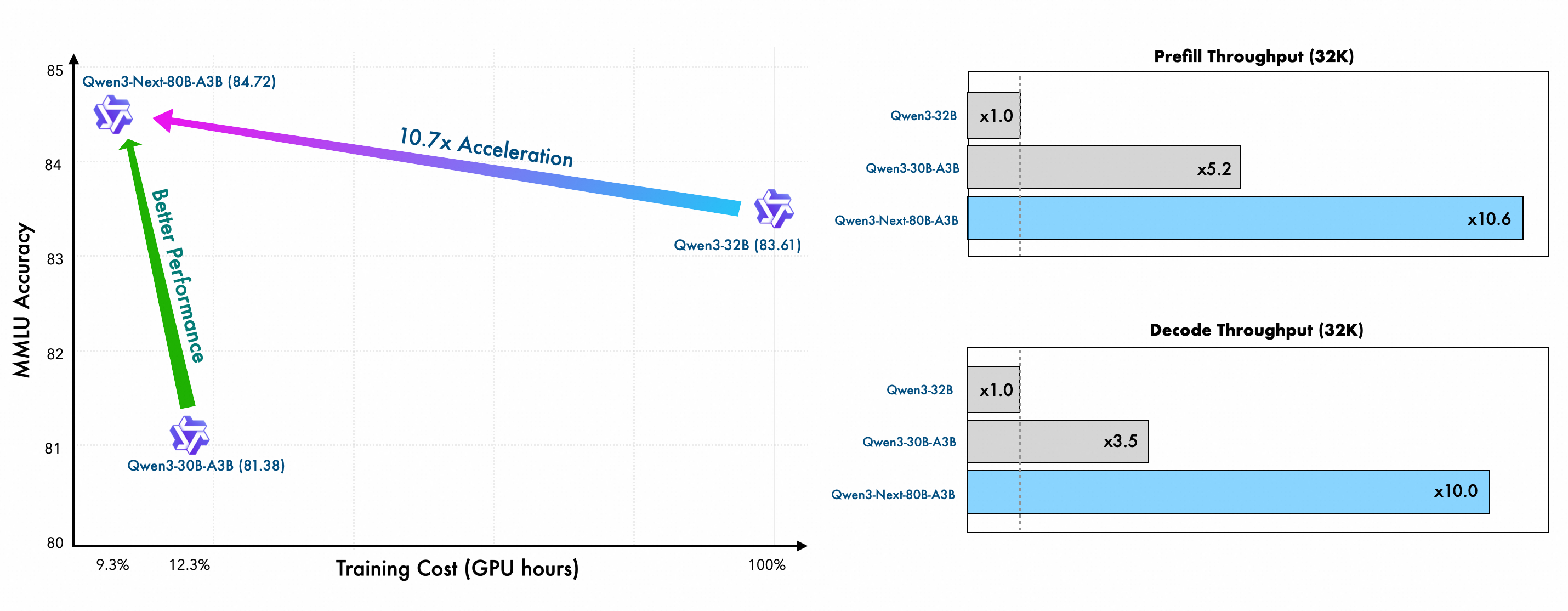
As mentioned before, some web apps have strong cross-platform requirements, or simply the Web Crypto API is not flexible enough or lacks support for new algorithms (eg, Matrix and Signal). However, for the projects where the Web Platform is a key use case, the Web API offers way more advantages in terms of performance, bundle size, security and stability. 

The Web Crypto API is supported in the main JavaScript engines (Node.js, Deno) and the main web browsers (Safari, Chrome and Firefox). This full coverage of the Web Platform ensures high levels of interoperability and stability for both users and developers of web apps. Additionally, with the recent milestone announced in this post – the shipment of Secure Curves support in the latest stable Chrome release –  the availability of this in the Web Platform is also remarkable:

Investment and prioritization

The work to implement and ship the Ed25519 and X25519 algorithms in the 3 main browser engines has been a long path. It took a few years to stabilize the WICG document, prototyping, increasing the test coverage in the WPT repository and incorporating both algorithms in the W3C official draft of the Web Cryptography API specification. Only after this final step, could the shipment procedure be finally completed, with Chrome 137 being the last one to ship the feature enabled by default. 

This experience shows another example of a non-browser vendor pushing forward a feature that benefits the whole Web Platform, even if it initially covers a short-term need of a niche community, in this case the dWeb ecosystem. It’s also worth noting how the prioritization of this kind of web feature works in the Web Platform development cycle, and more specifically the browser feature shipment process. The browsers have their own budgets and priorities, and it’s the responsibility of the Web Platform consumers to invest in the features they consider critical for their user base. Without non-browser vendors pushing forward features, the Web Platform would evolve at a much slower pace.

The flaws of trying to use the Web Crypto API for some projects have been noted in this post, which prevent a bigger adoption of this API in favor of third-party cryptography components. The API needs to incorporate new algorithms, as has been recently discussed in the Web App Sec Working Group meetings; there is an issue to collect ideas for new algorithms and a WICG draft. Some of the proposed algorithms include post-quantum secure and modern cryptographic algorithms like ML-KEM, ML-DSA, and ChaChaPoly1305.

Recap and next steps

The Web Cryptography API specification has had a difficult journey in the last few years, as was explained in a previous post, when the Web Cryptography WG was dismantled. Browsers gave very low priority to this API until Daniel Huigens (Proton) took over the responsibility and became the only editor of the spec. The implementation progress has been almost exclusively targeting standalone JS engines until this project by Igalia was launched 3 years ago. 

The incorporation of Ed25519 and X25519 into the official W3C draft, along with default support in all three major web browsers, has brought this feature to the forefront of web application development where a cryptographic layer is required. 

The use of the Web API provides several advantages to the web authors:

  • Performance – Generally more performant implementation of the cryptographic operations, including reduced bundled size of the web app.
  • Security  –  Reduced attack surface, including JS timing attacks or memory disclosure via JS inspection; no supply-chain vulnerabilities. 
  • Stability and Interoperability – Standardized and stable API, long-term maintenance by the browsers’ development teams. 

Streams and WebCrypto

This is a “decade problem”, as it’s noticeable from the WebCrypto issue 73, which now has some fresh traction thanks to a recent proposal by WinterTC, a technical committee focused on web-interoperable server runtimes; there is also an alternate proposal from the WebCrypto WG. It’s still unclear how much support to expect from implementors, especially the three main browser vendors, but Chrome has at least expressed strong opposition to the idea of a streaming encryption / decryption. However, there is a clear indication of support for hashing of streams, which is perhaps the use case from which IPFS developers would benefit most. Streams would have a big impact on many IPFS related use cases, especially in combination with better support for BLAKE3 which would be a major step forward.

by jfernandez at August 25, 2025 09:31 PM

Igalia WebKit Team

WebKit Igalia Periodical #35

Update on what happened in WebKit in the week from August 18 to August 25.

This week continue improvements in the WebXR front, more layout tests passing, support for CSS's generic font family for math, improvements in the graphics stack, and an Igalia Chat episode!

Cross-Port 🐱

Align the experimental CommandEvent with recent specification changes. This should finalise the implementation ready to enable by default.

The WebXR implementation has gained support to funnel usage permission requests through the public API for immersive sessions. Note that this is a basic implementation, and fine-grained control of requested session capabilities may be added at a later time.

The GTK MiniBrowser has been updated to handle WebKitXRPermissionRequest accordingly.

Implemented rawKeyDown and rawKeyUp in WKTestRunner for WPEWebKit and WebkitGTK, which made more than 300 layout tests pass.

Enable command and commandfor attributes in stable. These are part of the invoker commands API for buttons.

Graphics 🖼️

The CSS font-family: math generic font family is now supported in WebKit. This is part of the CSS Fonts Level 4 specification.

The WebXR implementation has gained to ability to use GBM graphics buffers as fallback, which allows usage with drivers that do not provide the EGL_MESA_image_dma_buf_export extension, yet use GBM for buffer allocation.

The WebXR render loop has been simplified by using a work queue and offloading the session handling to the render thread.

Community & Events 🤝

Early this month, a new episode of Igalia Chat titled "Get Down With the WebKit" was released, where Brian Kardell and Eric Meyer talk with Igalia's Alejandro (Alex) Garcia about the WebKit project and Igalia's WPE port.

That’s all for this week!

by Igalia WebKit Team at August 25, 2025 07:42 PM

August 22, 2025

Eric Meyer

No, Google Did Not Unilaterally Decide to Kill XSLT

It’s uncommon, but not unheard of, for a GitHub issue to spark an uproar.  That happened over the past month or so as the WHATWG (Web Hypertext Application Technology Working Group, which I still say should have called themselves a Task Force instead) issue “Should we remove XSLT from the web platform?” was opened, debated, and eventually locked once the comment thread started spiraling into personal attacks.  Other discussions have since opened, such as a counterproposal to update XSLT in the web platform, thankfully with (thus far) much less heat.

If you’re new to the term, XSLT (Extensible Stylesheet Language Transformations) is an XML language that lets you transform one document tree structure into another.  If you’ve ever heard of people styling their RSS and/or Atom feeds to look nice in the browser, they were using some amount of XSLT to turn the RSS/Atom into HTML, which they could then CSS into prettiness.

This is not the only use case for XSLT, not by a long shot, but it does illustrate the sort of thing XSLT is good for.  So why remove it, and who got this flame train rolling in the first place?

Before I start, I want to note that in this post, I won’t be commenting on whether or not XSLT support should be dropped from browsers or not.  I’m also not going to be systematically addressing the various reactions I’ve seen to all this.  I have my own biases around this — some of them in direct conflict with each other! — but my focus here will be on what’s happened so far and what might lie ahead.

Also, Brian and I talked with Liam Quin about all this, if you’d rather hear a conversation than read a blog post.

As a very quick background, various people have proposed removing XSLT support from browsers a few times over the quarter-century-plus since support first landed.  It was discussed in both the early and mid-2010s, for example.  At this point, browsers all more or less support XSLT 1.0, whereas the latest version of XSLT is 3.0.  I believe they all do so with C++ code, which is therefore not memory-safe, that is baked into the code base rather than supported via some kind of plugged-in library, like Firefox using PDF.js to support PDFs in the browser.

Anyway, back on August 1st, Mason Freed of Google opened issue #11523 on WHATWG’s HTML repository, asking if XSLT should be removed from browsers and giving a condensed set of reasons why it might be a good idea.  He also included a WASM-based polyfill he’d written to provide XSLT support, should browsers remove it, and opened “ Investigate deprecation and removal of XSLT” in the Chromium bug tracker.

“So it’s already been decided and we just have to bend over and take the changes our Googlish overlords have decreed!” many people shouted.  It’s not hard to see where they got that impression, given some of the things Google has done over the years, but that’s not what’s happening here.  Not at this point.  I’d like to set some records straight, as an outside observer of both Google and the issue itself.

First of all, while Mason was the one to open the issue, this was done because the idea was raised in a periodic WHATNOT meeting (call), where someone at Mozilla was actually the one to bring it up, after it had come up in various conversations over the previous few months.  After Mason opened the issue, members of the Mozilla and WebKit teams expressed (tentative, mostly) support for the idea of exploring this removal.  Basically, none of the vendors are particularly keen on keeping native XSLT support in their codebases, particularly after security flaws were found in XSLT implementations.

This isn’t the first time they’ve all agreed it might be nice to slim their codebases down a little by removing something that doesn’t get a lot of use (relatively speaking), and it won’t be the last.  I bet they’ve all talked at some point about how nice it would be to remove BMP support.

Mason mentioned that they didn’t have resources to put toward updating their XSLT code, and got widely derided for it. “Google has trillions of dollars!” people hooted.  Google has trillions of dollars.  The Chrome team very much does not.  They probably get, at best, a tiny fraction of one percent of those dollars.  Whether Google should give the Chrome team more money is essentially irrelevant, because that’s not in the Chrome team’s control.  They have what they have, in terms of head count and time, and have to decide how those entirely finite resources are best spent.

(I will once again invoke my late-1900s formulation of Hanlon’s Razor: Never attribute to malice that which can be more adequately explained by resource constraints.)

Second of all, the issue was opened to start a discussion and gather feedback as the first stage of a multi-step process, one that could easily run for years.  Google, as I assume is true for other browser makers, has a pretty comprehensive method for working out whether removing a given feature is tenable or not.  Brian and I talked with Rick Byers about it a while back, and I was impressed by both how many things have been removed, and what they do to make sure they’re removing the right things.

Here’s one (by no means the only!) way they could go about this:

  1. Set up a switch that allows XSLT to be disabled.
  2. In the next release of Chrome, use the switch to disable XSLT in one percent of all Chrome downloads.
  3. See if any bug reports come in about it.  If so, investigate further and adjust as necessary if the problems are not actually about XSLT.
  4. If not, up the percentage of XSLT-disabled downloads a little bit at a time over a number of releases.  If no bugs are reported as the percentage of XSLT-disabled users trends toward 100%, then prepare to remove it entirely.
  5. If, on the other hand, it becomes clear that removing XSLT will be a widely breaking change  —  where “widely” can still mean a very tiny portion of their total user base — then XSLT can be re-enabled for all users as soon as possible, and the discussion taken back up with this new information in hand.

Again, that is just one of several approaches Google could take, and it’s a lot simpler than what they would most likely actually do, but it’s roughly what they default to, as I understand it.  The process is slow and deliberate, building up a picture of actual use and user experience.

Third of all, opening a bug that includes a pull request of code changes isn’t a declaration of countdown to merge, it’s a way of making crystal clear (to those who can read the codebase) exactly what the proposal would entail.  It’s basically a requirement for the process of making a decision to start, because it sets the exact parameters of what’s being decided on.

That said, as a result of all this, I now strongly believe that every proposed-removal issue should point to the process and where the issue stands in it. (And write down the process if it hasn’t been already.) This isn’t for the issue’s intended audience, which was other people within WHATWG who are familiar with the usual process and each other, but for cases of context escape, like happened here.  If a removal discussion is going to be held in public, then it should assume the general public will see it and provide enough context for the general public to understand the actual nature of the discussion.  In the absence of that context, the nature of the discussion will be assumed, and every assumption will be different.

There is one thing that we should all keep in mind, which is that “remove from the web platform” really means “remove from browsers”.  Even if this proposal goes through, XSLT could still be used server-side.  You could use libraries that support XSLT versions more recent than 1.0, even!  Thus, XML could still be turned into HTML, just not in the client via native support, though JS or WASM polyfills, or even add-on extensions, would still be an option.  Is that good or bad?  Like everything else in our field, the answer is “it depends”.

Just in case your eyes glazed over and you quickly skimmed to see if there was a TL;DR, here it is:

The discussion was opened by a Google employee in response to interest from multiple browser vendors in removing built-in XSLT, following a process that is opaque to most outsiders.  It’s a first step in a multi-step evaluation process that can take years to complete, and whose outcome is not predetermined.  Tempers flared and the initial discussion was locked; the conversation continues elsewhere.  There are good reasons to drop native XSLT support in browsers, and also good reasons to keep or update it, but XSLT is not itself at risk.


Have something to say to all that? You can add a comment to the post, or email Eric directly.

by Eric Meyer at August 22, 2025 04:22 PM

August 20, 2025

Eric Meyer

To Infinity… But Not Beyond!

Previously on meyerweb, I explored ways to do strange things with the infinity keyword in CSS calculation functions.  There were some great comments on that post, by the way; you should definitely go give them a read.  Anyway, in this post, I’ll be doing the same thing, but with different properties!

When last we met, I’d just finished up messing with font sizes and line heights, and that made me think about other text properties that accept lengths, like those that indent text or increase the space between words and letters.  You know, like these:

div:nth-of-type(1) {text-indent: calc(infinity * 1ch);}
div:nth-of-type(2) {word-spacing: calc(infinity * 1ch);}
div:nth-of-type(3) {letter-spacing: calc(infinity * 1ch);}
<div>I have some text and I cannot lie!</div>

According to Frederic Goudy, I am now the sort of man who would steal a infinite number of sheep.  Which is untrue, because, I mean, where would I put them?

Consistency across Firefox, Chrome, and Safari

Visually, these all came to exactly the same result, textually speaking, with just very small (probably line-height-related) variances in element height.  All get very large horizontal overflow scrolling, yet scrolling out to the end of that overflow reveals no letterforms at all; I assume they’re sat just offscreen when you reach the end of the scroll region.  I particularly like how the “I” in the first <div> disappears because the first line has been indented a few million (or a few hundred undecillion) pixels, and then the rest of the text is wrapped onto the second line.  And in the third <div>, we can check for line-leading steganography!

When you ask for the computed values, though, that’s when things get weird.

Text property results
Computed value for…
Browser text-indent word-spacing letter-spacing
Safari 33554428px 33554428px 33554428px
Chrome 33554400px 3.40282e+38px 33554400px
Firefox (Nightly) 3.40282e+38px 3.40282e+38px 3.40282e+38px

Safari and Firefox are at least internally consistent, if many orders of magnitude apart from each other.  Chrome… I don’t even know what to say.  Maybe pick a lane?

I have to admit that by this point in my experimentation, I was getting a little bored of infinite pixel lengths.  What about infinite unitless numbers, like line-height or  —  even better  —  z-index?

div {
	position: absolute;
}
div:nth-of-type(1) {
	top: 10%;
	left: 1em;
	z-index: calc(infinity + 1);
}
div:nth-of-type(2) {
	top: 20%;
	left: 2em;
	z-index: calc(infinity);
}
div:nth-of-type(3) {
	top: 30%;
	left: 3em;
	z-index: 32767;
}
<div>I’m really high!</div>
The result you get in any of Firefox, Chrome, or Safari

It turns out that in CSS you can go to infinity, but not beyond, because the computed values were the same regardless of whether the calc() value was infinity or infinity + 1.

z-index values
Browser Computed value
Safari 2147483647
Chrome 2147483647
Firefox (Nightly) 2147483647

Thus, the first two <div> s were a long way above the third, but were themselves drawn with the later-painted <div> on top of the first.  This is because in positioning, if overlapping elements have the same z-index value, the one that comes later in the DOM gets painted over top any that come before it.

This does also mean you can have a finite value beat infinity.  If you change the previous CSS like so:

div:nth-of-type(3) {
	top: 30%;
	left: 3em;
	z-index: 2147483647;
}

…then the third <div> is painted atop the other two, because they all have the same computed value.  And no, increasing the finite value to a value equal to 2,147,483,648 or higher doesn’t change things, because the computed value of anything in that range is still 2147483647.

The results here led me to an assumption that browsers (or at least the coding languages used to write them) use a system where any “infinity” that has multiplication, addition, or subtraction done to it just returns “infinite”.  So if you try to double Infinity, you get back Infinity (or Infinite or Inf or whatever symbol is being used to represent the concept of the infinite).  Maybe that’s entry-level knowledge for your average computer science major, but I was only one of those briefly and I don’t think it was covered in the assembler course that convinced me to find another major.

Looking across all those years back to my time in university got me thinking about infinite spans of time, so I decided to see just how long I could get an animation to run.

div {
	animation-name: shift;
	animation-duration: calc(infinity * 1s);
}
@keyframes shift {
	from {
		transform: translateX(0px);
	}
	to {
		transform: translateX(100px);
	}
}
<div>I’m timely!</div>

The results were truly something to behold, at least in the cases where beholding was possible.  Here’s what I got for the computed animation-duration value in each browser’s web inspector Computed Values tab or subtab:

animation-duration values
Browser Computed value As years
Safari 🤷🏽
Chrome 1.79769e+308s 5.7004376e+300
Firefox (Nightly) 3.40282e+38s 1.07902714e+31

Those are… very long durations.  In Firefox, the <div> will finish the animation in just a tiny bit over ten nonillion (ten quadrillion quadrillion) years.  That’s roughly ten times as long as it will take for nearly all the matter in the known Universe to have been swallowed by supermassive galactic black holes.

In Chrome, on the other hand, completing the animation will take approximately half again as long asan incomprehensibly longer amount of time than our current highest estimate for the amount of time it will take for all the protons and neutrons in the observable Universe to decay into radiation, assuming protons actually decay. (Source: Wikipedia’s Timeline of the far future.)

“Okay, but what about Safari?” you may be asking.  Well, there’s no way as yet to find out, because while Safari loads and renders the page like usual, the page then becomes essentially unresponsive.  Not the browser, just the page itself.  This includes not redrawing or moving the scrollbar gutters when the window is resized, or showing useful information in the Web Inspector.  I’ve already filed a bug, so hopefully one day we’ll find out whether its temporal limitations are the same as Chrome’s or not.

It should also be noted that it doesn’t matter whether you supply 1s or 1ms as the thing to multiply with infinity: you get the same result either way.  This makes some sense, because any finite number times infinity is still infinity.  Well, sort of.  But also yes.

So what happens if you divide a finite amount by infinity?  In browsers, you very consistently get nothing!

div {
	animation-name: shift;
	animation-duration: calc(100000000000000000000000s / infinity);
}

(Any finite number could be used there, so I decided to type 1 and then hold the 0 key for a second or two, and use the resulting large number.)

Division-by-infinity results
Browser Computed value
Safari 0
Chrome 0
Firefox (Nightly) 0

Honestly, seeing that kind of cross-browser harmony… that was soothing.

And so we come full circle, from something that yielded consistent results to something else that yields consistent results.  Sometimes, it’s the little wins that count the most.

Just not infinitely.


Have something to say to all that? You can add a comment to the post, or email Eric directly.

by Eric Meyer at August 20, 2025 02:49 PM

Jasmine Tang

The hitchhiker's guide to LLVM debugging tools

Jasmine introduces to beginners some debugging tools that benefit their LLVM development.

August 20, 2025 12:00 AM

August 18, 2025

Igalia WebKit Team

WebKit Igalia Periodical #34

Update on what happened in WebKit in the week from August 11 to August 18.

This week we saw updates in WebXR support, better support for changing audio outputs, enabling of GLib API when building the JSCOnly port, improvements to damaging propagation, WPE platform enhancements, and more!

Cross-Port 🐱

Complementing our WebXR efforts, it is now possible to query whether a WebView is in immersive mode and request to leave immersive mode.

Multimedia 🎥

GStreamer-based multimedia support for WebKit, including (but not limited to) playback, capture, WebAudio, WebCodecs, and WebRTC.

Changing audio outputs has been changed to use gst_device_reconfigure_element() instead of relying on knowledge about how different GStreamer sink elements handle the choice of output device. Note that audio output selection support is in development and disabled by default, the ExposeSpeakers, ExposeSpeakersWithoutMicrophone, and PerElementSpeakerSelection features flags may be toggled to test it.

While most systems use PipeWire or PulseAudio these days, some systems may need a fix for the corresponding ALSA and OSS elements, which has been already merged in GStreamer.

JavaScriptCore 🐟

The built-in JavaScript/ECMAScript engine for WebKit, also known as JSC or SquirrelFish.

Support for enabling the GLib API when building the JSCOnly port has been added.

Graphics 🖼️

With the #44192 PR landed, the damage propagation feature is now able to propagate damage from accelerated 2D canvas.

WPE WebKit 📟

Fixed minor bug in WPE's: pressing Esc key inside a dialog closes dialog. See PR #49265.

WPE Platform API 🧩

New, modern platform API that supersedes usage of libwpe and WPE backends.

The WPEPlatform DRM backend can now report available input devices. This is mainly used to support Interaction Media Features queries, which allow web sites to better adapt to the available input devices.

That’s all for this week!

by Igalia WebKit Team at August 18, 2025 07:21 PM

Vivienne Watermeier

CEA-608 captions in Media Source Extensions with webkitgtk

Recently, I have been working on webkitgtk support for in-band text tracks in Media Source Extensions, so far just for WebVTT in MP4. Eventually, I noticed a page that seemed to be using a CEA-608 track - most likely unintentionally, not expecting it to be handled - so I decided to take a look how that might work. Take a look at the resulting PR here: https://github.com/WebKit/WebKit/pull/47763

Now, if you’re not already familiar with subtitle and captioning formats, particularly CEA-608, you might assume they must be straightforward, compared to audio and video. After all, its just a bit of text and some timestamps, right?

However, even WebVTT as a text-based format already provides lots of un- or poorly supported features that don’t mesh well with MSE - for details on those open questions, take a look at Alicia’s session on the topic: https://github.com/w3c/breakouts-day-2025/issues/14

Quick introduction to CEA-608 #

CEA-608, also known as line 21 captions, is responsible for encoding captions as a fixed-bitrate stream of byte pairs in an analog NTSC broadcast. As the name suggests, they are transmitted during the vertical blanking period, on line 21 (and line 284, for the second field) - imagine this as the mostly blank area “above” the visible image. This provides space for up to 4 channels of captioning, plus some additional metadata about the programming, though due to the very limited bandwidth, these capabilities were rarely used to their full extent.

While digital broadcasts provide captioning defined by its successor standard CEA-708, this newer format still provides the option to embed 608 byte pairs. This is still quite common, and is enabled by later standards defining a digital encoding, known as Caption Distribution Packets.

These are also what enables CEA-608 tracks in MP4.

Current issues, and where to go in the future #

The main issue I’ve encountered in trying to make CEA-608 work in an MSE context lies in its origin as a fixed-bitrate stream - there is no concept of cues, no defined start or end, just one continuous stream.

As WebKit internally understands only WebVTT cues, we rely on GStreamer’s cea608tott element for the conversion to WebVTT. Essentially, this element needs to create cues with well-defined timestamps, which works well enough if we have the entire stream present on disk.

However, when 608 is present as a track in an MSE stream, how do we tell if the “current” cue is continued in the next SourceBuffer? Currently, cea608tott will just wait for more data, and emit another cue once it encounters a line break, or its current line buffer fills up, but this also means the final cue will be swallowed, because there will never be “more data” to allow for that decision.

The solution would be to always cut off cues at SourceBuffer boundaries, so cues might appear to be split awkwardly to the viewer. Overall, this conversion to VTT won’t reproduce the captions as they were intended to be viewed, at least not currently. In particular, roll-up mode can’t easily be emulated using WebVTT.

The other issue is that I’ve assumed for the current patch that CEA-608 captions will be present as a separate MP4 track, while in practice they’re usually injected into the video stream, which will be harder to handle well.

Finally, there is the risk of breaking existing websites, that might have unintentionally left CEA-608 captions in, and don’t handle a surprise duplicate text track well.

Takeaway #

While this patch only provides experimental support so far, I feel this has given me valuable insight into how inband text tracks can work with various formats aside from just WebVTT. Ironically, CEA-608 even avoids some of WebVTT’s issues - there are no gaps or overlapping cues to worry about, for example.

Either way, I’m looking forward to improving on WebVTT’s pain points, and maybe adding other formats eventually!

August 18, 2025 12:00 AM

August 15, 2025

Tiago Vignatti

From Chromium to Community (2025)

In the first week of June (2025), our team at Igalia held our regular meeting about Chromium.

We talked about our technical projects, but also where the Chromium project is leading, given all the investments going to AI, and this interesting initiative from the Linux Foundation to fund open development of Chromium.

We also held our annual Igalia meeting, filled with many special moments — one of them being when Valerie, who had previously shared how Igalia is co-operatively managed, spoke about her personal journey and involvement with other cooperatives.

by Author at August 15, 2025 02:28 PM

August 13, 2025

Ricardo Cañuelo Navarro

First steps with Zephyr (II)

In the previous post we set up a Zephyr development environment and checked that we could build applications for multiple different targets. In this one we'll work on a sample application that we can use to showcase a few Zephyr features and as a template for other applications with a similar workflow.

We'll simulate a real work scenario and develop a firmware for a hardware board (in this example it'll be a Raspberry Pi Pico 2W) and we'll set up a development workflow that supports the native_sim target, so we can do most of the programming and software prototyping on a simulated environment without having to rely on the hardware. When developing for new hardware, it's a common practice that the software teams need to start working on firmware and drivers before the hardware is available, so the initial stages of software development for new silicon and boards is often tested on software or hardware emulators. Then, after the prototyping is done we can deploy and test the firmare on the real board. We'll see how we can do a simple behavioral model of some of the devices we'll use in the final hardware setup and how we can leverage this workflow to unit-test and refine the firmware.

This post is a walkthrough of the whole application. You can find the code here.

Application description

The application we'll build and run on the Raspberry Pi Pico 2W will basically just listen for a button press. When the button is pressed the app will enqueue some work to be done by a processing thread and the result will be published via I2C for a controller to request. At the same time, it will configure two serial consoles, one for message logging and another one for a command shell that can be used for testing and debugging.

These are the main features we'll cover with this experiment:

  • Support for multiple targets.
  • Target-specific build and hardware configuration.
  • Logging.
  • Multiple console output.
  • Zephyr shell with custom commands.
  • Device emulation.
  • GPIO handling.
  • I2C target handling.
  • Thread synchronization and message-passing.
  • Deferred work (bottom halves).

Hardware setup

Besides the target board and the development machine, we'll be using a Linux-based development board that we can use to communicate with the Zephyr board via I2C. Anything will do here, I used a very old Raspberry Pi Model B that I had lying around.

The only additional peripheral we'll need is a physical button connected to a couple of board pins. If we don't have any, a jumper cable and a steady pulse will also work. Optionally, to take full advantage of the two serial ports, a USB - TTL UART converter will be useful. Here's how the full setup looks like:

   +--------------------------+
   |                          |    Eth
   |      Raspberry Pi        |---------------+
   |                          |               |
   +--------------------------+               |
      6    5   3                              |
      |    |   |                              |
      |   I2C I2C       /                     |
     GND  SCL SDA    __/ __                   |
      |    |   |    |     GND                 |
      |    |   |    |      |                  |
      18   7   6    4     38                  |
   +--------------------------+            +-------------+
   |                          |    USB     | Development |
   |   Raspberry Pi Pico 2W   |------------|   machine   |
   |                          |            +-------------+
   +--------------------------+                |
          13      12      11                   |
           |      |       |                    |
          GND   UART1    UART1                 |
           |     RX       TX                   |
           |      |       |                    |
          +-----------------+     USB          |
          |  USB - UART TTL |------------------+
          |    converter    |
          +-----------------+

For additional info on how to set up the Linux-based Raspberry Pi, see the appendix at the end.

Setting up the application files

Before we start coding we need to know how we'll structure the application. There are certain conventions and file structure that the build system expects to find under certain scenarios. This is how we'll structure the application (test_rpi):


test_rpi
├── boards
│   ├── native_sim_64.conf
│   ├── native_sim_64.overlay
│   ├── rpi_pico2_rp2350a_m33.conf
│   └── rpi_pico2_rp2350a_m33.overlay
├── CMakeLists.txt
├── Kconfig
├── prj.conf
├── README.rst
└── src
    ├── common.h
    ├── emul.c
    ├── main.c
    └── processing.c

Some of the files there we already know from the previous post: CMakeLists.txt and prj.conf. All the application code will be in the src directory, and we can structure it as we want as long as we tell the build system about the files we want to compile. For this application, the main code will be in main.c, processing.c will contain the code of the processing thread, and emul.c will keep everything related to the device emulation for the native_sim target and will be compiled only when we build for that target. We describe this to the build system through the contents of CMakeLists.txt:


cmake_minimum_required(VERSION 3.20.0)

find_package(Zephyr REQUIRED HINTS $ENV{ZEPHYR_BASE})
project(test_rpi)

target_sources(app PRIVATE src/main.c src/processing.c)
target_sources_ifdef(CONFIG_BOARD_NATIVE_SIM app PRIVATE src/emul.c)

In prj.conf we'll put the general Zephyr configuration options for this application. Note that inside the boards directory there are two additional .conf files. These are target-specific options that will be merged to the common ones in prj.conf depending on the target we choose to build for.

Normally, most of the options we'll put in the .conf files will be already defined, but we can also define application-specific config options that we can later reference in the .conf files and the code. We can define them in the application-specific Kconfig file. The build system will it pick up as the main Kconfig file if it exists. For this application we'll define one additional config option that we'll use to configure the log level for the program, so this is how Kconfig will look like:


config TEST_RPI_LOG_LEVEL
	int "Default log level for test_rpi"
	default 4

source "Kconfig.zephyr"

Here we're simply prepending a config option before all the rest of the main Zephyr Kconfig file. We'll see how to use this option later.

Finally, the boards directory also contains target-specific overlay files. These are regular device tree overlays which are normally used to configure the hardware. More about that in a while.

Main application architecture

The application flow is structured in two main threads: the main thread and an additional processing thread that does its work separately. The main thread runs the application entry point (the main() function) and does all the software and device set up. Normally it doesn't need to do anything more, we can use it to start other threads and have them do the rest of the work while the main thread sits idle, but in this case we're doing some work with it instead of creating an additional thread for that. Regarding the processing thread, we can think of it as "application code" that runs on its own and provides a simple interface to interact with the rest of the system1.

Once the main thread has finished all the initialization process (creating threads, setting up callbacks, configuring devices, etc.) it sits in an infinite loop waiting for messages in a message queue. These messages are sent by the processing thread, which also runs in a loop waiting for messages in another queue. The messages to the processing thread are sent, as a result of a button press, by the GPIO ISR callback registered (actually, by the bottom half triggered by it and run by a workqueue thread). Ignoring the I2C part for now, this is how the application flow would look like:


    Main thread    Processing thread    Workqueue thread     GPIO ISR
        |                  |                    |                |
        |                  |                    |<--------------| |
        |                  |<------------------| |           (1) |
        |                 | |               (2) |                |
        |<----------------| |                   |                |
       | |             (3) |                    |                |
        |                  |                    |                |

Once the button press is detected, the GPIO ISR calls a callback we registered in the main setup code. The callback defers the work (1) through a workqueue (we'll see why later), which sends some data to the processing thread (2). The data it'll send is just an integer: the current uptime in seconds. The processing thread will then do some processing using that data (convert it to a string) and will send the processed data to the main thread (3). Let's take a look at the code that does all this.

Thread creation

As we mentioned, the main thread will be responsible for, among other tasks, spawning other threads. In our example it will create only one additional thread.


#include <zephyr/kernel.h>

#define THREAD_STACKSIZE	2048
#define THREAD_PRIORITY		10

K_THREAD_STACK_DEFINE(processing_stack, THREAD_STACKSIZE);
struct k_thread processing_thread;

int main(void)
{
	[...]

	/* Thread initialization */
	k_thread_create(&processing_thread, processing_stack,
			THREAD_STACKSIZE, data_process,
			&in_msgq, &out_msgq, NULL,
			THREAD_PRIORITY, 0, K_FOREVER);
	k_thread_name_set(&processing_thread, "processing");
	k_thread_start(&processing_thread);

We'll see what the data_process() function does in a while. For now, notice we're passing two message queues, one for input and one for output, as parameters for that function. These will be used as the interface to connect the processing thread to the rest of the firmware.

GPIO handling

Zephyr's device tree support greatly simplifies device handling and makes it really easy to parameterize and handle device operations in an abstract way. In this example, we define and reference the GPIO for the button in our setup using a platform-independent device tree node:


#define ZEPHYR_USER_NODE DT_PATH(zephyr_user)
const struct gpio_dt_spec button = GPIO_DT_SPEC_GET_OR(
	ZEPHYR_USER_NODE, button_gpios, {0});

This looks for a "button-gpios" property in the "zephyr,user" node in the device tree of the target platform and initializes a gpio_dt_spec property containing the GPIO pin information defined in the device tree. Note that this initialization and the check for the "zephyr,user" node are static and happen at compile time so, if the node isn't found, the error will be caught by the build process.

This is how the node is defined for the Raspberry Pi Pico 2W:


/ {

[...]

	zephyr,user {
		button-gpios = <&gpio0 2 (GPIO_ACTIVE_LOW | GPIO_PULL_UP)>;
	};
};

This defines the GPIO to be used as the second GPIO from bank 0, it'll be set up with an internal pull-up resistor and will be active-low. See the device tree GPIO API for details on the specification format. In the board, that GPIO is routed to pin 4:


Now we'll use the GPIO API to configure the GPIO as defined and to add a callback that will run when the button is pressed:


if (!gpio_is_ready_dt(&button)) {
	LOG_ERR("Error: button device %s is not ready",
	       button.port->name);
	return 0;
}
ret = gpio_pin_configure_dt(&button, GPIO_INPUT);
if (ret != 0) {
	LOG_ERR("Error %d: failed to configure %s pin %d",
	       ret, button.port->name, button.pin);
	return 0;
}
ret = gpio_pin_interrupt_configure_dt(&button,
                                      GPIO_INT_EDGE_TO_ACTIVE);
if (ret != 0) {
	LOG_ERR("Error %d: failed to configure interrupt on %s pin %d",
		ret, button.port->name, button.pin);
	return 0;
}
gpio_init_callback(&button_cb_data, button_pressed, BIT(button.pin));
gpio_add_callback(button.port, &button_cb_data);

We're configuring the pin as an input and then we're enabling interrupts for it when it goes to logical level "high". In this case, since we defined it as active-low, the interrupt will be triggered when the pin transitions from the stable pulled-up voltage to ground.

Finally, we're initializing and adding a callback function that will be called by the ISR when it detects that this GPIO goes active. We'll use this callback to start an action from a user event. The specific interrupt handling is done by the target-specific device driver2 and we don't have to worry about that, our code can remain device-independent.

NOTE: The callback we'll define is meant as a simple exercise for illustrative purposes. Zephyr provides an input subsystem to handle cases like this properly.

What we want to do in the callback is to send a message to the processing thread. The communication input channel to the thread is the in_msgq message queue, and the data we'll send is a simple 32-bit integer with the number of uptime seconds. But before doing that, we'll first de-bounce the button press using a simple idea: to schedule the message delivery to a workqueue thread:


/*
 * Deferred irq work triggered by the GPIO IRQ callback
 * (button_pressed). This should run some time after the ISR, at which
 * point the button press should be stable after the initial bouncing.
 *
 * Checks the button status and sends the current system uptime in
 * seconds through in_msgq if the the button is still pressed.
 */
static void debounce_expired(struct k_work *work)
{
	unsigned int data = k_uptime_seconds();
	ARG_UNUSED(work);

	if (gpio_pin_get_dt(&button))
		k_msgq_put(&in_msgq, &data, K_NO_WAIT);
}

static K_WORK_DELAYABLE_DEFINE(debounce_work, debounce_expired);

/*
 * Callback function for the button GPIO IRQ.
 * De-bounces the button press by scheduling the processing into a
 * workqueue.
 */
void button_pressed(const struct device *dev, struct gpio_callback *cb,
		    uint32_t pins)
{
	k_work_reschedule(&debounce_work, K_MSEC(30));
}

That way, every unwanted oscillation will cause a re-scheduling of the message delivery (replacing any prior scheduling). debounce_expired will eventually read the GPIO status and send the message.

Thread synchronization and messaging

As I mentioned earlier, the interface with the processing thread consists on two message queues, one for input and one for output. These are defined statically with the K_MSGQ_DEFINE macro:


#define PROC_MSG_SIZE		8

K_MSGQ_DEFINE(in_msgq, sizeof(int), 1, 1);
K_MSGQ_DEFINE(out_msgq, PROC_MSG_SIZE, 1, 1);

Both queues have space to hold only one message each. For the input queue (the one we'll use to send messages to the processing thread), each message will be one 32-bit integer. The messages of the output queue (the one the processing thread will use to send messages) are 8 bytes long.

Once the main thread is done initializing everything, it'll stay in an infinite loop waiting for messages from the processing thread. The processing thread will also run a loop waiting for incoming messages in the input queue, which are sent by the button callback, as we saw earlier, so the message queues will be used both for transferring data and for synchronization. Since the code running in the processing thread is so small, I'll paste it here in its entirety:


static char data_out[PROC_MSG_SIZE];

/*
 * Receives a message on the message queue passed in p1, does some
 * processing on the data received and sends a response on the message
 * queue passed in p2.
 */
void data_process(void *p1, void *p2, void *p3)
{
	struct k_msgq *inq = p1;
	struct k_msgq *outq = p2;
	ARG_UNUSED(p3);

	while (1) {
		unsigned int data;

		k_msgq_get(inq, &data, K_FOREVER);
		LOG_DBG("Received: %d", data);

		/* Data processing: convert integer to string */
		snprintf(data_out, sizeof(data_out), "%d", data);

		k_msgq_put(outq, data_out, K_NO_WAIT);
	}
}

I2C target implementation

Now that we have a way to interact with the program by inputting an external event (a button press), we'll add a way for it to communicate with the outside world: we're going to turn our device into a I2C target that will listen for command requests from a controller and send data back to it. In our setup, the controller will be Linux-based Raspberry Pi, see the diagram in the Hardware setup section above for details on how the boards are connected.

In order to define an I2C target we first need a suitable device defined in the device tree. To abstract the actual target-dependent device, we'll define and use an alias for it that we can redefine for every supported target. For instance, for the Raspberry Pi Pico 2W we define this alias in its device tree overlay:


/ {
	[...]

	aliases {
                i2ctarget = &i2c0;
	};

Where i2c0 is originally defined like this:


i2c0: i2c@40090000 {
	compatible = "raspberrypi,pico-i2c", "snps,designware-i2c";
	#address-cells = <1>;
	#size-cells = <0>;
	reg = <0x40090000 DT_SIZE_K(4)>;
	resets = <&reset RPI_PICO_RESETS_RESET_I2C0>;
	clocks = <&clocks RPI_PICO_CLKID_CLK_SYS>;
	interrupts = <36 RPI_PICO_DEFAULT_IRQ_PRIORITY>;
	interrupt-names = "i2c0";
	status = "disabled";
};

and then enabled:


&i2c0 {
	clock-frequency = <I2C_BITRATE_STANDARD>;
	status = "okay";
	pinctrl-0 = <&i2c0_default>;
	pinctrl-names = "default";
};

So now in the code we can reference the i2ctarget alias to load the device info and initialize it:


/*
 * Get I2C device configuration from the devicetree i2ctarget alias.
 * Check node availability at buid time.
 */
#define I2C_NODE	DT_ALIAS(i2ctarget)
#if !DT_NODE_HAS_STATUS_OKAY(I2C_NODE)
#error "Unsupported board: i2ctarget devicetree alias is not defined"
#endif
const struct device *i2c_target = DEVICE_DT_GET(I2C_NODE);

To register the device as a target, we'll use the i2c_target_register() function, which takes the loaded device tree device and an I2C target configuration (struct i2c_target_config) containing the I2C address we choose for it and a set of callbacks for all the possible events. It's in these callbacks where we'll define the target's functionality:


#define I2C_ADDR		0x60

[...]

static struct i2c_target_callbacks target_callbacks = {
	.write_requested = write_requested_cb,
	.write_received = write_received_cb,
	.read_requested = read_requested_cb,
	.read_processed = read_processed_cb,
	.stop = stop_cb,
};

[...]

int main(void)
{
	struct i2c_target_config target_cfg = {
		.address = I2C_ADDR,
		.callbacks = &target_callbacks,
	};

	if (i2c_target_register(i2c_target, &target_cfg) < 0) {
		LOG_ERR("Failed to register target");
		return -1;
	}

Each of those callbacks will be called as a response from an event started by the controller. Depending on how we want to define the target we'll need to code the callbacks to react appropriately to the controller requests. For this application we'll define a register that the controller can read to get a timestamp (the firmware uptime in seconds) from the last time the button was pressed. The number will be received as an 8-byte ASCII string.

If the controller is the Linux-based Raspberry Pi, we can use the i2c-tools to poll the target and read from it:


# Scan the I2C bus:
$ i2cdetect -y 0
     0  1  2  3  4  5  6  7  8  9  a  b  c  d  e  f
00:                         -- -- -- -- -- -- -- -- 
10: -- -- -- -- -- -- -- -- -- -- -- -- -- -- -- -- 
20: -- -- -- -- -- -- -- -- -- -- -- -- -- -- -- -- 
30: -- -- -- -- -- -- -- -- -- -- -- -- -- -- -- -- 
40: -- -- -- -- -- -- -- -- -- -- -- -- -- -- -- -- 
50: -- -- -- -- -- -- -- -- -- -- -- -- -- -- -- -- 
60: 60 -- -- -- -- -- -- -- -- -- -- -- -- -- -- -- 
70: -- -- -- -- -- -- -- --

# I2C bus 0: issue command 0 (read uptime) on device 0x60:
# - Send byte 0 to device with address 0x60
# - Read back 8 bytes
$ i2ctransfer -y 0 w1@0x60 0 r8
0x36 0x33 0x00 0x00 0x00 0x00 0x00 0x00

We basically want the device to react when the controller sends a write request (to select the register and prepare the data), when it sends a read request (to send the data bytes back to the controller) and when it sends a stop condition.

To handle the data to be sent, the I2C callback functions manage an internal buffer that will hold the string data to send to the controller, and we'll load this buffer with the contents of a source buffer that's updated every time the main thread receives data from the processing thread (a double-buffer scheme). Then, when we program an I2C transfer we walk this internal buffer sending each byte to the controller as we receive read requests. When the transfer finishes or is aborted, we reload the buffer and rewind it for the next transfer:


typedef enum {
	I2C_REG_UPTIME,
	I2C_REG_NOT_SUPPORTED,

	I2C_REG_DEFAULT = I2C_REG_UPTIME
} i2c_register_t;

/* I2C data structures */
static char i2cbuffer[PROC_MSG_SIZE];
static int i2cidx = -1;
static i2c_register_t i2creg = I2C_REG_DEFAULT;

[...]

/*
 * Callback called on a write request from the controller.
 */
int write_requested_cb(struct i2c_target_config *config)
{
	LOG_DBG("I2C WRITE start");
	return 0;
}

/*
 * Callback called when a byte was received on an ongoing write request
 * from the controller.
 */
int write_received_cb(struct i2c_target_config *config, uint8_t val)
{
	LOG_DBG("I2C WRITE: 0x%02x", val);
	i2creg = val;
	if (val == I2C_REG_UPTIME)
		i2cidx = -1;

	return 0;
}

/*
 * Callback called on a read request from the controller.
 * If it's a first read, load the output buffer contents from the
 * current contents of the source data buffer (str_data).
 *
 * The data byte sent to the controller is pointed to by val.
 * Returns:
 *   0 if there's additional data to send
 *   -ENOMEM if the byte sent is the end of the data transfer
 *   -EIO if the selected register isn't supported
 */
int read_requested_cb(struct i2c_target_config *config, uint8_t *val)
{
	if (i2creg != I2C_REG_UPTIME)
		return -EIO;

	LOG_DBG("I2C READ started. i2cidx: %d", i2cidx);
	if (i2cidx < 0) {
		/* Copy source buffer to the i2c output buffer */
		k_mutex_lock(&str_data_mutex, K_FOREVER);
		strncpy(i2cbuffer, str_data, PROC_MSG_SIZE);
		k_mutex_unlock(&str_data_mutex);
	}
	i2cidx++;
	if (i2cidx == PROC_MSG_SIZE) {
		i2cidx = -1;
		return -ENOMEM;
	}
	*val = i2cbuffer[i2cidx];
	LOG_DBG("I2C READ send: 0x%02x", *val);

	return 0;
}

/*
 * Callback called on a continued read request from the
 * controller. We're implementing repeated start semantics, so this will
 * always return -ENOMEM to signal that a new START request is needed.
 */
int read_processed_cb(struct i2c_target_config *config, uint8_t *val)
{
	LOG_DBG("I2C READ continued");
	return -ENOMEM;
}

/*
 * Callback called on a stop request from the controller. Rewinds the
 * index of the i2c data buffer to prepare for the next send.
 */
int stop_cb(struct i2c_target_config *config)
{
	i2cidx = -1;
	LOG_DBG("I2C STOP");
	return 0;
}

int main(void)
{
	[...]

	while (1) {
		char buffer[PROC_MSG_SIZE];

		k_msgq_get(&out_msgq, buffer, K_FOREVER);
		LOG_DBG("Received: %s", buffer);
		k_mutex_lock(&str_data_mutex, K_FOREVER);
		strncpy(str_data, buffer, PROC_MSG_SIZE);
		k_mutex_unlock(&str_data_mutex);
	}

Device emulation

The application logic is done at this point, and we were careful to write it in a platform-agnostic way. As mentioned earlier, all the target-specific details are abstracted away by the device tree and the Zephyr APIs. Although we're developing with a real deployment board in mind, it's very useful to be able to develop and test using a behavioral model of the hardware that we can program to behave as close to the real hardware as we need and that we can run on our development machine without the cost and restrictions of the real hardware.

To do this, we'll rely on the native_sim board3, which implements the core OS services on top of a POSIX compatibility layer, and we'll add code to simulate the button press and the I2C requests.

Emulating a button press

We'll use the gpio_emul driver as a base for our emulated button. The native_sim device tree already defines an emulated GPIO bank for this:


gpio0: gpio_emul {
	status = "okay";
	compatible = "zephyr,gpio-emul";
	rising-edge;
	falling-edge;
	high-level;
	low-level;
	gpio-controller;
	#gpio-cells = <2>;
};

So we can define the GPIO to use for our button in the native_sim board overlay:


/ {
	[...]

	zephyr,user {
		button-gpios = <&gpio0 0 GPIO_ACTIVE_HIGH>;
	};
};

We'll model the button press as a four-phase event consisting on an initial status change caused by the press, then a semi-random rebound phase, then a phase of signal stabilization after the rebounds stop, and finally a button release. Using the gpio_emul API it'll look like this:


/*
 * Emulates a button press with bouncing.
 */
static void button_press(void)
{
	const struct device *dev = device_get_binding(button.port->name);
	int n_bounces = sys_rand8_get() % 10;
	int state = 1;
	int i;

	/* Press */
	gpio_emul_input_set(dev, 0, state);
	/* Bouncing */
	for (i = 0; i < n_bounces; i++) {
		state = state ? 0: 1;
		k_busy_wait(1000 * (sys_rand8_get() % 10));
		gpio_emul_input_set(dev, 0, state);
	}
	/* Stabilization */
	gpio_emul_input_set(dev, 0, 1);
	k_busy_wait(100000);
	/* Release */
	gpio_emul_input_set(dev, 0, 0);
}

The driver will take care of checking if the state changes need to raise interrupts, depending on the GPIO configuration, and will trigger the registered callback that we defined earlier.

Emulating an I2C controller

As with the button emulator, we'll rely on an existing emulated device driver for this: i2c_emul. Again, the device tree for the target already defines the node we need:


i2c0: i2c@100 {
	status = "okay";
	compatible = "zephyr,i2c-emul-controller";
	clock-frequency = <I2C_BITRATE_STANDARD>;
	#address-cells = <1>;
	#size-cells = <0>;
	#forward-cells = <1>;
	reg = <0x100 4>;
};

So we can define a machine-independent alias that we can reference in the code:


/ {
	aliases {
		i2ctarget = &i2c0;
	};

The events we need to emulate are the requests sent by the controller: READ start, WRITE start and STOP. We can define these based on the i2c_transfer() API function which will, in this case, use the i2c_emul driver implementation to simulate the transfer. As in the GPIO emulation case, this will trigger the appropriate callbacks. The implementation of our controller requests looks like this:


/*
 * A real controller may want to continue reading after the first
 * received byte. We're implementing repeated-start semantics so we'll
 * only be sending one byte per transfer, but we need to allocate space
 * for an extra byte to process the possible additional read request.
 */
static uint8_t emul_read_buf[2];

/*
 * Emulates a single I2C READ START request from a controller.
 */
static uint8_t *i2c_emul_read(void)
{
	struct i2c_msg msg;
	int ret;

	msg.buf = emul_read_buf;
	msg.len = sizeof(emul_read_buf);
	msg.flags = I2C_MSG_RESTART | I2C_MSG_READ;
	ret = i2c_transfer(i2c_target, &msg, 1, I2C_ADDR);
	if (ret == -EIO)
		return NULL;

	return emul_read_buf;
}

static void i2c_emul_write(uint8_t *data, int len)
{
	struct i2c_msg msg;

	/*
	 * NOTE: It's not explicitly said anywhere that msg.buf can be
	 * NULL even if msg.len is 0. The behavior may be
	 * driver-specific and prone to change so we're being safe here
	 * by using a 1-byte buffer.
	 */
	msg.buf = data;
	msg.len = len;
	msg.flags = I2C_MSG_WRITE;
	i2c_transfer(i2c_target, &msg, 1, I2C_ADDR);
}

/*
 * Emulates an explicit I2C STOP sent from a controller.
 */
static void i2c_emul_stop(void)
{
	struct i2c_msg msg;
	uint8_t buf = 0;

	/*
	 * NOTE: It's not explicitly said anywhere that msg.buf can be
	 * NULL even if msg.len is 0. The behavior may be
	 * driver-specific and prone to change so we're being safe here
	 * by using a 1-byte buffer.
	 */
	msg.buf = &buf;
	msg.len = 0;
	msg.flags = I2C_MSG_WRITE | I2C_MSG_STOP;
	i2c_transfer(i2c_target, &msg, 1, I2C_ADDR);
}

Now we can define a complete request for an "uptime read" operation in terms of these primitives:


/*
 * Emulates an I2C "UPTIME" command request from a controller using
 * repeated start.
 */
static void i2c_emul_uptime(const struct shell *sh, size_t argc, char **argv)
{
	uint8_t buffer[PROC_MSG_SIZE] = {0};
	i2c_register_t reg = I2C_REG_UPTIME;
	int i;

	i2c_emul_write((uint8_t *)&reg, 1);
	for (i = 0; i < PROC_MSG_SIZE; i++) {
		uint8_t *b = i2c_emul_read();
		if (b == NULL)
			break;
		buffer[i] = *b;
	}
	i2c_emul_stop();

	if (i == PROC_MSG_SIZE) {
		shell_print(sh, "%s", buffer);
	} else {
		shell_print(sh, "Transfer error");
	}
}

Ok, so now that we have implemented all the emulated operations we needed, we need a way to trigger them on the emulated environment. The Zephyr shell is tremendously useful for cases like this.

Shell commands

The shell module in Zephyr has a lot of useful features that we can use for debugging. It's quite extensive and talking about it in detail is out of the scope of this post, but I'll show how simple it is to add a few custom commands to trigger the button presses and the I2C controller requests from a console. In fact, for our purposes, the whole thing is as simple as this:


SHELL_CMD_REGISTER(buttonpress, NULL, "Simulates a button press", button_press);
SHELL_CMD_REGISTER(i2cread, NULL, "Simulates an I2C read request", i2c_emul_read);
SHELL_CMD_REGISTER(i2cuptime, NULL, "Simulates an I2C uptime request", i2c_emul_uptime);
SHELL_CMD_REGISTER(i2cstop, NULL, "Simulates an I2C stop request", i2c_emul_stop);

We'll enable these commands only when building for the native_sim board. With the configuration provided, once we run the application we'll have the log output in stdout and the shell UART connected to a pseudotty, so we can access it in a separate terminal and run these commands while we see the output in the terminal where we ran the application:


$ ./build/zephyr/zephyr.exe
WARNING: Using a test - not safe - entropy source
uart connected to pseudotty: /dev/pts/16
*** Booting Zephyr OS build v4.1.0-6569-gf4a0beb2b7b1 ***

# In another terminal
$ screen /dev/pts/16

uart:~$
uart:~$ help
Please press the <Tab> button to see all available commands.
You can also use the <Tab> button to prompt or auto-complete all commands or its subcommands.
You can try to call commands with <-h> or <--help> parameter for more information.

Shell supports following meta-keys:
  Ctrl + (a key from: abcdefklnpuw)
  Alt  + (a key from: bf)
Please refer to shell documentation for more details.

Available commands:
  buttonpress  : Simulates a button press
  clear        : Clear screen.
  device       : Device commands
  devmem       : Read/write physical memory
                 Usage:
                 Read memory at address with optional width:
                 devmem <address> [<width>]
                 Write memory at address with mandatory width and value:
                 devmem <address> <width> <value>
  help         : Prints the help message.
  history      : Command history.
  i2cread      : Simulates an I2C read request
  i2cstop      : Simulates an I2C stop request
  i2cuptime    : Simulates an I2C uptime request
  kernel       : Kernel commands
  rem          : Ignore lines beginning with 'rem '
  resize       : Console gets terminal screen size or assumes default in case
                 the readout fails. It must be executed after each terminal
                 width change to ensure correct text display.
  retval       : Print return value of most recent command
  shell        : Useful, not Unix-like shell commands.

To simulate a button press (ie. capture the current uptime):


uart:~$ buttonpress

And the log output should print the enabled debug messages:


[00:00:06.300,000] <dbg> test_rpi: data_process: Received: 6
[00:00:06.300,000] <dbg> test_rpi: main: Received: 6

If we now simulate an I2C uptime command request we should get the captured uptime as a string:


uart:~$ i2cuptime 
6

We can check the log to see how the I2C callbacks ran:


[00:01:29.400,000] <dbg> test_rpi: write_requested_cb: I2C WRITE start
[00:01:29.400,000] <dbg> test_rpi: write_received_cb: I2C WRITE: 0x00
[00:01:29.400,000] <dbg> test_rpi: stop_cb: I2C STOP
[00:01:29.400,000] <dbg> test_rpi: read_requested_cb: I2C READ started. i2cidx: -1
[00:01:29.400,000] <dbg> test_rpi: read_requested_cb: I2C READ send: 0x36
[00:01:29.400,000] <dbg> test_rpi: read_processed_cb: I2C READ continued
[00:01:29.400,000] <dbg> test_rpi: read_requested_cb: I2C READ started. i2cidx: 0
[00:01:29.400,000] <dbg> test_rpi: read_requested_cb: I2C READ send: 0x00
[00:01:29.400,000] <dbg> test_rpi: read_processed_cb: I2C READ continued
[00:01:29.400,000] <dbg> test_rpi: read_requested_cb: I2C READ started. i2cidx: 1
[00:01:29.400,000] <dbg> test_rpi: read_requested_cb: I2C READ send: 0x00
[00:01:29.400,000] <dbg> test_rpi: read_processed_cb: I2C READ continued
[00:01:29.400,000] <dbg> test_rpi: read_requested_cb: I2C READ started. i2cidx: 2
[00:01:29.400,000] <dbg> test_rpi: read_requested_cb: I2C READ send: 0x00
[00:01:29.400,000] <dbg> test_rpi: read_processed_cb: I2C READ continued
[00:01:29.400,000] <dbg> test_rpi: read_requested_cb: I2C READ started. i2cidx: 3
[00:01:29.400,000] <dbg> test_rpi: read_requested_cb: I2C READ send: 0x00
[00:01:29.400,000] <dbg> test_rpi: read_processed_cb: I2C READ continued
[00:01:29.400,000] <dbg> test_rpi: read_requested_cb: I2C READ started. i2cidx: 4
[00:01:29.400,000] <dbg> test_rpi: read_requested_cb: I2C READ send: 0x00
[00:01:29.400,000] <dbg> test_rpi: read_processed_cb: I2C READ continued
[00:01:29.400,000] <dbg> test_rpi: read_requested_cb: I2C READ started. i2cidx: 5
[00:01:29.400,000] <dbg> test_rpi: read_requested_cb: I2C READ send: 0x00
[00:01:29.400,000] <dbg> test_rpi: read_processed_cb: I2C READ continued
[00:01:29.400,000] <dbg> test_rpi: read_requested_cb: I2C READ started. i2cidx: 6
[00:01:29.400,000] <dbg> test_rpi: read_requested_cb: I2C READ send: 0x00
[00:01:29.400,000] <dbg> test_rpi: read_processed_cb: I2C READ continued
[00:01:29.400,000] <dbg> test_rpi: stop_cb: I2C STOP

Appendix: Linux set up on the Raspberry Pi

This is the process I followed to set up a Linux system on a Raspberry Pi (very old, model 1 B). There are plenty of instructions for this on the Web, and you can probably just pick up a pre-packaged and pre-configured Raspberry Pi OS and get done with it faster, so I'm adding this here for completeness and because I want to have a finer grained control of what I put into it.

The only harware requirement is an SD card with two partitions: a small (~50MB) FAT32 boot partition and the rest of the space for the rootfs partition, which I formatted as ext4. The boot partition should contain a specific set of configuration files and binary blobs, as well as the kernel that we'll build and the appropriate device tree binary. See the official docs for more information on the boot partition contents and this repo for the binary blobs. For this board, the minimum files needed are:

  • bootcode.bin: the second-stage bootloader, loaded by the first-stage bootloader in the BCM2835 ROM. Run by the GPU.
  • start.elf: GPU firmware, starts the ARM CPU.
  • fixup.dat: needed by start.elf. Used to configure the SDRAM.
  • kernel.img: this is the kernel image we'll build.
  • dtb files and overlays.

And, optionally but very recommended:

  • config.txt: bootloader configuration.
  • cmdline.txt: kernel command-line parameters.

In practice, pretty much all Linux setups will also have these files. For our case we'll need to add one additional config entry to the config.txt file in order to enable the I2C bus:


dtparam=i2c_arm=on

Once we have the boot partition populated with the basic required files (minus the kernel and dtb files), the two main ingredients we need to build now are the kernel image and the root filesystem.

Building a Linux kernel for the Raspberry Pi

Main reference: Raspberry Pi docs

There's nothing non-standard about how we'll generate this kernel image, so you can search the Web for references on how the process works if you need to. The only things to take into account is that we'll pick the Raspberry Pi kernel instead of a vanilla mainline kernel. I also recommend getting the arm-linux-gnueabi cross-toolchain from kernel.org.

After installing the toolchain and cloning the repo, we just have to run the usual commands to configure the kernel, build the image, the device tree binaries, the modules and have the modules installed in a specific directory, but first we'll add some extra config options:


cd kernel_dir
KERNEL=kernel
make ARCH=arm CROSS_COMPILE=arm-linux-gnueabi- bcmrpi_defconfig

We'll need to add at least ext4 builtin support so that the kernel can mount the rootfs, and I2C support for our experiments, so we need to edit .config, add these:


CONFIG_EXT4_FS=y
CONFIG_I2C=y

And run the olddefconfig target. Then we can proceed with the rest of the build steps:


make ARCH=arm CROSS_COMPILE=arm-linux-gnueabi- olddefconfig
make ARCH=arm CROSS_COMPILE=arm-linux-gnueabi- zImage modules dtbs -j$(nproc)
mkdir modules
make ARCH=arm CROSS_COMPILE=arm-linux-gnueabi- INSTALL_MOD_PATH=./modules modules_install

Now we need to copy the kernel and the dtbs to the boot partition of the sd card:


cp arch/arm/boot/zImage /path_to_boot_partition_mountpoint/kernel.img
cp arch/arm/boot/dts/broadcom/*.dtb /path_to_boot_partition_mountpoint
mkdir /path_to_boot_partition_mountpoint/overlays
cp arch/arm/boot/dts/overlays/*.dtb /path_to_boot_partition_mountpoint/overlays

(we really only need the dtb for this particular board, but anyway).

Setting up a Debian rootfs

There are many ways to do this, but I normally use the classic debootstrap to build Debian rootfss. Since I don't always know which packages I'll need to install ahead of time, the strategy I follow is to build a minimal image with the bare minimum requirements and then boot it either on a virtual machine or in the final target and do the rest of the installation and setup there. So for the initial setup I'll only include the openssh-server package:


mkdir bookworm_armel_raspi
sudo debootstrap --arch armel --include=openssh-server bookworm \
        bookworm_armel_raspi http://deb.debian.org/debian

# Remove the root password
sudo sed -i '/^root/ { s/:x:/::/ }' bookworm_armel_raspi/etc/passwd

# Create a pair of ssh keys and install them to allow passwordless
# ssh logins
cd ~/.ssh
ssh-keygen -f raspi
sudo mkdir bookworm_armel_raspi/root/.ssh
cat raspi.pub | sudo tee bookworm_armel_raspi/root/.ssh/authorized_keys

Now we'll copy the kernel modules to the rootfs. From the kernel directory, and based on the build instructions above:


cd kernel_dir
sudo cp -fr modules/lib/modules /path_to_rootfs_mountpoint/lib

If your distro provides qemu static binaries (eg. Debian: qemu-user-static), it's a good idea to copy the qemu binary to the rootfs so we can mount it locally and run apt-get on it:


sudo cp /usr/bin/qemu-arm-static bookworm_armel_raspi/usr/bin

Otherwise, we can boot a kernel on qemu and load the rootfs there to continue the installation. Next we'll create and populate the filesystem image, then we can boot it on qemu for additional tweaks or dump it into the rootfs partition of the SD card:


# Make rootfs image
fallocate -l 2G bookworm_armel_raspi.img
sudo mkfs -t ext4 bookworm_armel_raspi.img
sudo mkdir /mnt/rootfs
sudo mount -o loop bookworm_armel_raspi.img /mnt/rootfs/
sudo cp -a bookworm_armel_raspi/* /mnt/rootfs/
sudo umount /mnt/rootfs

To copy the rootfs to the SD card:


sudo dd if=bookworm_armel_raspi.img of=/dev/sda2 bs=4M

(Substitute /dev/sda2 for the sd card rootfs partition in your system).

At this point, if we need to do any extra configuration steps we can either:

  • Mount the SD card and make the changes there.
  • Boot the filesystem image in qemu with a suitable kernel and make the changes in a live system, then dump the changes into the SD card again.
  • Boot the board and make the changes there directly. For this we'll need to access the board serial console through its UART pins.

Here are some of the changes I made. First, network configuration. I'm setting up a dedicated point-to-point Ethernet link between the development machine (a Linux laptop) and the Raspberry Pi, with fixed IPs. That means I'll use a separate subnet for this minimal LAN and that the laptop will forward traffic between the Ethernet nic and the WLAN interface that's connected to the Internet. In the rootfs I added a file (/etc/systemd/network/20-wired.network) with the following contents:


[Match]
Name=en*

[Network]
Address=192.168.2.101/24
Gateway=192.168.2.100
DNS=1.1.1.1

Where 192.168.2.101 is the address of the board NIC and 192.168.2.100 is the one of the Eth NIC in my laptop. Then, assuming we have access to the serial console of the board and we logged in as root, we need to enable systemd-networkd:


systemctl enable systemd-networkd

Additionally, we need to edit the ssh server configuration to allow login as root. We can do this by setting PermitRootLogin yes in /etc/ssh/sshd_config.

In the development machine, I configured the traffic forwarding to the WLAN interface:


sudo sysctl -w net.ipv4.ip_forward=1
sudo pptables -t nat -A POSTROUTING -o <wlan_interface> -j MASQUERADE

Once all the configuration is done we should be able to log in as root via ssh:


ssh -i ~/.ssh/raspi root@192.168.2.101

In order to issue I2C requests to the Zephyr board, we'll need to load the i2c-dev module at boot time and install the i2c-tools in the Raspberry Pi:


apt-get install i2c-tools
echo "ic2-dev" >> /etc/modules

1: Although in this case the thread is a regular kernel thread and runs on the same memory space as the rest of the code, so there's no memory protection. See the User Mode page in the docs for more details.

2: As a reference, for the Raspberry Pi Pico 2W, this is where the ISR is registered for enabled GPIO devices, and this is the ISR that checks the pin status and triggers the registered callbacks.

3: native_sim_64 in my setup.

by rcn at August 13, 2025 12:00 PM

August 11, 2025

Igalia WebKit Team

WebKit Igalia Periodical #33

Update on what happened in WebKit in the week from July 29 to August 11.

This update covers two weeks, including a deluge of releases and graphics work.

Cross-Port 🐱

Graphics 🖼️

CSS animations with a cubic-bezier timing function are now correctly rendered

The rewrite of the WebXR support continued making steady progress, and is getting closer to being able to render content again.

WPE WebKit 📟

The WPE port gained basic undo support in text inputs.

WPE Android 🤖

Adaptation of WPE WebKit targeting the Android operating system.

WPE-Android has been updated to use WebKit 2.48.5. This update particular interest for development on Android is the support for using the system logd service, which can be configured using system properties. For example, the following will enable logging all warnings:

adb shell setprop debug.log.WPEWebKit all
adb shell setprop log.tag.WPEWebKit WARN

Updated prebuilt packages are also available in the Central repository.

Releases 📦️

Stable releases of WebKitGTK 2.48.5 and WPE WebKit 2.48.5 are now available. These include the fixes and improvements from the corresponding 2.48.4 ones, and additionally solve a number of security issues. Advisory WSA-2025-0005 (GTK, WPE) covers the included security patches.

WebKitGTK 2.49.3 and WPE WebKit 2.49.4 have been released, intended to test out upcoming features and improvements. As usual, issue reports are welcome in Bugzilla, and are particularly important now to stabilize the newly created branch for the upcoming 2.50.x series.

Ruby was re-added to the GNOME SDK, thanks to Michael Catanzaro and Jordan Petridis. So we're happy to report that the WebKitGTK nightly builds for GNOME Web Canary are now fixed and Canary updates were resumed.

That’s all for this week!

by Igalia WebKit Team at August 11, 2025 09:07 PM